Skip to content
View in the app

A better way to browse. Learn more.

LCPDFR.com

A full-screen app on your home screen with push notifications, badges and more.

To install this app on iOS and iPadOS
  1. Tap the Share icon in Safari
  2. Scroll the menu and tap Add to Home Screen.
  3. Tap Add in the top-right corner.
To install this app on Android
  1. Tap the 3-dot menu (⋮) in the top-right corner of the browser.
  2. Tap Add to Home screen or Install app.
  3. Confirm by tapping Install.
Due to overzealous filtering on Microsoft’s side, some emails to Outlook and Hotmail addresses may not be delivered. If you’re affected, please use a different email address or try again later.

Arkansas State Trooper 1.0.1

(0 reviews)

4 Screenshots

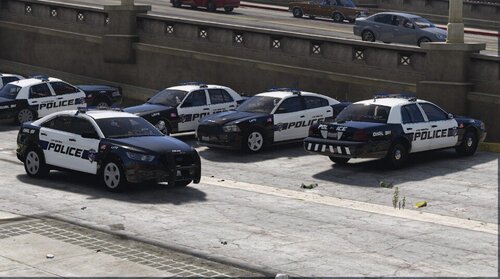
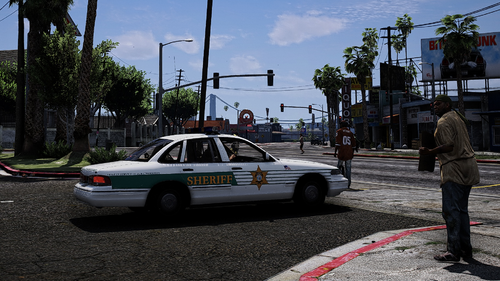
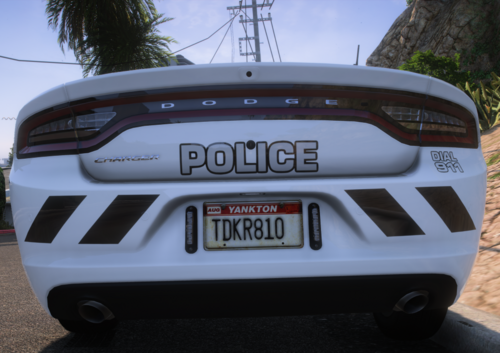
I made this ASP patrol because i love watching them on youtube how aggressive they are when is time to take down the runners

Edited by crazylatino

What's New in Version 1.0.1

Released

Lightbar lights have been fixed and now every siren has a different pattern


Short Description

Arkansas State Trooper

User Feedback

Recommended Comments

zombieland530

Members

You might need to fix the left side of the lightbar because their lightbars are all blue and have a blue and amber mix on the backside

Could contain: screenshot, pc game

crazylatino

Members Author

Yes i am aware of that. When i uploaded the file i put it under work in progress and thats the only thing i need to fix i believe. Other than that i believe the car looks good and i dont think you will find another asp patrol car in the website so instead of complaining at least a thanks for the upload specially because i spent hours making it so you can get it for free

zombieland530

Members

The work u did is amazing. I was just letting you know before someone comments the same thing; add it in the Description that u are still working on the project

crazylatino

Members Author

It is 4am and im working on it. actually i fixed the lights and now i added the code so the lights change patterns when you change your sirens so is not the same pattern for every siren. now it has different patterns

Create an account or sign in to comment

Latest Mods

Account

Navigation

Search

Search

Configure browser push notifications

Chrome (Android)
  1. Tap the lock icon next to the address bar.
  2. Tap Permissions → Notifications.
  3. Adjust your preference.
Chrome (Desktop)
  1. Click the padlock icon in the address bar.
  2. Select Site settings.
  3. Find Notifications and adjust your preference.