Skip to content
View in the app

A better way to browse. Learn more.

LCPDFR.com

A full-screen app on your home screen with push notifications, badges and more.

To install this app on iOS and iPadOS
  1. Tap the Share icon in Safari
  2. Scroll the menu and tap Add to Home Screen.
  3. Tap Add in the top-right corner.
To install this app on Android
  1. Tap the 3-dot menu (⋮) in the top-right corner of the browser.
  2. Tap Add to Home screen or Install app.
  3. Confirm by tapping Install.

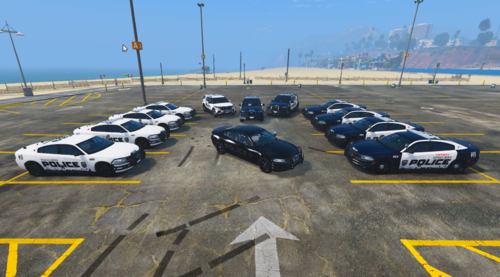
Paso Robles, CA Police-Based Livery Pack 1.0.0

(0 reviews)

7 Screenshots

User Feedback

Recommended Comments

JoeSchmo805

Members

My buddies and I live here in San Luis Obispo County. We have all been waiting for a long time to see a local, lore friendly pack. Would love to see more departments local to us if possible! I will definately be reaching out to you on Discord. Keep up the amazing work!


Coastal Customs

Members Author

20 minutes ago, JoeSchmo805 said:

My buddies and I live here in San Luis Obispo County. We have all been waiting for a long time to see a local, lore friendly pack. Would love to see more departments local to us if possible! I will definately be reaching out to you on Discord. Keep up the amazing work!


Thank you so much! Glad you enjoyed the liveries.

Coastal Customs

Members Author

6 hours ago, TreyvonC said:

This is fire! You should drop a lore friendly version.

Thank you! The version included in the download is lore friendly (for Rockford Hills) however if you mean for lore cars like the Vapid Scout and stuff, maybe soon...

TreyvonC

Members

13 hours ago, Coastal Customs said:

Thank you! The version included in the download is lore friendly (for Rockford Hills) however if you mean for lore cars like the Vapid Scout and stuff, maybe soon...

Oh, I just seen that. But I was meaning like "Los Santos Police Department"

Coastal Customs

Members Author

On 9/29/2024 at 12:25 PM, TreyvonC said:

Oh, I just seen that. But I was meaning like "Los Santos Police Department"

I won't be releasing a Los Santos version for this pack in specific sadly

Create an account or sign in to comment

Account

Navigation

Search

Search

Configure browser push notifications

Chrome (Android)
  1. Tap the lock icon next to the address bar.
  2. Tap Permissions → Notifications.
  3. Adjust your preference.
Chrome (Desktop)
  1. Click the padlock icon in the address bar.
  2. Select Site settings.
  3. Find Notifications and adjust your preference.