Skip to content
View in the app

A better way to browse. Learn more.

LCPDFR.com

A full-screen app on your home screen with push notifications, badges and more.

To install this app on iOS and iPadOS
  1. Tap the Share icon in Safari
  2. Scroll the menu and tap Add to Home Screen.
  3. Tap Add in the top-right corner.
To install this app on Android
  1. Tap the 3-dot menu (⋮) in the top-right corner of the browser.
  2. Tap Add to Home screen or Install app.
  3. Confirm by tapping Install.

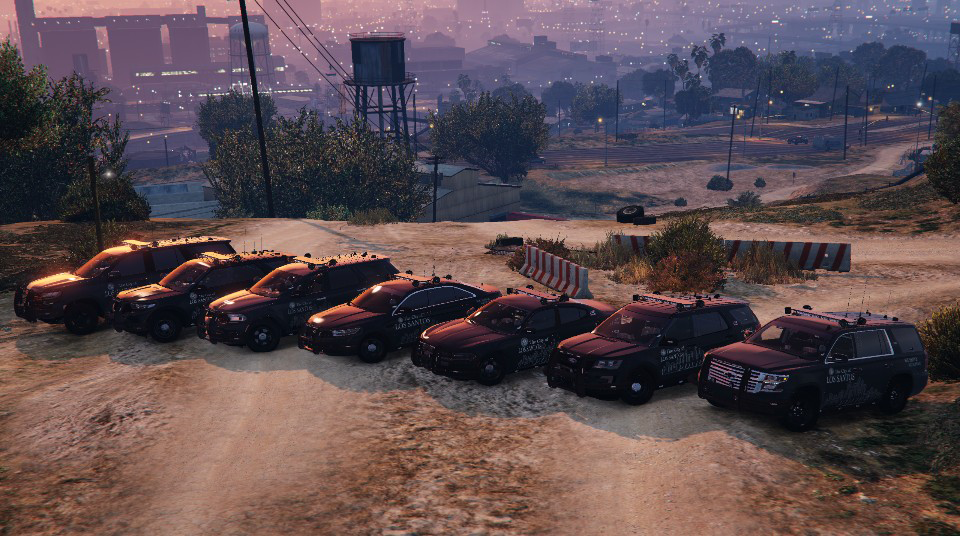
[ELS][Addon] Los Santos Police Department 1.0.4

(15 reviews)

12 Screenshots


Features:

-PIP's ALPR's mounted to lightbar.

          -Optional, use extra_10.

-Takedown Lights.

-Alley Lights.

          -The spotlight emis does not work with these enabled (I am working on that).

-ELS pattern changes with sirens.


Thank you @Parzival for helping work out the kinks.

-A big thanks again to him for this showcase video!


Thank you @SnickersClassicTTV for the showcase video of the updated pack!


As Always, Please Enjoy 🙂

Edited by OfficerArk

What's New in Version 1.0.4

Released

1.0.5 Update

-Added separate DLC packs for Red/Blue & Blue/Blue.

-Files have been checked and everything works in game.


Coming Soon:

Tintable windows.


-----------             -----------

         Previous Updates

------------------------------

1.0.4 Update

-All blue 2015 slicktop Tahoe added.

-2016 FPIU dashboard textures fixed.


1.0.3 Update

-Changed Charger's handling line to stop from crashing game.


1.0.2 Update

-Removed separate models with no ALPR's.

     -You can now use extra_10 in a trainer to enable/disable them.

-Templates Included


1.0.1 Update

-Liveries have been updated to reflect old version.

     -Next update will have a few different liveries for each vehicle.

-Charger has been greatly reduced in size for both the model and textures. 

     -I can still spawn the model, so I am hoping this solves some issues for people.

-Still looking into the non-synced steering wheel. Will require time as I will need to edit both the base models and meta files.


1.0.0 Update

This release introduces 3 new vehicles and an overhauled livery generously made by @Parzival, this release wouldn't have been possible in this time frame without his help.

-Minor bug fixes for existing vehicles.

     -Charger lights fixed; they look normal now. (I think the antennas might be still synced with the trunk; I'll look into it)

     -Maybe others, but I'm tired.

-2021 Durango

-2016 Ford Explorer

-2016 Taurus

These include both Red/Blue and Blue/Blue variants as well as optional ALPR's


IMPORTANT - This pack now has 2 DLC folders. You will need remove the old version of this pack before installing the new update.


More than a few hours have gone into this pack, and I really do appreciate feedback. If you find anything wrong or have new ideas, please reach out.


As Always, Please Enjoy 🙂


Upcoming Vehicles:

-2014 Charger

-A Truck (Don't know which one yet)

-Unmarked Units


0.0.2

1 Vehicle Update

-2015 Unmarked Tahoe

     -ALPR's mounted on push bar.


0.0.1

3 Vehicle Update

-2018 Charger

-2015 Tahoe

     -Some QOL edits by me including breakable windows and proper taillights at night.

     -IGNORE the white flashing box on the front right bumper, it will disappear once you've driven around for a few seconds.

-2021 Tahoe


Each Vehicle Includes a Red-Blue & Blue-Blue option as well as optional PIP's ALPR's


REMOVED Replace files for the time being. Please be patient!


Updated a few things from the original release.

-Removed front push-bar light module

-Added mirror takedown lights & side runner alley lights.


More photos eventually (If you have/take any, DM me and I will use them!)


Short Description

Ready to patrol the streets and alleys of Los Santos

User Feedback

Recommended Comments

noli24

Members

What name do I have to enter to spawn this vehicles?

OrionPax087

Members

On 1/9/2025 at 5:19 PM, Papogamer said:

Can someone help me please, My game crash when I spawn any of the vehicles in this car park. I got all the requirements

If you still have this issue I can try to help you. I have ran into mamny issues throughout my modding days. Message me!

On 3/20/2025 at 6:24 AM, noli24 said:

What name do I have to enter to spawn this vehicles?

I use Simple Trainer.

exdec

Members

(edited)

what do i name the els file when i turn the addons to replace, theres 4 different xmls 🙏


for example if i was to turn these into POLICE.xml what do i do


Could contain: text, screenshot, display, font, number, software, operating system, computer icon

Edited by exdec

OfficerArk

Insiders Author

16 hours ago, exdec said:

what do i name the els file when i turn the addons to replace, theres 4 different xmls 🙏


for example if i was to turn these into POLICE.xml what do i do


Could contain: text, screenshot, display, font, number, software, operating system, computer icon

You pick the model you’d like to use!

21tahoepolice - Standard police car

21tahoepoliceblue - Blue version

21…….NP - These are the same as the above but without ALPR’s


If you’re going to replace with police, you’ll choose one of these to use.

IceGuy221

Members

On 3/28/2025 at 6:39 PM, exdec said:

what do i name the els file when i turn the addons to replace, theres 4 different xmls 🙏


for example if i was to turn these into POLICE.xml what do i do


Could contain: text, screenshot, display, font, number, software, operating system, computer icon

If you switch to replace, you'll need to rename them as the file that you are replacing. i.e. if you replace sheriff.ytd, the xml will need to be named sheriff.xml. 
You will only be able to use one of the xml's for replacing one vehicle, as each xml is for a different version of the vehicle (i.e. its own separate car)

IceGuy221

Members

(edited)

Not sure why these cars are coming up as invalid but though i'd let you know about it. don't mind the rebel/rebel 2 xmls, those are for another pack

Could contain: text, screenshot, software, operating system


Edited by IceGuy221

Comstar

Members

Steay

Members

Garnitur als ersetzen möglich ?

CowBoy 1li

Members

when i install lspdpackblue,i cant spown any vehicle,but lspdpackred is not.

CowBoy 1li

Members

can I use red pack and blue pack at the same time in game?or I can only use one of them

Roanpk

Members

i absolutly love this pack but are there any plans on adding a crown vic to this pack?, and a replace version?

OfficerArk

Insiders Author

14 hours ago, ZZZZZEBRA said:

can I use red pack and blue pack at the same time in game?or I can only use one of them

Yes, this pack is designed for that!

8 hours ago, Roanpk said:

i absolutly love this pack but are there any plans on adding a crown vic to this pack?, and a replace version?

I might not be updating these packs with vehicles going forward as I roll in some new units here in the future. I don't know when, but it will include a crown vic.

CowBoy 1li

Members

I tried again. I installed the red and blue versions into the game. Only the red version could generate the vehicle, while the blue one was a model error.

OfficerArk

Insiders Author

On 4/13/2025 at 4:49 AM, ZZZZZEBRA said:

I tried again. I installed the red and blue versions into the game. Only the red version could generate the vehicle, while the blue one was a model error.

Make sure you followed the steps correctly and you have the proper config files; heap limit adjuster, gameconfig for 300+ cars, etc.

CowBoy 1li

Members

13 hours ago, OfficerArk said:

Make sure you followed the steps correctly and you have the proper config files; heap limit adjuster, gameconfig for 300+ cars, etc.

I did what you said, but I can generate the red and blue versions of the two dlc packages, but I can't generate the blue version. I should have no problem, as I have installed both dlcs. Please check it, thank you, the package you made is really perfect, I just want to help you understand the problem.

OfficerArk

Insiders Author

(edited)

5 hours ago, ZZZZZEBRA said:

I did what you said, but I can generate the red and blue versions of the two dlc packages, but I can't generate the blue version. I should have no problem, as I have installed both dlcs. Please check it, thank you, the package you made is really perfect, I just want to help you understand the problem.

I have no issues spawning them! Like I said, make sure you’ve installed it correctly, these packs are tested before being released.

Edited by OfficerArk

OrionPax087

Members

On 4/11/2025 at 3:40 PM, OfficerArk said:

Yes, this pack is designed for that!

I might not be updating these packs with vehicles going forward as I roll in some new units here in the future. I don't know when, but it will include a crown vic.

I was looking to having a 2014 charger, darn. Alright man I hope your new project is better than the last.

Roanpk

Members

do you have any intension to one day adding a motorbike to one of your packs?, there arent many options for bikes especially not in bb lighting and i love the quality and looks of your packs

WarEagle34

Members

For some reason when i download this pack and try to add the dlc file to open iv as a addon it says folder has 0 items and when i click on the file it has no cars in the download file but i added all of the els files.. im confused on where the cars are because this will crash my game for sure

3 minutes ago, WarEagle34 said:

For some reason when i download this pack and try to add the dlc file to open iv as a addon it says folder has 0 items and when i click on the file it has no cars in the download file but i added all of the els files.. im confused on where the cars are because this will crash my game for sure


This is what my open iv shows when i added the pack

Could contain: text, screenshot, display, software, computer icon, operating system, web page, multimedia software, computer, office application software

OfficerArk

Insiders Author

17 hours ago, WarEagle34 said:

For some reason when i download this pack and try to add the dlc file to open iv as a addon it says folder has 0 items and when i click on the file it has no cars in the download file but i added all of the els files.. im confused on where the cars are because this will crash my game for sure


This is what my open iv shows when i added the pack

Could contain: text, screenshot, display, software, computer icon, operating system, web page, multimedia software, computer, office application software

Close out of OpenIV and re open it. This is also the case if it says corrupted.

CheeseBurger843

Members

Does this car pack have a replacement version?

WarEagle34

Members

I am still trying to install this pack. Everything was fine when i had this pack before the recent update. Now all of a sudden every single time i download this pack its showing 0 cars in the download file when i drag it over to open iv as a addon. When i click on the file in open iv to view the cars thats supposed to be in the file it still shows that the file is empty with no cars in it. I have no idea what is going on but i really need this pack. Can anyone help me on this?

steaynrw

Members

R e p l a c e  V e r s i o n  Pl e a s e

OfficerArk

Insiders Author

On 5/21/2025 at 5:35 PM, WarEagle34 said:

I am still trying to install this pack. Everything was fine when i had this pack before the recent update. Now all of a sudden every single time i download this pack its showing 0 cars in the download file when i drag it over to open iv as a addon. When i click on the file in open iv to view the cars thats supposed to be in the file it still shows that the file is empty with no cars in it. I have no idea what is going on but i really need this pack. Can anyone help me on this?

I have just redownloaded the file and dragged the addon files into OpenIV. They are there and I was able to view the vehicles. I would recommend making sure you are importing the right folder into the program. Also, if you get a corrupted error, do not delete from OpenIV, just reload the program.


Hope this helps!

WarEagle34

Members

17 hours ago, OfficerArk said:

I have just redownloaded the file and dragged the addon files into OpenIV. They are there and I was able to view the vehicles. I would recommend making sure you are importing the right folder into the program. Also, if you get a corrupted error, do not delete from OpenIV, just reload the program.


Hope this helps!

I'll give it another try and let you know how it goes.. I believe this pack needs to be updated or something because i havent had this problem before this new recent update and now all of a sudden when i try to download this pack this is the issue that im getting. 

Create an account or sign in to comment

Account

Navigation

Search

Search

Configure browser push notifications

Chrome (Android)
  1. Tap the lock icon next to the address bar.
  2. Tap Permissions → Notifications.
  3. Adjust your preference.
Chrome (Desktop)
  1. Click the padlock icon in the address bar.
  2. Select Site settings.
  3. Find Notifications and adjust your preference.














