


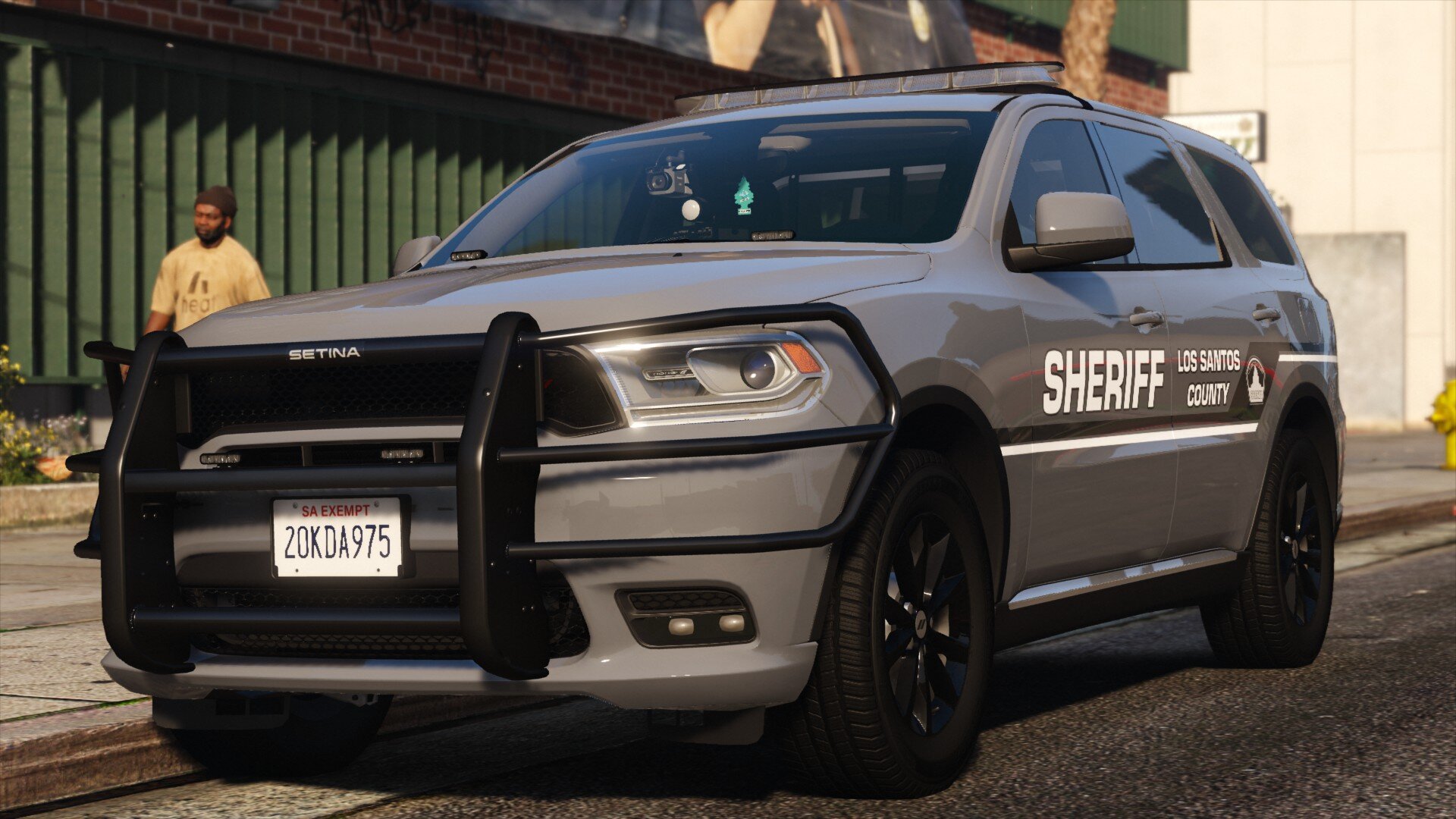


Hello peeps! After a little bit of work i got a quick 1 car release for y'all.
It's a 2020 Durango based off of Franklin County, GA. Which means it uses a all blue lighting setup.
The vehicle is a ELS/NON-ELS Hybrid. But it does NOT use 32 sirens and DOESN'T require the 32 siren script!
- Features -
ELS Controlled Lighting
ELS Controlled T/A
FCSO Based livery for LSSD
Realistic Interior and Wiring
Slideout Trunk
Working Takedowns
Working Alley Lights
⛖ Question & Answer ⛖
Q. Is this pack ELS, and if not, can you convert it? A. This pack is a ELS, NON-ELS hybrid which requires use of both systems
Q. Will there be a FiveM version? A. Short answer, No.
Q. The pack doesn't work? A. Double check, Especially if no one else is reporting the same issues
Q. Most of my lights are super screwed up but the T/A and some others? A. You might have another NON-ELS car interfering with this one
Q. The traffic advisor wont work or stays on? A. Make sure your ELS is working correctly and you installed the correct XML
Q. What format will the files come in? A. These files will come as a DLC List and will be Addons.
Q. Are these cars going to have reflective liveries like your last one? A. Maybe if people want it but I'm not planning on it.
Q. Will you release a Red and Blue Variant? A. No, This is strictly all blue.
- Vehicles -
2020 Durango - lssd20dur
HOW TO INSTALL!!
Navigate to GTAV - mods - Update - x64 - dlcpacks
Drag and drop the "LSSD20DUR" folder
Next Navigate to GTAV - mods - Update - Update.rpf - common - data
Open dlclist.xml and add the following line
<Item>dlcpacks:/LSSD20DUR/</Item>
For the XML files place them in GTAV - ELS - pack_default
And your done. go ahead and load up your game!
Vehicle showcase by my man Nutty
If you have any issues feel free to join the Rocket Mods Discord https://discord.gg/6xHyEE9
As always....
DO NOT rip or republish my work (Don't be one of those people)
DO NOT Unlock ANY of my models
You are ALLOWED to EDIT the YTD files of the vehicles BUT CANNOT use the textures included on other vehicles WITHOUT my permission.
and if able give me credit if this car is used in yt vid or stream(Helps spread the word)
Edited by Scorpionfam
lspdfr messed up screenshot order
Short Description
IF I MISSED A CREDIT MESSAGE ME ON DISCORD
Livery logo by Indie, From their assorted logo pack!
---VEHICLES---
Original 2018 Dodge Durango SRT from FM7, revamped, remodeled, and turned into a 2014-2020 Durango by GeorgieMoon.
Purchased by Scorpiofam#1073
---LIGHTING---
SoundOff nForce Exterior Lightbar by Kane104
Dual Deck Light Modeled, textured, and converted by HANAKO
Whelen ION SOLO modelled, textured and converted to GTA V by CEO.
- mounts by Harriot
---INTERIOR---
Jotto Desk console by Harriot
Panasonic Arbitrator dashcam modeled and textured by Cj24
Weapon mount and 870 shotgun modeled and textured by Cj24, M4 rifle modeled and textured by
Kane104
Havis tablet and keyboard modeled and textured by KLE0.
- Model mount by KIKI, fitted to durango by me
Havis inspired Swivel Arm scratch modeled by Recon - discord.gg/z3SSfWDygx
- Havis inspired laptop mount by Cj24
- Textures by CJ24 - Can be found here, https://www.modding-forum.com/forums/thread/811-havis-consoles-for-2011-2019-ford-police-interceptor-utility/
- Plastic Normal Map by +Vincent#9999
Setina RP Partition Modeled and Textured by Jophics
Rear Durango Cargo Windows by Evan K.
MPH Python III Radar system scratch modeled by Recon - discord.gg/z3SSfWDygx
-MPH Python III Radar Remote controller scratch modeled by Brendo - https://discord.gg/gUdjXKn4Ph
-Textures by Recon and Brendo
-Plastic Normal Map by +Vincent#9999
XTL5000 by Hanako
nERGY 400 Series Controller Modeled, textured, and converted by HANAKO
Ammo by Drew F.
Boot Equipment Pack by Billy J Mods
Cones by LIX
GTA Quick Props compiled by officerpudding78 | pudding#9483
Narcan by Othrin
Setina SUV Trunk Organizer modeled and converted to GTA V by Sniper67.
• Textures by Sniper67 and Terry Sloman.
---EXTERIOR---
MobileMark/Motorola/Laird antennas, modelled, textured and converted to GTA V by Ainsley Harriot#0420
Go Rhino for the 2014-2020 Durango, textured and converted to GTA V by Ainsley Harriot#0420




![[EUP] COLP](http://s3-screenshots.int-cdn.lcpdfrusercontent.com/resize/500/-/monthly_2026_05/COL_2.thumb.png.8f6eb8191867522992ea01416d182a80.png)
![[EUP] CBRN](http://s3-screenshots.int-cdn.lcpdfrusercontent.com/resize/500/-/monthly_2026_05/CBRN_2.thumb.png.f03f06680f58ccff02223a2fe99e473b.png)

.thumb.png.bd195e42a078bb7c7f3a1182f03e9694.png)




![[Non-ELS/DLSv2] Generic BMW R1200RT-P [Addon/FiveM]](http://s3-screenshots.int-cdn.lcpdfrusercontent.com/resize/500/-/monthly_2026_05/1.Thumbnail.thumb.png.1755ddcc24711022d8951345c49501b7.png)



![[DLS/Add-on] New York Police Pack](http://s3-screenshots.int-cdn.lcpdfrusercontent.com/resize/500/-/monthly_2026_04/preview.thumb.png.18b807af87cc2bc0f01f1e6156a9ad39.png)
![台灣警車 Taiwan Police Car(2016 Ford Mondeo)[ADD-ON|ELS]](http://s3-screenshots.int-cdn.lcpdfrusercontent.com/resize/500/-/monthly_2026_04/271590_20260403180956_1.thumb.png.553e9d7daaf5ab08616b5417d74f863c.png)

Recommended Comments
Create an account or sign in to comment