


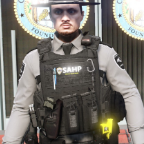


As default the texture of the vest says "POLICE" but I decided that I think it's bland and I wanted to change it so I did and I decided to share it. And hopefully get some feedback. The texture on the pack has a stitched American flag along with a San Andreas city logo/patch.
Sorry that it's pretty bland, it's my first time doing this.
What's New in Version 1.0.0
Released
Forgot to add the BCSO texture of this pack, sorry.
Short Description
San Andreas State Trooper Texture / SAST
The actually vest belongs to "Hanako". I just wanted to make my own texture for it and share it I guess.

![[EUP] COLP](http://s3-screenshots.int-cdn.lcpdfrusercontent.com/resize/500/-/monthly_2026_05/COL_2.thumb.png.8f6eb8191867522992ea01416d182a80.png)
![[EUP] CBRN](http://s3-screenshots.int-cdn.lcpdfrusercontent.com/resize/500/-/monthly_2026_05/CBRN_2.thumb.png.f03f06680f58ccff02223a2fe99e473b.png)

.thumb.png.bd195e42a078bb7c7f3a1182f03e9694.png)




![[Non-ELS/DLSv2] Generic BMW R1200RT-P [Addon/FiveM]](http://s3-screenshots.int-cdn.lcpdfrusercontent.com/resize/500/-/monthly_2026_05/1.Thumbnail.thumb.png.1755ddcc24711022d8951345c49501b7.png)



![[DLS/Add-on] New York Police Pack](http://s3-screenshots.int-cdn.lcpdfrusercontent.com/resize/500/-/monthly_2026_04/preview.thumb.png.18b807af87cc2bc0f01f1e6156a9ad39.png)
![台灣警車 Taiwan Police Car(2016 Ford Mondeo)[ADD-ON|ELS]](http://s3-screenshots.int-cdn.lcpdfrusercontent.com/resize/500/-/monthly_2026_04/271590_20260403180956_1.thumb.png.553e9d7daaf5ab08616b5417d74f863c.png)

Recommended Comments
Create an account or sign in to comment