Skip to content
View in the app

A better way to browse. Learn more.

LCPDFR.com

A full-screen app on your home screen with push notifications, badges and more.

To install this app on iOS and iPadOS
  1. Tap the Share icon in Safari
  2. Scroll the menu and tap Add to Home Screen.
  3. Tap Add in the top-right corner.
To install this app on Android
  1. Tap the 3-dot menu (⋮) in the top-right corner of the browser.
  2. Tap Add to Home screen or Install app.
  3. Confirm by tapping Install.

Minnesota State Trooper Taurus 1.0

(3 reviews)

6 Screenshots

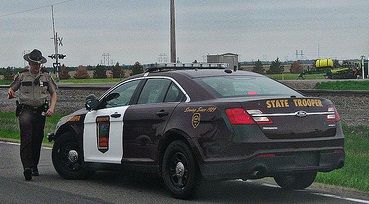
Ford Taurus skin modeled after the new era Minnesota State Trooper cars.

This download DOES come with 2 LIVERYS. One for Bxbugs123's Taurus, or one for Cj24's Taurus.
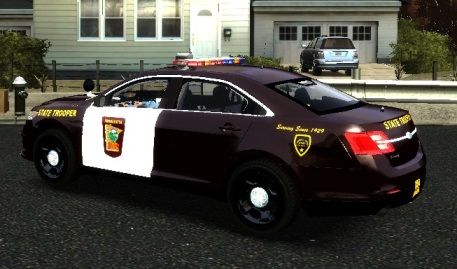
2013-07-26_00011_zpsfe24451e.jpg

8859718055_5a7562d4a3_zps28333432.jpg

**Note -- this file includes the SKIN ONLY. You will need to have your own Taurus in the game to upload the skin to.

Thanks for downloading!

What's New in Version 1.0

Released

  • -Uploaded

User Feedback

Recommended Comments

axeman1224

Members

Now we just need someone to make a taurus with a wrap around!

BroJam

Members Author

Now we just need someone to make a taurus with a wrap around!

ROYKIRK

Members

Looks good, what taurus model is that?

BroJam

Members Author

Looks good, what taurus model is that?

Thank you very much! I used Cj24's LCPD Taurus for the screenshots, I don't really like it though. The lightbar looks kind of weird, and it doesn't have a rambar.

JMG0051821

Members

Thank you very much! I used Cj24's LCPD Taurus for the screenshots, I don't really like it though. The lightbar looks kind of weird, and it doesn't have a rambar.

Looks good, what taurus model is that?

Create an account or sign in to comment

Account

Navigation

Search

Search

Configure browser push notifications

Chrome (Android)
  1. Tap the lock icon next to the address bar.
  2. Tap Permissions → Notifications.
  3. Adjust your preference.
Chrome (Desktop)
  1. Click the padlock icon in the address bar.
  2. Select Site settings.
  3. Find Notifications and adjust your preference.