


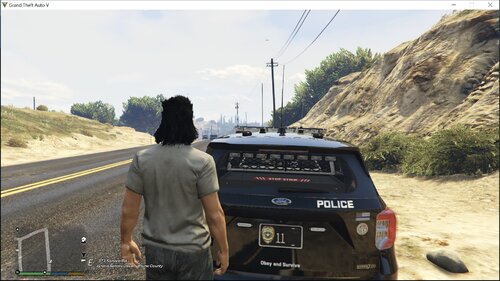
So this pack was originally for a community but I left due to circumstances that I will not name. But here you are! If you see / notice any bugs please report them to me @ https://discord.gg/VXHRHhG6eH or by DMing me @ Maryland Modifications#6037
Vehicle List:
2011 Ford Crown Victoria - vic
2014 Dodge Charger - 14chrg
2018 Dodge Charger - 18chrg
2015 Ford Explorer - 15exp
2016 Ford Explorer - 16exp
2020 Chevy Tahoe - tahoe
2016 Ford Taurus - tau
Vehicle Components -
Extra 1 - Lightbar
Extra 2 - Lightbar Mounted ALPRs
Extra 3 - Rambar
Extra 4 - Grill Lights
Extra 5 - Rear Window Lights
Extra 6 - Rear Plate Lights
Extra 7 - Antenna Set #1
Extra 8 - Antenna Set #2
Extra 9 - Visor Lights
Extra 10 - Spotlight
Extra 11 - Laird Antenna
Extra 12 - Ownership Ornament
Short Description
//Vehicles
2011 Vic -
- 2011 Forza CVPI Base Extracted by DMN
- Optimized, Converted, Textured and stuff by Thehurk
- Realisim Edits and more optimization by Lundy
- Major support with screenshots, feedback, IRL pictures, etc by Steinberg, Lundy, Problematic, and Taylor Swift
- Steelies and tires by Carper
- Hubcaps and tires by Carper
2014 Charger =
- 2013 Charger SRT8 from Forza Horizon
- Converted and textured by Thehurk
- Converted to PPV by Thehurk
- Templated by Thehurk
- Taillight textures by Five0
2015 Explorer -
- Base Model Provided by VooDoo of GTA 5 Mod Center
- Center Dash, Steering Wheel, Wheel and Tire, Gauge Cluster Provided by OfficerUnderwood
- Seats, Dash, Door Panels Provided by The Hurk
- Molded Together by SoCal Thero
- Template UV Mapped by SoCal Thero
2016 Explorer -
- Ford explorer Base model purchased by Thehurk, GTAxB0SS, Requiem and Windows446
- Poly Crunched by Thehurk
- Textured and Converted by Thehurk
- Textures by Taylor Swift and Thehurk
- Rims by GTAxB0SS
- Interceptor Hood text by GTAxB0SS
- Interior purchased by TrentMU and FRGamer
- Ecoboost and Rear Police interceptor text by Jasonct203
- Converted to Police interceptor by Thehurk
- Templated by Thehurk
2016 Taurus -
- 2010 Ford Taurus SHO by Turn 10 Studios, modified into 2016 Ford Taurus Police Interceptor by OfficerUnderwood
- Rear bumper, headlamps, & dash by be fast, modified by OfficerUnderwood & Carper
- Front bumper by Ridgerunner, Grill by Vertex3D, modified by OfficerUnderwood
- Chassis parts by Ubisoft, Reverse lights by OfficerUnderwood
- Rims by BxBugs123, Centercap by Carper
2018 Charger -
- Original vehicle model is 2015 Dodge Charger from Forza, edited into the 2018 Dodge Charger Pursuit by Matt with parts from FH3 and Gamemodels
- Seats, center mirror, shifter and dash edits modeled and done by Kane104 - commissioned by Ranger Rick
- Major help from EVI for digital dial information and help to get the dials working and his patience to help me
- Rear bumper diffuser modeled by Patrol 31 Normal edits by Steinberg
- AWD/Charger badge modeled by iansonwheels Converted to V by Matt
- AWD Steelies/Hubcap modeled by iansonwheels Converted to V by Matt
- Big thanks to Cj24 for beta testing the model and help with spec maps and normal maps and his overall knowledge of gta materials
- Interior dial textures made by NeonLazer
- Interior button textures made by Slendis
- Rims from Gamemodels.ru Centercap edited by Matt
- Dome Light modeled by Matt
- A big thanks to Cj24, Kane104, EVI, Patrol 31, Steinberg , Desmond , NeOnLaZeR, Izick, Rekram, HDgamerzPC
- Big thanks to Ranger Rick who bought 3D parts so that i wouldn't give up on this project and bought me a Zmodeler license so that i can keep working on this project Thank you Rick.
- Thank you to everyone who supported me and the project...
- Another big thanks to iansonwheels who had the time to make the AWD steelies and AWD package stuff....
2020 Tahoe -
- 2015 Suburban by Carface converted to a 2019-2020 Tahoe PPV by Dan with da van
- Countless Textures and parts redone and remodeled by Dan with da Van
- Most included parts modeled and textured by Dan with da van
- Door sticker redone by Billy J.
- Thanks to Bigams for providing high quality pictures of a real Tahoe
- Mayor edits by Dan with da Van
- ENV from some lspdfr post oof
- Templated and normals redon by Dan with da van
- A huge thanks to everyone below for helping make this project as good as it is
- Krul, TickleMyElmo, Blaster, HP Deskjet, Bigams, INSAN1TY, Billy J and Maurice97
//Lighting Equipment
Whelen Liberty II -
- Kane
Federal Signal Spectralux -
- FS Spectralux ILS modeled and textured by Cj24
Whelen ION -
- CEO
Whelen Avengers -
- Otaku
Code 3 LED X -
- Cj24
Whelen M4 -
- Whelen M4 scratch modeled, textured and converted by panos_zaf
Whelen 200 Series TIR6 -
- Whelen 200 series tir6 scratch modeled by Five0/OfficerFive0
- Converted to gta 5 by Five0/OfficerFive0
- Main texture by five0
- Groove texture by neonlazer
- Huge thank you to CJ24 for helping me create the textures
- Commissioned by CHiP
//Vehicle Equipment
Console -
- Made by Maryland Modifications
Brother Printer -
- JOHNCLARK1102 for the printer & textures
- BuscuitHead for conversion
Motorola APX 6500 -
- Motorola APX 6500 Modeled, Textured and UV mapped by Dan with da van
Whelen Cencom Sapphire -
- Cencom Modelled & Textured by Jakub
Laptop Stand -
- Laptop Stand by Twurtleee
Toughbook CF-31 -
- Toughbook CF-31 modeled and textured by Cj24
Setina RP Partition & Gun Racks -
- CEO
Radar -
- Kustom Signal Radars Modelled And Textured By - Jakub
Unity 330 Series H3 Halogen Spotlight -
- Spotlight Created By Turn10Studios; Converted And Edited By Shmurda
- Textures By Shmurda
Whelen SA315P Speaker -
- Whelen SA315P speaker made by krul
Setina PB400 for Crown Vics -
- Setina PB-400 modelled and converted to GTA 4 by CEO
- Converted to GTA 5 By JackTheDev
Setina Pushbar Pack -
- Setina by Twurtleee
- Setina textured by Twurtlee
- Textures provided by Matt
Anternnas -
- Billy J
- Modeled, textured, converted, the works by Frost88
- Credits to Laird for their design
- Laird B8065CN Antenna Modeled, Textured by VooDoo. Textures by VooDoo. Converted to V by VooDoo
- Screenshots by VooDoo (only had time to get zmod ss's)
Whelen PAR46 Spotlight -
- Cj24









Recommended Comments
Create an account or sign in to comment