Skip to content
View in the app

A better way to browse. Learn more.

LCPDFR.com

A full-screen app on your home screen with push notifications, badges and more.

To install this app on iOS and iPadOS
  1. Tap the Share icon in Safari
  2. Scroll the menu and tap Add to Home Screen.
  3. Tap Add in the top-right corner.
To install this app on Android
  1. Tap the 3-dot menu (⋮) in the top-right corner of the browser.
  2. Tap Add to Home screen or Install app.
  3. Confirm by tapping Install.

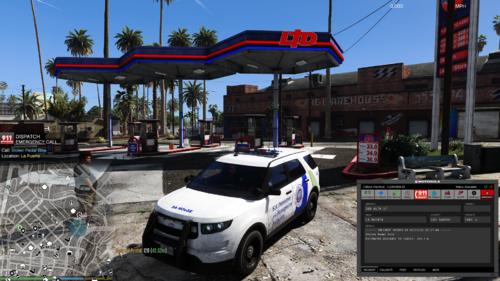
[ELS] BCSO Pack 1.0.0

(4 reviews)

4 Screenshots

User Feedback

Recommended Comments

Dongolev

Members

Looks really good! Can't wait to try these beauties out.

Synczz

Members

Looks real nice man! Thank you! I was actually looking for a nice Blaine County Pack

THE YOUTUBE GUY

Members

Amazing Pack RangerZ Thank You!


SnailPowerGT

Members

Amazing work! You got the handling down as well. I highly enjoy them. Cant ask for much better quality


cooltheme

Members

(edited)

I like the car design and color. You definitely put in some great effort. Excited to give this a try! Thanks for releasing this awesome pack!

Edited by cooltheme

Draxxef

Members

The Suv is tipping over badly 😛

Ethan.Low

Members

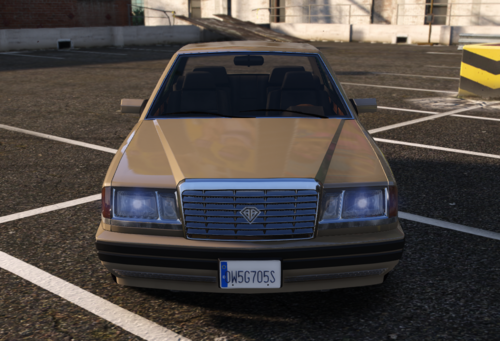
Its really nice, however my Ford Taurus Spawns in with Jet Black windows it there a way to change that?


LtFrosty

Members

Amazing pack, Hopefully we see more vehicles like these

flyingeagle855

Members

Can someone tell me what I did wrong? The car worked fine but this is what I get when I spawn the SUV sheriff2

20200429203800_1.jpg

samrushy90

Members

is anyone else having issues with the blue lights being too dim on Sheriff2? 

RangerZ

Members Author

9 hours ago, omnipotentbandito said:

The lights on the explorer are SUPER dark?

Take the tint off 

zorba

Members

On 4/30/2020 at 6:05 AM, flyingeagle855 said:

Can someone tell me what I did wrong? The car worked fine but this is what I get when I spawn the SUV sheriff2

20200429203800_1.jpg


Yes +1, I have this too, dunno how to fix it

samrushy90

Members

Check the vehicle.meta and vehicle txt name.

DesiroCity

Members

On 5/2/2020 at 3:21 PM, RangerZ said:

Take the tint off 

I'm not very great very modding at all, so please don't think I'm an idiot or get angry but could you explain how to do that?

RangerZ

Members Author

2 hours ago, DesiroCity said:

I'm not very great very modding at all, so please don't think I'm an idiot or get angry but could you explain how to do that?

Take a transparent png and go into the .ytd and replace it over the Taurus windows file. 

LtFrosty

Members

On 4/30/2020 at 12:05 AM, flyingeagle855 said:

Can someone tell me what I did wrong? The car worked fine but this is what I get when I spawn the SUV sheriff2

20200429203800_1.jpg


You need to delete the sheriff 2 ytd in ''NVR_Emissive'' mods/update/x64/dlcpacks/NVR_emissive

DarthZak

Members

It's amazing however i'm not sure if I'm the only one experiencing the high glare in both vehicles. The ford els blue lightbar is on when you aren't using it and not functioning properly between stages. The Tahoe works phenomenally. 

Dutchie77

Members

(edited)

On 4/26/2020 at 5:29 PM, Draxxef said:

The Suv is tipping over badly 😛

Change the handling ID of the vehicle spot (i.e police3, sheriff2) in vehicle.meta to GRESLEY and roll over will stop. In fact as a tip whenever you install a SUV vehicle change the ID to GRESLEY. You can also do for the other vehicles (especially when they bounce like crazy) and change their ID to FUGITIVE.


Edited by Dutchie77

Deputy Konosuke

Members

On 4/25/2020 at 10:14 PM, THE YOUTUBE GUY said:


any red and blue light version or cfg i can use


NOTTHATSTOP

Members

(edited)

UPDATE: Copied the meta from Police3 over to Sheriff2, and the SUV handles much better without tipping over so easily. 


I really like these. If you're having issues with light bar tint, just diffuse it in the vehicle meta.  I did lose the light bar on the car once, just completely disappeared in game. Tried deleting it and respawn, still same issue.  Wouldn't come back until I restarted the game. Computer screens are pretty bright, but I'll look into toning them down.  The worst is the SUV tipping over, but I figure I can adjust it in the meta somehow.  All in all good looking vehicles.

Edited by Bigcrookdaddy

visozki32

Members

Got the same issue with the blue lights on the lightbar and on the back window.
You said about replacing something in the YTD files, wouldn't it be easier to just fix the mod and reupload it ?
As most of us no texture experts, if you can guide us how to fix it though that would be great ty.

Other then that great vehicles.

image.thumb.png.f8f5cbca83fef50a6cab24cbf7b710d5.png

RangerZ

Members Author

On 1/8/2021 at 9:25 AM, visozki32 said:

Got the same issue with the blue lights on the lightbar and on the back window.
You said about replacing something in the YTD files, wouldn't it be easier to just fix the mod and reupload it ?
As most of us no texture experts, if you can guide us how to fix it though that would be great ty.

Other then that great vehicles.

image.thumb.png.f8f5cbca83fef50a6cab24cbf7b710d5.png

Try cleaning the vehicle and setting the tint to stock.

Create an account or sign in to comment

Latest Mods

Account

Navigation

Search

Search

Configure browser push notifications

Chrome (Android)
  1. Tap the lock icon next to the address bar.
  2. Tap Permissions → Notifications.
  3. Adjust your preference.
Chrome (Desktop)
  1. Click the padlock icon in the address bar.
  2. Select Site settings.
  3. Find Notifications and adjust your preference.