Skip to content
View in the app

A better way to browse. Learn more.

LCPDFR.com

A full-screen app on your home screen with push notifications, badges and more.

To install this app on iOS and iPadOS
  1. Tap the Share icon in Safari
  2. Scroll the menu and tap Add to Home Screen.
  3. Tap Add in the top-right corner.
To install this app on Android
  1. Tap the 3-dot menu (⋮) in the top-right corner of the browser.
  2. Tap Add to Home screen or Install app.
  3. Confirm by tapping Install.

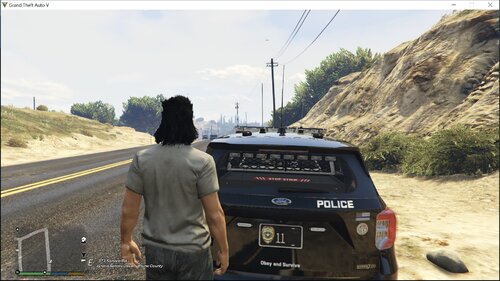
Alaska State Troopers pack (AST) 1.0.0

(1 review)

45 Screenshots

I started this pack a long time ago and never really got around to uploading it. I stopped working on it a while ago so there will more than likely be some problems with it. This is my first pack for gta so yeah. Hope you enjoy it 🙂  All vehicles and ped models go to the people that made them. I did not make these models just re skinned them.


CVPI - 


2012 Charger - 


Explorer - 


FPI Slicktop, Chevy van - 


BMW Bike, F350, Expedition - 


09 Charger - 


Bearcat - 


Unmarked FPI - 


Ambulance - 


AST uniforms - 


Sorry about the silverado. The model I used got removed. If anyone finds you should drop it in the comments for other people. ❤️

User Feedback

Recommended Comments

SergeantSamuel

Members

Nice Pack man and Finally ifound a real AST Pack!

Austin O.27

Members

(edited)

For the S.E.R.T Uniform,
Navigate to:


GTA V - mods - x64e.rpf - models - cdimages - componentpeds_s_m_y.rpf


Then Find:


s_m_y_swat_01.ytd


For the patch named "ABI.png",

You are going to want to rename it as:


decl_diff_000_a_uni.png


And your done, hope this helps you guys on being able to install the S.E.R.T Uniform!


If you are too lazy like I am then just get it from this google drive link!:


https://drive.google.com/drive/folders/1z5BUBHyrDMV_dP90xwJMd0iRJ_ZOxxgx?usp=sharing

Edited by Austin O.27

Create an account or sign in to comment

Latest Mods

Account

Navigation

Search

Search

Configure browser push notifications

Chrome (Android)
  1. Tap the lock icon next to the address bar.
  2. Tap Permissions → Notifications.
  3. Adjust your preference.
Chrome (Desktop)
  1. Click the padlock icon in the address bar.
  2. Select Site settings.
  3. Find Notifications and adjust your preference.