Skip to content
View in the app

A better way to browse. Learn more.

LCPDFR.com

A full-screen app on your home screen with push notifications, badges and more.

To install this app on iOS and iPadOS
  1. Tap the Share icon in Safari
  2. Scroll the menu and tap Add to Home Screen.
  3. Tap Add in the top-right corner.
To install this app on Android
  1. Tap the 3-dot menu (⋮) in the top-right corner of the browser.
  2. Tap Add to Home screen or Install app.
  3. Confirm by tapping Install.

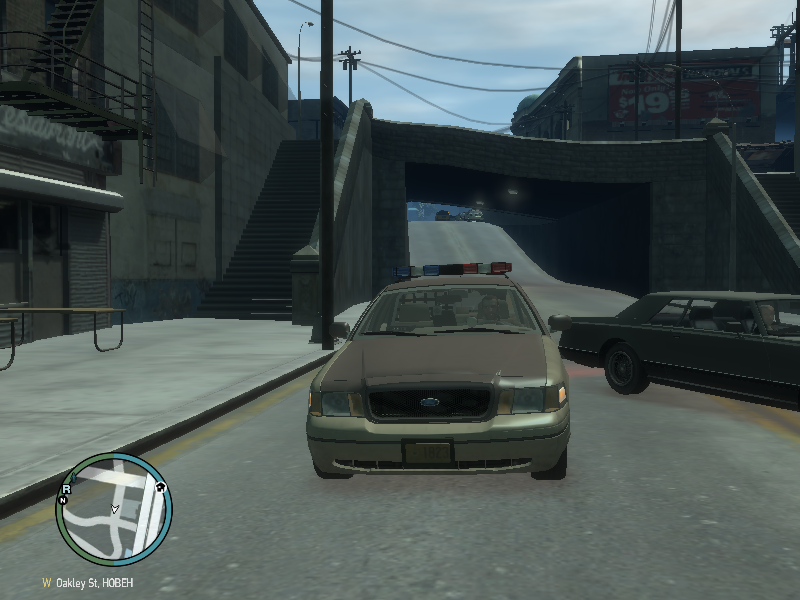
Sheriff Dept. 1998 CVPI v1.1

(3 reviews)

6 Screenshots

- NAME: Sheriff 1998 CVPI

- VERSION: v1.1

- OPTIMIZED FOR: police

- MOD STATUS: Closed

----------------------------------------------------------------------------------------------------

CREDITS

Model is original Ford Crown Victoria by Driver San Francisco, modified for and converted to GTAIV and marked to Police version by F5544.

Main textures are made by Lt.Caine. Decatur Genesis Radar, Rockwell Collins Laptop, WatchGuard Video System, '98 CVPI Wheels, The Bodyguard Partition and Whelen Edge

lightbar are made by BxBugs123. Skin by Strike.

----------------------------------------------------------------------------------------------------

What's new in 1.1?

-added The Bodyguard Partition

-fixed Whelen Edge's bugs

----------------------------------------------------------------------------------------------------

HANDLING & VEHICLES

HANDLING

POLICE 1700.0 6.5 85 0.0 0.0 -0.5 0.0 6 0.23 1.0 155.0 0.3 0.65 0.7 35.0 1.35 1.10 14.5 0.12 0.47 1.7 1.3 1.4 0.08 -0.15 0.0 0.5 1.0 1.0 0.7 1.5 0.0 110000 440010 1 1

VEHICLES.IDE

police, police, car, POLICE, POLICE, VEH@STD, VEH@STD_LO4_LO4, 100, 999, 0.2514, 0.2514, 0.3, 2, 1.5 ,1, -

----------------------------------------------------------------------------------------------------

2012 GTABARAN Modding

This file was originally released at LCPDFR.com. DO NOT EDIT OR REUPLOAD WITHOUT PERMISSION!

This product is freeware and may not be exploited for personal, financial or commercial gain.

The product is provided without any form of warranty!

What's New in Version v1.1

Released

  • added The Bodyguard Partition
  • fixed Whelen Edge's bugs

User Feedback

Recommended Comments

FCV96

Members

Is it me, or are these two mods exactly the same? -

strike

Members

True, haven't you just reuploaded Policefanatic's car?

Nick55

Members

There's a watchguard camera in the dash

Guest Enough of all this

Guest Enough of all this

Guests

Haha copy of my sheriff car.Its not stolen but a stolen idea...........

Pengi

Members

Either of you would be up to editing the secondary lights so that instead of having the second ones from the middle of the lightbar flashing secondaries both 1 and 2 from the middle of the light bar could be secondaries and amber?

Thanks!

gtabaran

Members Author

To FCV96 and strike: I USED ONLY SKIN! LIGHTBAR ON THIS CVPI IS FROM KevinDV. ON MY CVPI I USED LIGHTBAR FROM BxBugs123!

gtabaran

Members Author

Credits from CVPI_SH:

-Policefanatic for ripping.converting and editing the model

-KevinDV for the EDGE Lightbar

-strike for the awesome skin

-Cj24 for the spotlight and the template

-PFCbarefoot for the console

gtabaran

Members Author

I didn't use the Police Console by PFCBarefoot. I used Rockwell Collins Laptop from BxBugs123!

gtabaran

Members Author

Policefanatic:Haha copy of my sheriff car.Its not stolen but a stolen idea...........

Sorry, but this skin is great so I used it:)

gtabaran

Members Author

True, haven't you just reuploaded Policefanatic's car?

I DON'T STEAL MODS!

gtabaran

Members Author

Either of you would be up to editing the secondary lights so that instead of having the second ones from the middle of the lightbar flashing secondaries both 1 and 2 from the middle of the light bar could be secondaries and amber?

Thanks!

Thanks for hint. I will try do it.

gtabaran

Members Author

can i get a template for this?

This is the BxBugs123's Template

Create an account or sign in to comment

Latest Mods

Account

Navigation

Search

Search

Configure browser push notifications

Chrome (Android)
  1. Tap the lock icon next to the address bar.
  2. Tap Permissions → Notifications.
  3. Adjust your preference.
Chrome (Desktop)
  1. Click the padlock icon in the address bar.
  2. Select Site settings.
  3. Find Notifications and adjust your preference.

