






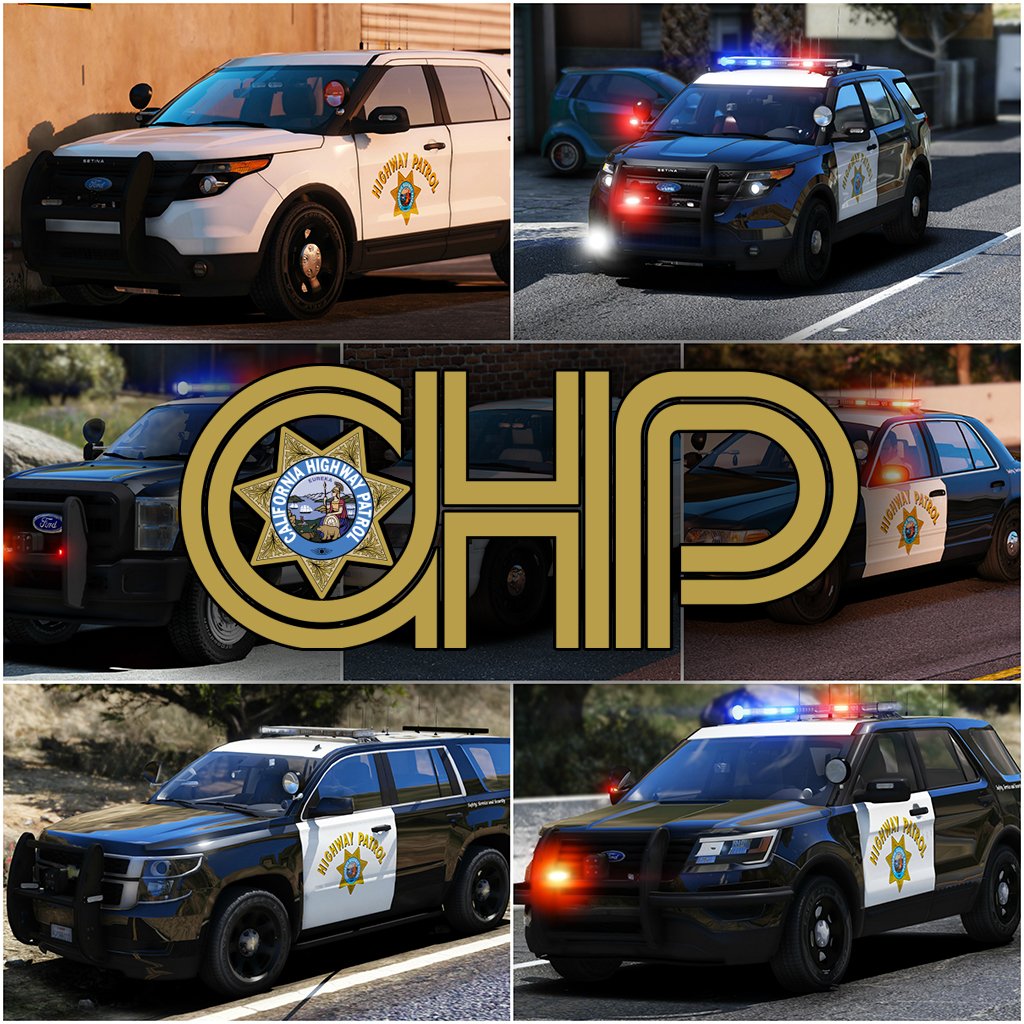


Welcome to something that has been in the making since I've gotten my hands on ELS, something that has taken more hours then you guys could understand. I've pulled out all the stops for this pack. I've taken all your guys' feedback on my screenshots, and I've done my best to destroy it in the realistic/quality/immersion department. I've done my best to simplify the installation of this file. For those of you who are looking for an add-on version of this pack, you're going to have to wait a little longer, as I've got barely any time to even upload this. So without further adieu, I present to you my pride and joy, the 2017 California Highway Patrol ELS mega pack, or whatever you want to call it.
I've updated the pack to include updates to the majority of cars, an add-on version of the pack(.oiv format), and the templates that everyone has requested!
PACK OVERVIEW
=================================
- NAME: 2017 CHP mega pack ELS
- VERSION: V1.0
- EXTRA PARTS: CHP
- OPTIMIZED FOR: Anything
ELS USE IN GAME
=================================
When in game, the lights will work as i've designed for them to. When you exit the vehicle, the entire front of the vehicle will steady burn as it will mimic the
CHP Traffic Stop pattern. I can't stop this from happening.
When you are using any of the vehicles in this pack, and you preform a traffic stop, I HIGHLY recommend hitting alt-j to go to light stage two and hitting L to turn on the
front of the vehicle. This; A, enhances realism and B, makes the car look really pretty.
There are multiple other features that I will leave for you guys to find out with the CHP settings.
IMPORTANT NOTES
=================================
I am always accepting donations! Any amount is appreciated more then you guys will ever know!
Unfortunately I've had to split this pack into two separate parts (will be 3 when .oiv is included), PLEASE BE SURE TO DOWNLOAD ALL PARTS!
PLEASE PLEASE PLEASE READ THE READ ME BEFORE YOU ACTUALLY INSTALL THIS PACK!!!!!!!!!!!!!!!!!!!!
There are some things I have been unable to do with this pack and there are some things i've been able to do.
There is no way for me to turn off the park mode steadyburn for when you get out of the vehicle.
If you want to "reset" the pattern for the vehicle if some reason it becomes out of sync, simply press alt-J and then j again.
A incredible thank you to @Problematic , @TaylorSwift and a few more for their help and assistance throughout this entire production of this pack.
INSTALLATION INSTRUCTIONS
=================================
-To install any of these vehicles, Navigate to the latest patch day that you install vehicles to, I've found success with patchday10, and drag all vehicle files into the patch day
Location: Grand Theft Auto V\mods\update\x64\dlcpacks\patchday10ng\dlc.rpf\x64\levels\gta5\vehicles.rpf
-To install any VCFs with the pack
Location: Grand Theft Auto V\ELS\pack_default
-To install any included vehicle metas files
Location: Grand Theft Auto V\mods\update\update.rpf\common\data\levels\gta5
COMMON QUESTIONS
=================================
Q: Why aren't my lights bright?
A: You do not have light-enhancing mods installed. Download RadianceV and/or, other mods that increase emergency lighting brightness.
Q: Where is _____(insert any vehicle here)?
A: I've made the main vehicles of the CHP fleet as I've seen. At this point I am Content with the 16 Vehicles.
Q: Will you please help me ins--
A: Did you read the readme? No? The installation is simple.
Q: I don't have Patchday10/anything else?
A: Then put the car in your latest patch day, or copy patchday10/anything else over from your base game into your mods folder.
Q: Why does my game crash after I install the car/meta/carcol?
A: Make sure you have no spaces when you copied the line, make sure you're installing it in the right location and back all your shit up.
Q: Will you send me ______?
A: No.
Q: Can I make skins for this Pack?
A: By all means, go ahead, just dont re-upload the vehicle model itself.
Q: Can I have the templates for this pack?
A: In the next update, hopefully I remember to add them.
PACK NOTES
=================================
Before i get started, please, please PLEASE don't ask me where this vehicle is, or why i didn't make this vehicle. There are 14 in this pack, please be happy with what i've
made so far.
- All vehicles do have working takedowns with working spotlights
- All vehicles feature the same CHP setup as in real life
- All vehicles have accurate interior equipment
- All vehicles feature accurate antenna setups
- K9 vehicles have a spawnable dog in the rear of the vehicle, for those of you who do or don't use a k9 mod
- If I haven't included a version for add-on vehicles that is in an .oiv format, then i will include one at a later date.
- There is approx 14 vehicles in this current phase of the pack, phase 2 will have a few more vehicles, that are the more abstract vehicles in the CHP fleet.
- A huge thanks to officer27 for the CHP and SAHP skins.
- With the large amount of vehicles in this pack, there are bound to be some issues with vehicles. Please let me know of any bugs you find and i'll do my best to fix them
I'm going to be doing my best to update this pack with as many cars as I can make, and fixing any bugs i come across in the midst of it. Please consider following the file to make sure you receive all updates for the file!
Flawless video by @mroxplay, also you need to start making music mixes, the transition between songs was fantastic!
Disclaimer
=================================
-You are not to attempt to modify or rip this pack in any way shape or form.
-I (Thehurk) am not responsible for any damages done to your game. Please make a backup of any edited files!
-Do not attempt to make a profit off this pack in any way shape or form.
-Do not re-upload this pack, please make a link!!!!!
-Do not upload this file to any other site, claiming it as your own.
-If you want to use this file in a clan, PLEASE ask me before doing so!!! I greatly appreciate this and almost always say yes!
Thank you everyone if you've gotten to this point in reading, you are truly a saint and I appreciate you not just skipping it saying what is this bullshit.
What's New in Version 1.1.0
Released
-Fixed all vehicles that have a liberty (missing one module on the passenger side)
-Fixed the 2006 CVPI Vision somehow having being affected by tint.
-Fixed the expedition's rear blues on the liberty not working
-Fixed 2013 Explorer's mirror lights not being synced
-Fixed some of the spotlights, not all, didn't have time to do others as i've been working crazy overtime.
-Fixed some VCF issues (once again they are all customizable);
- 2006 CVPI traffic advisor should be customizable to your liking, i've left it on the default TRAF pattern
- All motorcycles (Policeb) should now automatically go to stage 3, as there is nothing with the other two stages
-Added 2013 Harley Davidson Electraglide motorcycle
-Added the Add-On Version .oiv
-Uploaded all templates
=================================
Main Vehicles
-------------
2006 CVPI
Steinberg4145- assembled 2006 version and minor edits
Murphy -developed 2011 , part modifications, custom modeled components, testing, UV mapping, features & fixes
Original Light - CVPI expertise, modeling contributions
Lundy - Door handles, CVPI expertise, CVPI parts from his models, mod tester
Yard1 - modding techniques
Netman
Cj24 - Publisher of the original model for IV & template, including headlight modifications & misc changes from F5544's release
KevinDV - Work on the original model & grille
Ubisoft - Driver: San Francisco Ford Crown Victoria parts, including base model & first person interior
BxBugs123 - Headlight textures & expertise
OfficerUnderwood - CVPI parts from his DEV resource
F5544 - Initial GTA IV conversion
Schaefft - Some interior components and initial seat model
Rekram- Vehicle edits and bug fixes
2009-2011 CVPI
- CJ24
- KevinDV
- F5544
- TrooperFightingNote
- Underwood
- EvanC
- Schaeft
- Carper
2009 Charger
- Lundy
- Lt. Caine
- 0taku
- BxBugs
2013 BMW 1200RT
- Harley Davidson Electraglide Purchased by beautiful bastards at Code Zero Gaming
- Bike poly Crunched by Thehurk
- Converted to GTA V by Thehurk
- Templated by Windows446 and Thehurk
- Released by Polecat324 & BayAreaBuggs for community enjoyment 1-3-17
2013 Ford Expedition
- Model purchased by VooDoo
- Bodyshell re-made by RoegonTV
- Interior from DSF fitted by Thehurk
- Converted to GTA V by Thehurk
- Extensive edits by RoegonTV & Thehurk
- Templates by GTAxBOSS
2013 Ford Explorer
- 2013 Ford Explorer converted from NFS by Jasonct203
- Templated by Jasonct203
- HQ interior fitted by Thehurk
- Bugfixes by Thehurk
- Rims by GTAxBOSS
2013 Ford F350
- Model Provided from unknown 3d Model Website by TrooperFightingNote
- Poly Crunched and optimized by Thehurk
- Textures by Thehurk
- Interior From DSF, Fitted by thehurk
- Converted to V by Thehurk
- Templated By TrooperFightingNote
- Cap From Sketchup, Done to v by Thehurk
2015 Dodge Charger
- Original model from forza horizon extracted by DMN
- Converted, and textured by Thehurk
- converted to PPV by Thehurk
- Textures by Thehurk
2015 Chevy Tahoe
-Orignal suburban Scratch modeled by Shadydk311
-Converted and edited to V by BritishGamer88
-Converted to Tahoe by Thehurk & Allaboutk9
-MAJOR edits by Thehurk
-Convert to PPV By Thehurk
-Rims purchased by Him1250
-Normals and wireframe fixed by Thehurk
-Textured by Thehurk
2016 Ford Explorer
- Ford explorer Base model purchased by Thehurk, FrGamer, TrentMU
- Poly Crunched by Thehurk
- Textured and Converted by Thehurk
- Textures by Taylor Swift and Thehurk
- Ecoboost and Rear Police interceptor text by Jasonct203
- rims by GTAxB0SS
- Templated by Thehurk
Other Parts
-----------
Lighting Parts
- Whelen Liberty SX scratch modeled, textured and converted by KevinDV
- Federal Signal Vector By Five0, signalmaster by KevinDV
- Whelen Raiders Modeled by Hilth0, retextured by Thehurk
- Whelen Ion V series by Voodoo, remade to 500 V series by Thehurk
- Unity halogen spotlight by Cody
Misc Equipment
- Rockwell Collins iForce By Thehurk
- Stalker Radar by Carper
- Genesis II by Five0
- Watchguard Camera system by ReaganTV
- CHP Partition by Thehurk
- Proguard Gunrack by GTAxB0SS
- Antennas by Carper, edited by Thehurk
- CHP CVPI Rambar by Thehurk
- Power Adaptor by Thehurk
- Fedsig AS124 by Thehurk
- Fedsig TS100 by Deco
- K9 Partition by Vertex 3d
- Doggo by IronicRainbow
- Lightbar ALPRS by Thehurk
- General Electric Rangr by Thehurk, texture by Zando
- Toughbook by Ridgerunner
- Harris XG 75m by Five0
- Setina Rambars by Vertex3d, Ridgerunner, NickieB, Carper
Thanks to Kilyin for making the add-on version.
If i've forgotten any credits, which I probably have, please let me know and I will add you/them!



.thumb.png.a0f80464539c2dd42ee2519c1bda91f2.png)



![Generic Whelen 2023 F150 B/B [FiveM & Single Player]](http://s3-screenshots.int-cdn.lcpdfrusercontent.com/resize/500/-/monthly_2026_05/enb2026_5_13_15_23_48_06.thumb.png.ecbdfb941234f496e3fd959033f602d4.png)











Recommended Comments
Create an account or sign in to comment