


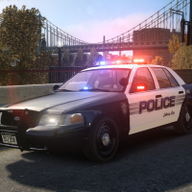


A pack with marked, slicktop, and unmarked Los Santos Police Department CVPIs, based accurately on the Los Angeles Police Department's 2008 setups with many equipment options, including traffic and ALPR setups.
Vehicle Slots: lspdcvpi08, lspdcvpi08a, lspdcvpi08s, lspdcvpi08u (Add-On); police, police2, police3, police4 (Replace)
Lighting Equipment: Federal Signal Arjent S2 and Federal Signal Cuda TriOptic
DLS Support: DLS v2.1 (optional)
Multiple Liveries: Supported
Notes
This modification requires the game to be run with DirectX 11.
Required mods:
SirenSetting Limit Adjuster: Required for 32 siren support. If not installed, some lights on the marked CVPI such as the front and rear corner LEDs and the takedown lights will not flash. Also adds additional siren setting IDs to minimize the risk of conflicts.
Recommended mods:
DLS (Dynamic Lighting System) v2.1 or newer: Light stages, siren controls and more. Only light stage 3 with simplified patterns will be available when not using DLS.
Improved Emergency Lights: A modified visualsettings.dat file to increase emergency light brightness. Not necessary if a different graphics mod with brighter lights is used.
Vehicle slots and extra components (view readme for details):
Standard Marked, lspdcvpi08 (Add-on) or police (Replace): Spotlights up or down, pushbar, gun rack and partition options, dashcam, radar, and LoJack
Marked with ALPR, lspdcvpi08a (Add-on) or police2 (Replace): Flat ALPR, round ALPR, Cuda visor light, gun rack and partition options, dashcam
Slicktop, lspdcvpi08s (Add-on) or police3 (Replace): Spotlights up or down, pushbar, gun rack and partition options with siren controller options, passenger side rear Cuda light, dashcam
Unmarked, lspdcvpi08u (Add-on) or police4 (Replace): Shotgun, antenna options, passenger side rear Cuda light
Installation
Installation with Lenny's Mod Loader (LML) is recommended. Refer to the included readme.pdf for detailed instructions.
Terms of use
You may replace or edit textures and create and redistribute liveries of your own using the provided template.
When using this modification in a public multiplayer server, a link to this file must be provided for your users.
You may not modify any model files. You may not use any assets for other modifications. You may not redistribute this archive or its contents, including any edited versions.
If you'd like to follow progress on my projects and download all of mods and assets, feel free to join my Discord server: https://discord.gg/9mJpfUC
Edited by Cj24
Short Description
- Undercarriage, tires, and rims made from scratch by HANAKO, Tire textures by RobertTM and Cartres.
- Light emissive textures upscaled and colors adjusted by Cartres.
- Base edits with many minor fixes and improvements by Cj24, including many minor improvements to textures, model, LODs, and collisions for improved accuracy and optimization.
- FS Arjent S2 lightbar modeled and textured by Kane104, emissive textures by Cj24. FS Corner LED and Cuda TriOptic modeled and textured by Cj24. Front corner LED reflection and rear corner LED textures by Hanako, color adjustments by Cj24.
- Motorola radio modeled and textured by Kane104. Setina PB100 pushbar, FS Smart System LMS and Six-Button controllers, FS TS100 siren speaker, Havis console, map light, Setina partition, gun mounts, 870 shotgun, Coban Edge dashcam, Decatur Genesis I radar, LoJack display, Dell D610 laptop, dome light, Unity spotlights, and antennas modeled and textured by Cj24.
- Liveries, Lighting and DLS setup, and configuration files by Cj24.



.thumb.png.987d590a4b6fb85cfcd7b327be51397d.png)




(1).thumb.png.96c1873ad62dd8fed9b2ed3729d3df66.png)
![[NZP] 2018 Toyota Highlander UnMarked (STG)](http://s3-screenshots.int-cdn.lcpdfrusercontent.com/resize/500/-/monthly_2026_07/image2.thumb.png.42c6e1cec759572291b830c94014f0f1.png)
![(PVPD)(AZ) Prescott Valley Police Department Mini Pack [2025+ Livery]](http://s3-screenshots.int-cdn.lcpdfrusercontent.com/resize/500/-/monthly_2026_07/271590_16.thumb.jpg.38ec8cdd1fae1dac73014a4de4874c27.jpg)
Recommended Comments
Create an account or sign in to comment