


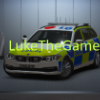


This is my Marked BMW X5 that I made for my Isle Of Arwick fleet. The vehicle does not have any inside equipment however it features state of the ark lighting equipment and 4k skins. The credits, template, and screenshots are in the download. The Isle Of Arwick logo is not included on the vehicle. Special thanks to StoneyLK for taking the screenshots.
What's New in Version 1.0.0
Released
Fixed TOS and Credits
Short Description
Fictional car for british police
Credits For BMW X5
2018 BMW X5
Dev Model -JamesR
Sov - KaiW
Whelen ION - Bradstr
Stealthplate - Bradstr
Whelen ION Spitfire - 0taku
Setup - LukeB
Skin - i.hunter
Screenshots - StoneyLK
2018 BMW X5
Dev Model -JamesR
Sov - KaiW
Whelen ION - Bradstr
Stealthplate - Bradstr
Whelen ION Spitfire - 0taku
Setup - LukeB
Skin - i.hunter
Screenshots - StoneyLK

![[ELS] LSSD Pack (ADDON VERSION) By thegreathah (with permission)](http://s3-screenshots.int-cdn.lcpdfrusercontent.com/monthly_2026_06/image_2026-06-11_185715261.thumb.png.5d29c68c6724b1ad23ad0294c4301f97.png)






![Chevrolet Tahoe - Unmarked SUV - [8SEATS] [ELS] [REPLACE]](http://s3-screenshots.int-cdn.lcpdfrusercontent.com/monthly_2026_06/ezgif-5f6ef3beeba16849.thumb.gif.fb3570093a5f738f115cbd3c9f6409ee.gif)


![[DLS] CSP Slicktop and Unmarked 2018 Charger](http://s3-screenshots.int-cdn.lcpdfrusercontent.com/monthly_2026_06/GrandTheftAutoVScreenshot2026_06.12-10_17_31_97.thumb.jpg.460f74746aae6bb1113450f440bf7b78.jpg)

![1972 WardLafrance Ambassador [DEV]](http://s3-screenshots.int-cdn.lcpdfrusercontent.com/resize/500/-/monthly_2026_06/Ward1.thumb.png.e086b1a7f4f29f4ac1f30e64720beb1f.png)


Recommended Comments
Create an account or sign in to comment