Jump to content
View in the app

A better way to browse. Learn more.

LCPDFR.com

A full-screen app on your home screen with push notifications, badges and more.

To install this app on iOS and iPadOS
  1. Tap the Share icon in Safari
  2. Scroll the menu and tap Add to Home Screen.
  3. Tap Add in the top-right corner.
To install this app on Android
  1. Tap the 3-dot menu (⋮) in the top-right corner of the browser.
  2. Tap Add to Home screen or Install app.
  3. Confirm by tapping Install.
FiveM scripts have moved to Resources & Assets.

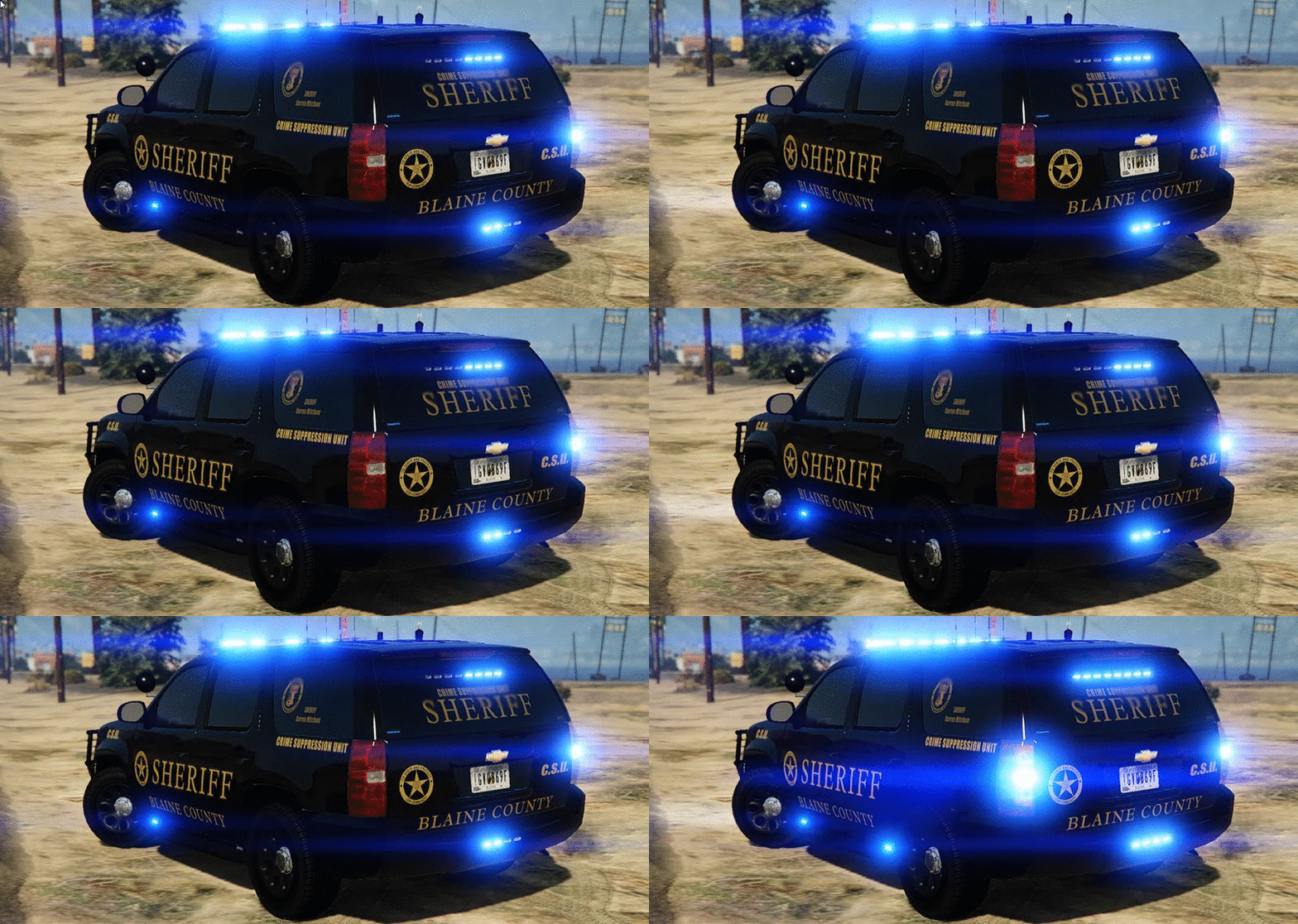
Blaine County COBRA(CSU) Tahoe w/Liberty II

(28 reviews)

4 Screenshots

324f7e3b72edd36edf0c2d8f1eb5c9c3.gif

d2f763a1f00f96d40b64349166dfd5bc.gif

I know what you're thinking....Good Lord....There is drugs,prostitution and DWI's going on in Blaine County right now...But, I don't have a Tahoe to combat it! Well, today is your lucky day kid....The Blaine County Crime Suppression Unit Tahoe is now available to download!

You will have 8 extra's to choose from:
extra_1 -Stalker Radar
extra_2 -Wraparound
extra_3 -Spotlgiht
extra_4 -Antenna's
extra_5 -Cb antenna
extra_6 -Right side ALPR
extra_7 -FS Speaker boxes on rambar
extra_8 -Left side ALPR

 Installation:
You can rename the .yft and .ytd to whatever you want,you don't have to use police.yft.

    For RDE users: Install into update.rpf\update\x64\dlcpacks\rde\dlc.rpf\x64\levels\gta5\vehicles.rpf\
    Non-RDE users will have to rename the cars to whatever you want, then place in the latest patchday: update.rpf\update\x64\dlcpacks\patchday9(or 10)\dlc.rpf\x64\levels\gta5\vehicles.rpf\
        The sirensettings is 1, so change the .metas accordingly, if you need to(Probably won't at this point)


To edit handling for the tahoe:


Go to the necessary vehicles.meta, and change the handling id of the slot your using for the tahoe. Replace the handling id with "baller" or "baller2"


Credits:
-  Model from free 3D site, author unknown.
-  Converted and edited by GeorgieMoon.
-  Interior by 4x4 Hummer merged and textured by GeorgieMoon.
-  Interior converted by FightingNote
-  Wheels by BxBugs123
-  Initiative Tahoe Wraparound by Carper
-  DigitalAlly 500 Dashcamera/Mirror by Carper
-  Stalker Radar by Carper
-  Livery by getinmybelly0627
-  Whelen TIR 6 by tomcat8492
-  Whelen PAR 36 by Bueno
-  Spotlight by BlackJesus
-  ALPR by Molex
-  Antenna's by Vertex3D,lGump and Priman
-  Watchgard 4RE by CAP N' CRUNCH
-  Federal Signal AS124 by TheHurk
-  Console by Sheriffvandyke
-  Handcuff by Solo
-  Whelen Liberty II by Dannyboy
-  Toughbook CF31 by Ridgerunner
-  Whelen Dominator by Tomcat8492
-  Whelen Avenger by Trumapak



Stay vigil and thirsty my friends..


User Feedback

Recommended Comments

Gump

Members Author

Would of been released sooner guys....But, I kept getting an error uploading it...Enjoy it!

Atwood16

Members

You're a legend gump, I love how many tahoe's you've been coming out with and there all excellent models

RoguePlus

Members

Addon cars are now my best friends, thanks to you :)

jacklop21

Members

Same template as your SAHP Tahoe?


NewbCrazy

Members

Plans on a red and blue model? Also, what is "RDE" and "Non RDE"?

NewbCrazy

Members

48 minutes ago, GGN Crazy said:

Plans on a red and blue model? Also, what is "RDE" and "Non RDE"?

My Bad - I did not realize red and blues where in the file download. The pictures deceived me. :p

RyWilson

Members

i sat and looked at that picture up there for like two minutes and watched those lights flash :whistling: what a fantastic piece of bad assery!! that all blue look, decals placed perfectly, tons of extras..it dont get no better than this folks.

Starmix

Members

holy shit, just woke up and clicked on this file and now my eyes hurt a little :sad:

Kilyin

Members

(edited)

For me the windows spawn tinted jet black, and I used the normal windows. I have to go in the trainer and remove the tint, then the window skin becomes visible. Great model though. Adapted my sheriff fleet skin for it. ;)

tahoe2.png

Edited by Kilyin

howardchris40

Members

First off let me say what an amazing model this is and the lighting setup is incredible. So I've renamed the files to replace the sheriff2 slot and placed them in patchday11, the vehicle comes spawns in-game perfectly but the lightbar on top of the vehicle seems to have a black tint over it and you cannot see any lights coming out of it when you activate the sirens, I've tried editing the window tint in the trainer, editing the windows file in the ytd to just a clear glass, and also putting in the sheriff2+hi.ytd in patchday11 as well, nothing seems to work and the lightbar is still black. Any help or suggestions would be greatly appreciated.

20160721130911_1.jpg

20160721130931_1.jpg

Techengage

Members

I absolutely love this Tahoe. I use it as an add-on (Sheriff4). But I did change the spawn color to black and I prefer the handling set to Gresley handling over Baller or Baller2. I have a big question, though. The blue lights appear as pure white and minuscule at a distance. I have my graphics relatively low, so is that my issue or is there a way I can make them brighter? Thank you in advance, and thank you for the amazing model!

TahoeFront.png

TahoeRear.png

patientzero00

Members

i am having the same issue as howardchris40.... can figure this out can someone help plz?

grimdar

Members

Same problem as above, no lights from lightbar. Placed in sheriff2 slot

Techengage

Members

(edited)

52 minutes ago, grimdar said:

Same problem as above, no lights from lightbar. Placed in sheriff2 slot

Also for patientzero00 and howardchris40,

I have attached the .meta coding I am using for this model. You can copy and paste the contents of both and add them to the following:

For carvariations.meta: mods > update > x64 > dlcpacks > patchday11ng > dlc.rpf > common > data > copy into carvariations.meta

For vehicles.meta: mods > update > x64 > dlcpacks > patchday11ng > dlc.rpf > common > data > levels > gta v > copy into vehicles.meta


Once you have those two copied and pasted into the proper place, it should work just fine (as long as you put the .ytd's and .ytf's in patchday11ng like howardchris40 says he did).

Also note I am using GRESLEY handling, fbi2 audionamehash, black liveries, and all extras when spawned; but you can change that all, of course.

Please let me know as well if I should not post this. Credits to F5544 for the original .metas (from the State Trooper Pack), I just edited them for this truck.


vehicles.meta

carvariations.meta

Edited by Techengage

howardchris40

Members

2 hours ago, Techengage said:

Also for patientzero00 and howardchris40,

I have attached the .meta coding I am using for this model. You can copy and paste the contents of both and add them to the following:

For carvariations.meta: mods > update > x64 > dlcpacks > patchday11ng > dlc.rpf > common > data > copy into carvariations.meta

For vehicles.meta: mods > update > x64 > dlcpacks > patchday11ng > dlc.rpf > common > data > levels > gta v > copy into vehicles.meta


Once you have those two copied and pasted into the proper place, it should work just fine (as long as you put the .ytd's and .ytf's in patchday11ng like howardchris40 says he did).

Also note I am using GRESLEY handling, fbi2 audionamehash, black liveries, and all extras when spawned; but you can change that all, of course.

Please let me know as well if I should not post this. Credits to F5544 for the original .metas (from the State Trooper Pack), I just edited them for this truck.


vehicles.meta

carvariations.meta


There is no common folder after dlc.rpf

Techengage

Members

(edited)

8 hours ago, howardchris40 said:

There is no common folder after dlc.rpf

If any of these folders don't exist, just make them. The game knows how to reconfigure the files, it will find them.

I created every folder/file leading to my .metas in my dlcpacks/statetrooper folder. If you can't get it to work, put the model files in the main x64e.rpf file, edit the vehicles.meta into update/update.rpf/common/data/levels/gtav, then edit the carvars into dlcpacks/mpvalentines2.

Edited by Techengage

I love this sheriff vehicle a lot 10/10 but the only problem I have is I wanted to change it to sheriff2 and when I rename it, it does not change in the game. If anyone could help I would really appreciate it thanks!  

Gabe C.

Members

What is RDE?

Techengage

Members

2 hours ago, TFG said:

What is RDE?

RDE is one hell of a mod. ;)

Pho

Members

Hey man this is cool. My favorite is the all blue lights. Is there any way of changing the skin texture of this vehicle? I have a precise skin pack rolling for the LSPD and LSCS. I would like to get a certain skin going for this vehicle but there is no skin sign in the .ytd file. Can you help me out with this?

Kilyin

Members

14 hours ago, Pho said:

Hey man this is cool. My favorite is the all blue lights. Is there any way of changing the skin texture of this vehicle? I have a precise skin pack rolling for the LSPD and LSCS. I would like to get a certain skin going for this vehicle but there is no skin sign in the .ytd file. Can you help me out with this?

police_sign_1 in the .ytd file.

Create an account or sign in to comment

Account

Navigation

Search

Configure browser push notifications

Chrome (Android)
  1. Tap the lock icon next to the address bar.
  2. Tap Permissions → Notifications.
  3. Adjust your preference.
Chrome (Desktop)
  1. Click the padlock icon in the address bar.
  2. Select Site settings.
  3. Find Notifications and adjust your preference.