Skip to content
View in the app

A better way to browse. Learn more.

LCPDFR.com

A full-screen app on your home screen with push notifications, badges and more.

To install this app on iOS and iPadOS
  1. Tap the Share icon in Safari
  2. Scroll the menu and tap Add to Home Screen.
  3. Tap Add in the top-right corner.
To install this app on Android
  1. Tap the 3-dot menu (⋮) in the top-right corner of the browser.
  2. Tap Add to Home screen or Install app.
  3. Confirm by tapping Install.

Wildfire Weather Timecycle 1.0.0

(0 reviews)

4 Screenshots

Mainly made for Roleplay & video purposes, use however you want to.

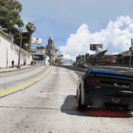
This mod overhauls the Los Santos Smog to resemble the Real-Life January 2025 Los Angeles Wildfires.

Inspiration taken from real photos & videos of the event.

AS OF THE 1.0 VERSION, THIS ONLY AFFECTS THE LOS SANTOS AREA. ANYWHERE OUTSIDE LOS SANTOS WILL NOT HAVE THE WILDFIRE EFFECTS, THIS WILL BE UPDATED.

REPLACES THE SMOG TIMECYCLE.

Installation:

mods > update > update.rpf > common > data > timecycle

Features

-Heavy fog to simulate wildfire smoke

-Darker Nights

-Sun being blocked out by smoke simulated

Plus more.

Bugs/Issues

None found.

Edited by ReelOnline245


Short Description

This mod overhauls the Los Santos weather to look like the Real-Life January 2025 Los Angeles Wildfires.

User Feedback

Recommended Comments

249Xeno

Members

how does the Ai react to this mod?

ReelOnline245

Members Author

1 hour ago, 249Xeno said:

how does the Ai react to this mod?

It's just visual, however I could include an update that changes them.

249Xeno

Members

1 hour ago, ReelOnline245 said:

It's just visual, however I could include an update that changes them.

you should. Its either Ai slow down due to smokes where they can't see the road in front of them or cars, or something...

Create an account or sign in to comment

Account

Navigation

Search

Search

Configure browser push notifications

Chrome (Android)
  1. Tap the lock icon next to the address bar.
  2. Tap Permissions → Notifications.
  3. Adjust your preference.
Chrome (Desktop)
  1. Click the padlock icon in the address bar.
  2. Select Site settings.
  3. Find Notifications and adjust your preference.













