parsa
Members
-
Joined
-
Last visited
-
 Can you please update the mod whenever you have the time? Thanks!
 -
 bakerxgooty reacted to a comment on a file:
TouchMaster TM4 Federal Signal | FiveM Ready | Studio Recorded
bakerxgooty reacted to a comment on a file:
TouchMaster TM4 Federal Signal | FiveM Ready | Studio Recorded
-
bakerxgooty reacted to a review on a file:
TouchMaster TM4 Federal Signal | FiveM Ready | Studio Recorded
-
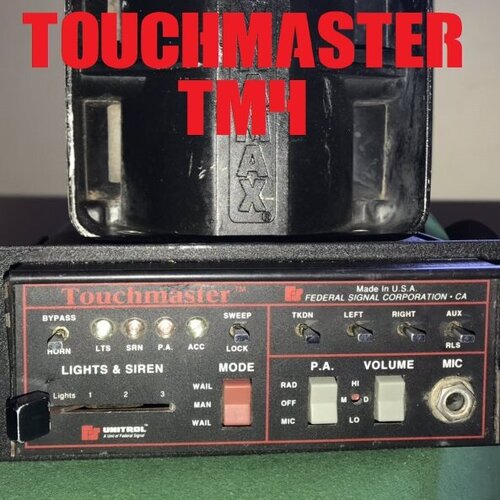 1. extremely clean and brilliantly recorded with a lot of care, for those of us who can tell the difference 2. I think gta V's sound engine makes all sirens sort of less basish and more thin, This specific siren however is quite powerful and packs a punch, i love it.
- 34 comments
- 5 reviews
-
-
- 1
-
-
Hi there, I think this is, if not the number one, then one of the best siren available on this site. First of all, I don't know why but most of the sirens uploaded here are ridiculously overgained and are so loud that they make a sharp hissing sound when they're actually played in game. This one does not,like the rest of your content Secondly, This one specially packs a punch to it that kind feels more real compared to the other sirens that shriek but lack the base to it, i'm sure you know what i mean cause you hear all of this up close
- 34 comments
- 5 reviews
-
-
- 1
-
-
-
-
-
-
 Hi there, AI Siren Cycling does not work for me. do i need els for this to work?
- 394 comments
- 30 reviews
-
parsa reacted to a comment on a file:
Auto Patrol - Autodrive, Real Code Driving & Intersection Siren Usage
-
Hi Sorry, disregard my previous issue, The autodrive can easily reach up to 110 mph if the traffic is good it was a problem at my end. Which driving mode do you think is best for pursuits?
-
 Hi there How did you make your pursuits to get direction updates? in my pursuits, my units don't give me direction updates. thanks for any help
- 13 comments
- 4 reviews
-
I have low eyesight and looking at the screen hurts my eyes, specially for driving, I've been waiting for a mod like this for years so i can do pursuits properly, Thank you so so much for this!
-
-
Is it possible to make the autodrive drive faster than 45mph when in pursuit? I have tried the 60, 80, 100 and max settings but it can't go more than 45 Could it be AI limitation? I set it to code 3 when in pursuit Usually suspects drive faster than 70mph specially in freeways.
-
OJdoesIt reacted to a comment on a file:
Auto Patrol - Autodrive, Real Code Driving & Intersection Siren Usage
-
Hi there I'm disabled and this mod is very useful for me Thank you very much for this! I've been waiting for this mod for a very long time
-
Hi Sorry if i post this in a wrong area, i'm not sure where to post this. Is it possible to jump into an AI police car during a chase so then you could have a free camera recording the suspect or be able to record the chase from different angles? I was trying to find a mod that let's me to lock my camera to the suspect but i could not find such a thing as well. Does any one have any ideas on how to achieve this?
-
Hello. I remember that one of the first versions of LSPDFR had This amazing feature of your dispatch radio updating you on your suspect's location, e.g. she would tell you that he/she's heading south/north/east/west on street name everytime they entered a new street or highway. Then a new update came and it broke that feature, and I never heard the dispatch radio do this ever again. I wonder if there was a technical limitation that led to the removal of this feature? or was it simply forgotten to be re added because noone cared for it?
-
-
-
I also upvote this idea of cops staying around for a while, holding a perimeter. Currently when a callout is over, they use anything at their disposal (including people's abandoned vehicles) to just get out of that place. well also some of them decide to abandon their partners and drive off with their cars fast, leaving some cops behind to walk off randomly out of the scene.