


Rich
Members
-
Joined
-
Last visited
Everything posted by Rich
-
-
 Thanks. I could have tried to look into this sooner if someone had let me know. The cause of this problem is not new with V2.0, but it is related to the traffic control feature. You can disable the feature and still use the rest of the plugin, or just get out of your vehicle to call tow trucks. Expect an update with a fix on Sunday.
- 262 comments
- 34 reviews
-
The only solution at this time is if you use your vehicle for the roadblock. There are too many variables to take into consideration when it comes scene management and the AI, so I have not attempted to address this yet.
- 262 comments
- 34 reviews
-
I'm also running 0.4.5. I'm curious about the conditions in which you got the Interaction+ Store Evidence feature to work while traffic control is enabled. Edit: Disregard, I think I've fixed it in the new version.
- 262 comments
- 34 reviews
-
If it is, then it's either vehicle dependent or you have the traffic control feature disabled. I just tested it on a sedan and SUV and it did not work for either.
- 262 comments
- 34 reviews
-
I do not plan on addressing the Interaction+ evidence bug at this time. Disabling the traffic control feature in the .ini will resolve the problem in the meantime.
- 262 comments
- 34 reviews
-
-
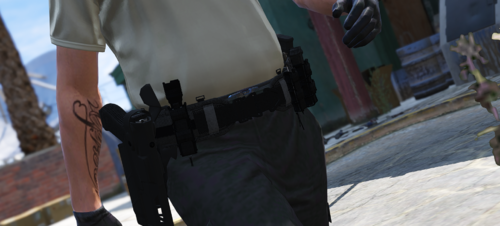 Do you plan on making a variant with less magazines and more handcuff cases and radios?
- 59 comments
- 7 reviews
-
I think that was a bug when AI Siren Cycle was a feature. Make sure you've updated to the version without it, or disable it in the .ini
- 262 comments
- 34 reviews
-
Not sure how Phaxol handles that part of Interaction+, but from the testing I just did, I don't plan on addressing that bug at this time. Thank you for reporting it though. Disabling the traffic control feature will fix it.
- 262 comments
- 34 reviews
-
Unfortunately I cannot make the AI mimic your specific light stage. It's either on or off.
- 262 comments
- 34 reviews
-
-

- 1
-
-
This feature will be available for testing in a separate plugin with other features related to police AI that I am currently working on. Expect to see it in about a week.
- 262 comments
- 34 reviews
-
Perhaps if a backup unit gets within a certain distance of the player's vehicle, and the player's vehicle's lights/sirens are off, then the backup unit turns off their lights/sirens?
- 262 comments
- 34 reviews
-
-
- 2
-
-
Maybe, but the other issues will still exist and I just don't know if people would want to use the feature at that point.
- 262 comments
- 34 reviews
-
I could do this. However, the problem with this entire idea is that it will happen anytime you hit the brakes with stage 3 lighting on. So if your lights are on and sirens are off, and you hit the brakes, your sirens will turn on. For the original idea, if I make it go back to wail after a certain amount of time, if the player turns the sirens off during that time (and keeps their lights on), then the sirens will come back on after the time has elapsed. These things are possible, but the execution won't be ideal.
- 262 comments
- 34 reviews
-
-
- 1
-
-
Interesting idea. I just tried it. I can make it yelp when you hit the brake and automatically go back to wail after a certain amount of time, or let the player change the tone manually.
- 262 comments
- 34 reviews
-
Disable the experimental AI Siren Cycle feature and see if that fixes it. I'll look into this issue, thanks.
- 262 comments
- 34 reviews
-
-
- 1
-
-
-
In the future, if you are ever able to use Discord, you are free to come ask me for personal assistance getting the mod working. Thanks for your interest.
- 262 comments
- 34 reviews
-
-
- 1
-
-
Sorry you couldn't get it to work. It sounds like most people who followed the installation instructions correctly haven't had a problem. Thanks for giving it a try, though.
- 262 comments
- 34 reviews
-
-
- 1
-
-
I've already addressed your first concern in another comment. I don't understand the tow truck thing
- 262 comments
- 34 reviews
-
-
-
-

