


wav3574
Members
-
Joined
-
Last visited
Everything posted by wav3574
-
-
-
I really like that skin..... U should make a skin pack i would definately use it.. KICK a@# SKIN !!!!!!!!
- 8 comments
- 12 reviews
-
-
Thanks LCPDFR for four great years, and hopefully LOTS more!!!!!!!!!! HAPPY BIRTHDAY, Thanks for all the hard work all of you put into this mod, in my opinion it's the best thing that has happened to the GTA franchise. THANKS AGAIN WE LOVE YA!!!!!
-
if you have a trainer try going into your trainer and turning off the the keys, you can enable/disable the keys. That worked for me, i installed ELS and nothing workeed until I disabled the keys in the trainer, try that and see if it works.....
-
No problem hope it works for you....
-
Sure thing i'd be happy to give u my settings, # Other emmissive lights car.defaultlight.emissive. on 50.00 car.defaultlight.emissive.off 0.05 car.brakelight.emissive.on 20.00 car.brakelight.emissive.off 0.05 car.middlebrakelight.emissive.on 20.00 car.middlebrakelight.emissive.off 0.05 car.reversinglight.emissive.on 5.00 car.reversinglight.emissive.off 0.10 car.extralight.emissive.on 50.00 car.extralight.emissive.off 0.05 I only changed 3 things here, i changed the "reversing light from 10.00 to 5.00" the " car default light emissive from 150.00 to 50.00" then the "car extra light emissive from 150.00 to 50.00" Now thats how I like them, feel free to try them out..... But please make a back-up of your original just in case you don't like my settings. GOOD LUCK I HOPE YOU LIKE THEM !!!!
-
Oh i'm sorry lol i thought it was the left shift key. So they both work?
-
it's supposed to be the left shift key...
-
Hey all, I just wanted to say that i didn't like the bloom on the ELS either, but adjusting the emissive levels does work and it looks great. So thanks for the the info.
-
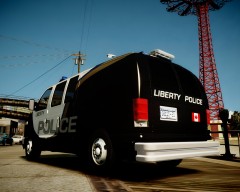 That's really sweet I like this!!!!!!

