
Riley24
Members
-
Joined
-
Last visited
Files posted by Riley24
-
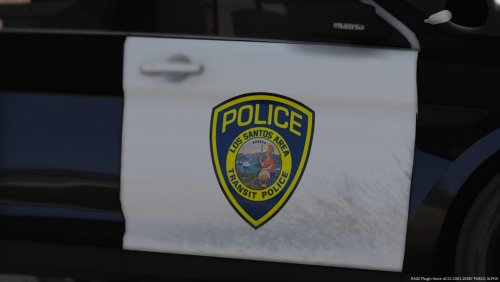
Hey y'all, here's a little skin pack I made. I noticed a lack of transit police skin packs so I decided to try my hand. BART police protect the transit system in the Bay Area of California, so it felt to me like they would fit pretty well in Los Santos.
Please don't reupload these anywhere. If you want to tweak these skins for your own personal use, go right ahead. I've even included the templates I used so you can have an easier time doing so. If you have any suggestions or constructive criticisms, let me know! I might have time to get to it. I tried my best to keep true to BART police's design, but I wasn't going for a 100% replica, I wanted this to be lore-friendly.
Here's the links to the cars used in the screenshots:
2011 CVPI and 2016 FPIS by OfficerNorcal:
2013/2015 FPIU (I used the LASD version) by TWISTEDSCOPES:
The skins will also fit any model with the same template.
Enjoy!
- 359 Downloads
- 2 Comments
Submitted -
DiversePD is a script that allows you to use the "fbi", "noose", and "polpatriot" slots as regular patrol vehicles in GTA IV. Typically, only "police" and "police2" spawn. This changes the game (literally).
I'm not a scripter, but I used my limited knowledge to make this script usable. I'm not responsible if you break your game somehow. If this works for you, awesome! If not, sorry.
To install: Simply drag and drop "DiversePD.vb" into your scripts folder.
- 5,533 Downloads
- 22 Comments
Updated