


BlueLineAviator
Members
-
Joined
-
Last visited
Everything posted by BlueLineAviator
-
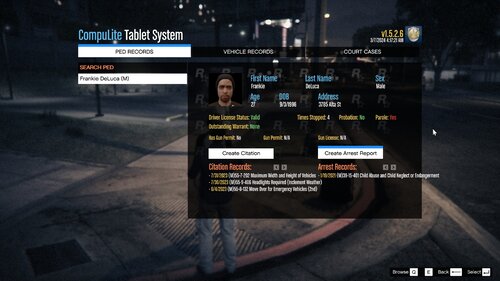 Sure, whatever you need. There may be a few inaccuracies but for the most part it's fairly accurate.
 -
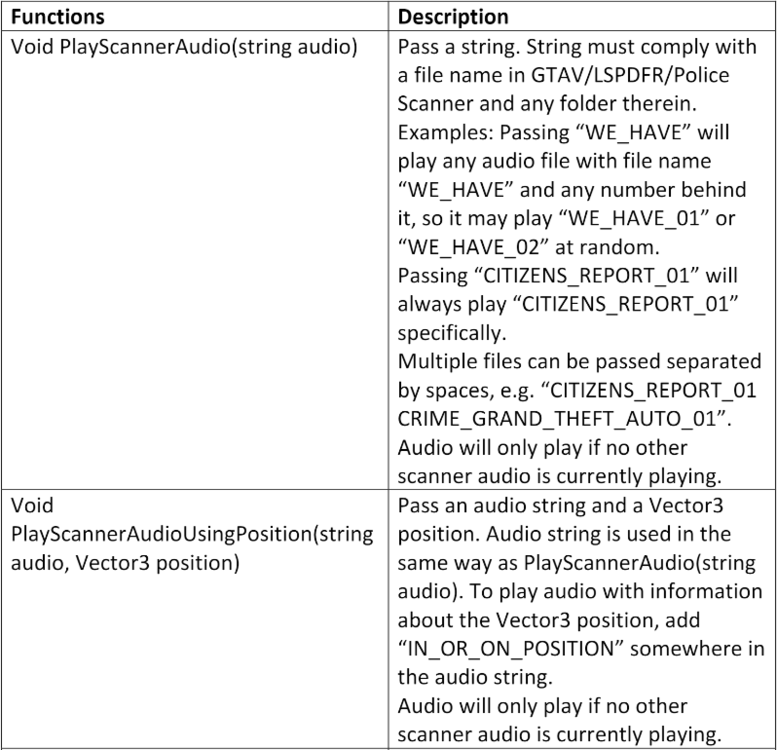
EDIT: So ok, now that I have been experimenting I am not so sure about the name mattering at all, I must have just been totally screwing my code up somehow or another. So I have renamed my folder in scanner 'TCA Callouts Audio' it has a bunch of subfolders inside of it such as 'Calls' 'Directions' where all of audio files are sorted out in. I don't think the name matters at all as long as it isn't the same name as another audio file. Functions.PlayScannerAudioUsingPosition("all_units_be_advised We_have_reports_of domestic_assault IN_OR_ON_POSITION", MSpawnpoint); I just put in the exact name of the audio files and it is playing them flawlessly. I don't think it matters at all what folder they are in as long as they are somewhere within "GTAV\lspdfr\audio\scanner\" at least that is the assumption I have come to. I appreciate your help because I was wasting all of my time in Visual Studio looking for other audio solutions when all I needed to do was make sure my files were correct inside of "GTAV\lspdfr\audio\scanner\". I will update if I run into any other further issues with this! I found a great explanation on the github LSPDFR API page I found. See the attached image, in case anyone else has an issue.
-
/*A GREAT EXAMPLE OF WHAT CODE NOT TO USE*/ List<string> audioPaths = new List<string> { "plugins/lspdfr/my-callouts/audio/1.wav", "plugins/lspdfr/my-callouts/audio/2.wav", "plugins/lspdfr/my-callouts/audio/3.wav", "plugins/lspdfr/my-callouts/audio/4.wav", "plugins/lspdfr/my-callouts/audio/5.wav", "plugins/lspdfr/my-callouts/audio/6.wav", "plugins/lspdfr/my-callouts/audio/7.wav" }; SoundPlayer sounds = new SoundPlayer(); foreach (string path in audioPaths) { sounds.SoundLocation = path; sounds.Load(); sounds.PlaySync(); } /*A GREAT EXAMPLE OF WHAT CODE NOT TO USE*/ Alright so I made a bunch of custom audio clips, short clips kind of like the default scanner sounds in the LSPDFR Scanner folder. I assumed I could string them together much the same as you can the default ones with Functions.PlayScannerAudio("one two three"); etc. Well I saw another post where someone was claiming you could use that function to route to your custom files via a path and it would work but so far I have found that to not be accurate. I can play a single custom sound file no problem, worst case scenario I will manually combine the clips I need into one file in davinci resolve and just do that. I have been able to play audio files with System.Media and it seems to work well. The only way I've been able to play clips one after another in my OnBeforeCalloutDisplayed() is by using sounds.PlaySync(); however that freezes your whole script for the duration of the audio files soooo nooooo bueno. I tried using ManagedBass.dll with no luck, LSPDFR log kept saying it could not find the file for it basically and from what I could tell I didn't need to include another .dll or anything in the GTA directory for it to work? I decided it must not be compatible? Tried a few other 3rd party plugins with no luck. I honestly have been working on this part for a few days now trying to figure it out for myself and I've had absolutely no success. Just wanted to see if there are any other options before I get busy splicing audio files, thanks for any help. OH I also tried NAudio but I couldn't get it to properly find my files I don't believe.
-
To install just download the files for your desired mod and unzip the file. Simply drop the plugins folder into your main GTAV directory and once you load up LSPDFR you should be good to go! Don't be too hard on me this is my first upload! I've been seeing a lot of Tennessee themed police car skins recently so this should go great with those! I decided to go through and create charges straight from Tennessee Code Annotated since I am familiar with it. I tried to organize everything as best as I could, there are hundreds of charges. I tried to stay as true to the actual statutes as possible although I did simplify some of the titles so people could actual tell what the charge is for (such as I would do on an actual warrant). I will say the CompuLite version is better as I could be more Specific as to the actual sentencing ranges and fines for each charging class. I'm sure there are errors somewhere or I have missed a very important charge, let me know and I will fix/add/update it. If you need to be able to scroll through the categories again in CompuLite just remember to click on the PED RECORDS tab at the top and it will keep you current charges selected and allow you to scroll to the other categories! I say this because there are so many categories you have to scroll to be able to see them all. I hope someone finds value in this modification to the statutes, I know it is a game changer for me as I feel like there is now a charge for almost everything and it keeps me fresh on my laws! If anyone has a question regarding certain laws or their meanings the TCA codes in front of the charge (ex:39-13-101) Should be accurate. Feel free to look it up if you would like to gain an understanding or interpretation of the law. This is a free source to view Tennessee State Laws in their entirety: https://advance.lexis.com/container?config=014CJAA5ZGVhZjA3NS02MmMzLTRlZWQtOGJjNC00YzQ1MmZlNzc2YWYKAFBvZENhdGFsb2e9zYpNUjTRaIWVfyrur9ud or you can just google TCA Lexus Nexus and find it that way. Thanks for downloading!

