Skip to content
View in the app

A better way to browse. Learn more.

LCPDFR.com

A full-screen app on your home screen with push notifications, badges and more.

To install this app on iOS and iPadOS
  1. Tap the Share icon in Safari
  2. Scroll the menu and tap Add to Home Screen.
  3. Tap Add in the top-right corner.
To install this app on Android
  1. Tap the 3-dot menu (⋮) in the top-right corner of the browser.
  2. Tap Add to Home screen or Install app.
  3. Confirm by tapping Install.

delongt

Members
  • Joined

  • Last visited

Everything posted by delongt

  1. this has in fact done the trick thank you much!
  2. still crashing in the same spot. will include both most recent crash report and RagePluginHook.log also regular gtav is working fine ps thank you for helping everyone out your a legend!
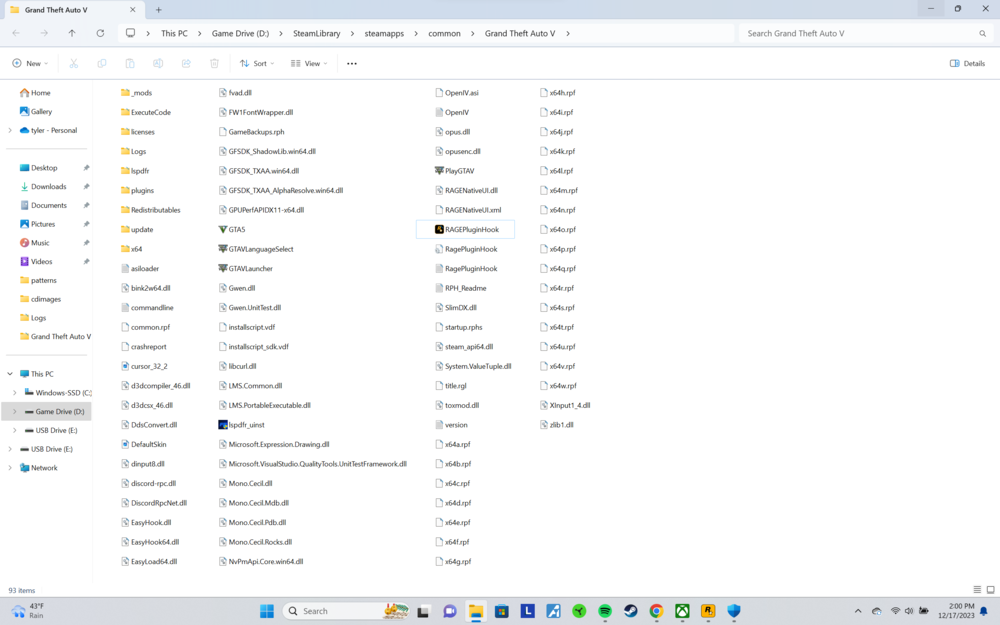
  3. my bad on topic. tried that and still crashes after clicking play on steam with rockstar launcher. ill include the newest log RagePluginHook.log
  4. rph is crashing while attempting to hook. windows defender exclusions have been applied. still no luck. new clean install of gta too RagePluginHook_16122023_213739.log

Account

Navigation

Search

Search

Configure browser push notifications

Chrome (Android)
  1. Tap the lock icon next to the address bar.
  2. Tap Permissions → Notifications.
  3. Adjust your preference.
Chrome (Desktop)
  1. Click the padlock icon in the address bar.
  2. Select Site settings.
  3. Find Notifications and adjust your preference.