Skip to content
View in the app

A better way to browse. Learn more.

LCPDFR.com

A full-screen app on your home screen with push notifications, badges and more.

To install this app on iOS and iPadOS
  1. Tap the Share icon in Safari
  2. Scroll the menu and tap Add to Home Screen.
  3. Tap Add in the top-right corner.
To install this app on Android
  1. Tap the 3-dot menu (⋮) in the top-right corner of the browser.
  2. Tap Add to Home screen or Install app.
  3. Confirm by tapping Install.

Jonny9998

Members
  • Joined

  • Last visited

  1. Just woow! Been waiting for
  2. cnayr started following Jonny9998
  3. Jonny9998 started following cnayr
  4. Jonny9998 started following Double Doppler
  5. Double Doppler started following Jonny9998
  6. You don't know how long I've been doing that haha.
  7. Yeah I know its something to do with that, Just need to Object ID
  8. Yeah, Searched everywhere for it, No luck..
  9.    Jonny9998 reacted to a gallery image: Unmarked 2012 Ford Focus St Estate
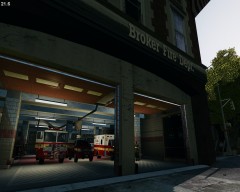
  10. I know where the fire station is. Just want to know what the Object id is for the moving door?
  11. Does anyone know where I can find the door that goes with the fire station?.As seen in this video. Skip to 4:52 http://www.youtube.com/watch?v=B_UzzCpfRh4
Account

Navigation

Search

Search

Configure browser push notifications

Chrome (Android)
  1. Tap the lock icon next to the address bar.
  2. Tap Permissions → Notifications.
  3. Adjust your preference.
Chrome (Desktop)
  1. Click the padlock icon in the address bar.
  2. Select Site settings.
  3. Find Notifications and adjust your preference.