Skip to content
View in the app

A better way to browse. Learn more.

LCPDFR.com

A full-screen app on your home screen with push notifications, badges and more.

To install this app on iOS and iPadOS
  1. Tap the Share icon in Safari
  2. Scroll the menu and tap Add to Home Screen.
  3. Tap Add in the top-right corner.
To install this app on Android
  1. Tap the 3-dot menu (⋮) in the top-right corner of the browser.
  2. Tap Add to Home screen or Install app.
  3. Confirm by tapping Install.

wubanger

Members
  • Joined

  • Last visited

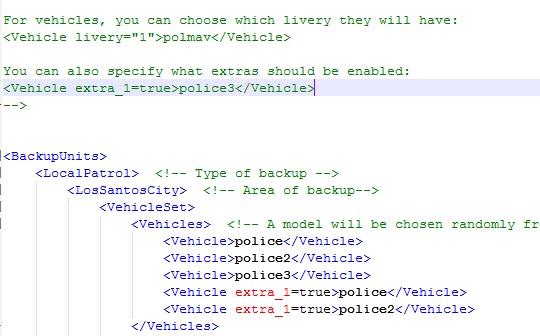
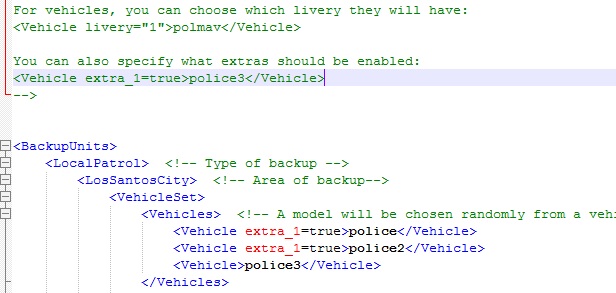
  1. Hi guys, I need some help with the backup.xml file. I'm trying to specify what extras should be enabled for vehicles located within the backup.xml file in my lcpdfr folder, specifically for the police and police2 vehicles. However, whenever I request for backup in game, nothing ever comes, not even state patrol or swat. The included jpgs are the edits I've made to the backup.xml file. When I change the edits back to default, the backup function works as normal. Am I doing this entirely wrong? EDIT: I found a solution for my problem by editing vehicles.meta instead.
Account

Navigation

Search

Search

Configure browser push notifications

Chrome (Android)
  1. Tap the lock icon next to the address bar.
  2. Tap Permissions → Notifications.
  3. Adjust your preference.
Chrome (Desktop)
  1. Click the padlock icon in the address bar.
  2. Select Site settings.
  3. Find Notifications and adjust your preference.