



Kodah
Members
-
Joined
-
Last visited
Everything posted by Kodah
-
 Send me a message on discord and I’ll help ya out! Kodah#1993
 -
Hello World! So I have been on LCPDFR for quite some time but have never made an introduction so here goes nothing. I have been involved in the GTA Modding community since GTA IV, I have made a few vehicles focusing on non-els. Recently I have been in a POST academy to become a State Trooper where I currently live and will finally be graduating on January 15th. I am brand new to the law enforcement world but I was in the military for roughly 7 years. I have been away from here due to training for the academy and the academy itself but once I am out of the academy I will be getting back into the community. Other than that I am pretty excited to get on to 2021 because 2020 has been the worst year in most peope's life so there is always that to look forward to. Hope you all have a wonderful New Years and I will see ya'll on the other side! Kodah
-
-
Looking Sickkkk
-
 You know there is a texture issue with the keyboard right? And the monitor and keyboard are floating in the air. Only wires are attached.
- 19 comments
- 1 review
-
-

- 1
-
-
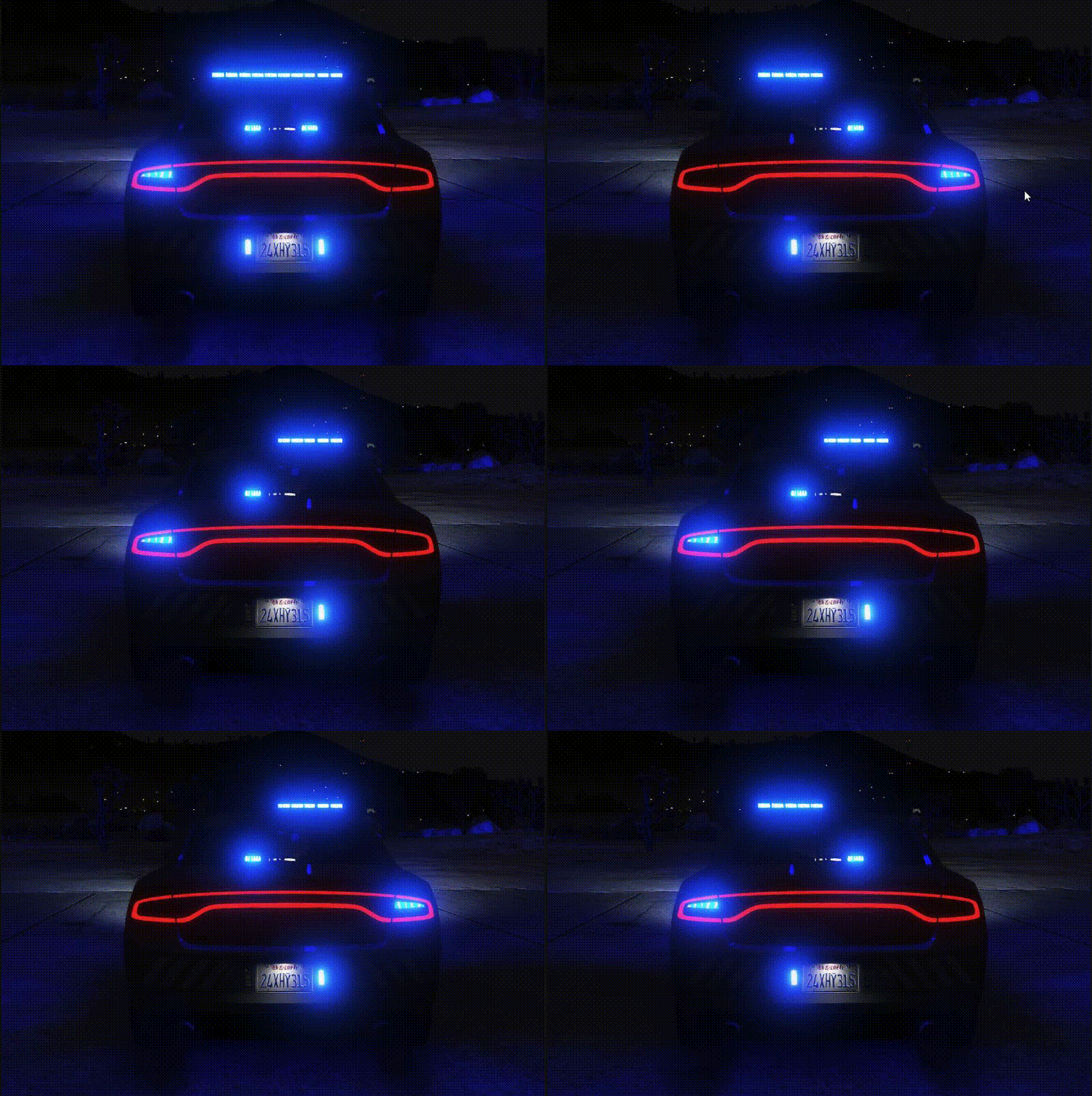
Almost finished with the main lightbar. Few more tweeks. https://gyazo.com/06c6a2ed6bad97b343ad07686ddc8440 https://gyazo.com/623f8c6ef0b083ea7fd2fd67d9124cb5
-
 I know that it works with single player as well,but sadly I have not played since the GTA IV days so I do not know how to install the cars. Before my next vehicle, I will look into it and add a folder for singleplayer.
- 18 comments
- 2 reviews
-
-
-
-
-
-
Hello Everyone! Join my discord if you want updates or you need help! https://discord.gg/ADGBhMfjDU This vehicle is intended to be an Undercover unit / Gang Unit / Slicktop vehicle. This is a NON-ELS vehicle with the ability to have ELS like lighting features. In this file, I have added a FiveM script called "Extraswitch" which can allow you to control the lighting Via the Numpad. Huge shoutout to Hallux for creating this script for me. If you would like to EASILY cycle lights on and off, please drag and drop the folder named "extraswitch" into your FiveM resource folder. This will give yo uthe ability to control extra's 7-12 using your numpad. Please see the guide below. Numpad 4 -> Extra 7 Numpad 5 -> Extra 8 Numpad 6 -> Extra 9 Numpad 7 -> Extra 10 Numpad 8 -> Extra 11 Numpad 9 -> Extra 12 Example: https://gyazo.com/5a87f9c5926144801bfc06c14ae1abc4 If you can make this script even better or make the visual part better, let me know so we can see hwo great it looks. This vehicle is NON-ELS with ELS like controls. Using extra's 7-12 you can control the lighting that the vehicle uses. Turning on and off different lights affects the enviromental lighting so lets say you want to just use the alley lights, you can have extra's 7-11 turned OFF and extra 12 ON and you will only have alley lights on with only the enviromental lighting for the alley lights. Be advised if you have your lights ON but have all the extra's turned OFF then local vehicles will still pull over. You need to make sure you have turned off the lights just like usual. -- -- -- Red and Blue: v1 - https://gyazo.com/f9866bd974be910721dcae647b7502ae v2 - https://gyazo.com/e2e7d24b504ecb8f3142d5412f8ad1a4 Pattern v1 - https://gyazo.com/da241a9ebf93043ff09856e2d6601471 Pattern v2 - https://gyazo.com/f053570e0952a59e82c546166ecfd6f5 Pattern v3 - https://gyazo.com/6b655ee9cfe6f00938ce3d5d0672bea9 -- -- -- Blue and Blue: v1 - https://gyazo.com/b19dce3fdaafd927a6cc32419a1a5189 v2 - https://gyazo.com/6b47dc25fa10a7f6a07c06a7a842ad75 Pattern v1 - https://gyazo.com/96601eb637a8c57e5fd51171d619715b Pattern v2 - https://gyazo.com/4796db6ddc8633ce4816836002eecc32 Pattern v3 - https://gyazo.com/c5f57410284d3e23050851ae32ef6827 How to change the Pattern: https://gyazo.com/5a942b878e75fe257a389dc503b3981d -- -- -- Vehicle Extra's Extra 1 - Push Bar Extra 2 - Console w/Radio & Printer Extra 3 - MDT Stand w/ Computer Extra 4 - Prisoner Partition Extra 5 - ALPRs Extra 6 - Antennas Extra 7 - Front Lights Extra 8 - Side Lights Extra 9 - Rear Lights Extra 10 - Front White Flashing Extra 11 - Extra 12 - Left and Right Alley Lights -- -- -- FiveM Script Credits "Extraswitch" Hallux for creating the script @Scott for his script - Used for click sounds in "Extraswitch" script -- -- -- 2018 Dodge Charger Credits See "Credits.txt" -- -- -- Terms of Use: This pack is provided as-is with no form of warranty. These files are not to be modified, redistributed, ripped, or otherwise exploited in any way, shape, or form. When uploading textures, do not reupload the vehicle models. Upload the textures only and include a link to the original vehicle pack download.
- 18 comments
- 2 reviews
-
-
- 1
-
-
Currently in the works: 2018 Dodge Charger (Gang Unit / Undercover / Slicktop) Front Pattern w/ toggable white flashes: https://gyazo.com/678752498b163fa33406255a514e94e8 Possible Rear Pattern #1: https://gyazo.com/5ca95b8d56319046596cab449cac02ec Possible Rear Pattern #2: https://gyazo.com/0f818acbc69f00e547cec0446d8a30d1 Front & Side Lighting: https://gyazo.com/09e715d100145e87214cebb809f456f5 Rear & Side Lighting w/ toggable alley lights: https://gyazo.com/76f7a239b31d37bd8dba5a4e93ba3536
-
I can add that to my list. I would like to make a whole pack thatmatches with this type of lighting system on it.
-
Released Models: [NON-ELS][FiveM] 2018 Dodge Charger PPV [Reflective] So first and foremost, I only do NON-ELS vehicles. I have never done ELS and I dont plan to do ELS. Everything I test is in FiveM as well! If you ever use any of my stuff in your server, shoot me a link so I can check you all out! Current Project: 2014 Dodge Charger PPV Federal Signal Valor White Flashers (Toggable) https://gyazo.com/f164e3c718bfdb432b2dacacf26e97b9 Rear Lighting (Toggable) https://gyazo.com/829de7c2409cc2cd2cb50a633ac838e2 Finishing up Front Lighting (Toggable) https://gyazo.com/831550b47b11b86d0fc927e626067b9d Custom License Plate xD https://gyazo.com/d154bb2f45d0b1209fb385044503a6d2 https://gyazo.com/448a9429392b19ddaccf1ecfe601e757
-
Are you trying to use it for FiveM or LSPDFR?
-
I have never done ELS and mainly focus on non-els due to the lack of good non-els models but I will look into it and I may do an update for ELS. inside the vehicles.meta I have the handling ID as FBI so if you can change the ingame FBI vehicle to faster then that would work. Or go into the vehicles.meta and search for "<handlingId>FBI</handlingId>" and you can change that to another vehicles handling file.
-
Are you talking about for LSPDFR? I typically only deal with FiveM but I can try to figure out the best way to put them into LSPDFR.
-
Yes they will
-
Check v2 update I am sorry but I typically only play FiveM. I know that the models and everything work, you would just need to know where to put the files and data files as well.
-
If you read the description above, it tells you what each extra is.
-
I will update in the next few days. I have been super busy and sick. Be on the lookout. Once you turn the lights on like the normal non-els vehicle. You use extra's 7-12 to turn on / off specific parts of lights. I typically turn 7 and 8 on always and start from there.
-
I only make Non-ELS right now. I might try out ELS at some point!
-
If you DM me on Discord I can help you solve your issue.

