




TheRealNoodle
Members
-
Joined
-
Last visited
Everything posted by TheRealNoodle
-
This is my skin for the 2012 dodge charger. The vehicle in the picture is this one I know its kind of simple but it don't always have to be super complicated :D I hope you guys enjoy it.
- 3 comments
- 2 reviews
-
-
ineseri ooooo I had it right :DDDD
-
i can try the car but I hav no idea how to make a siren soooo yea sorry
-
wow nice I will sure try that :D
-
-
ill try
-
ill try I don't know how to do a ped so sorry and I don't understand what car you want
-
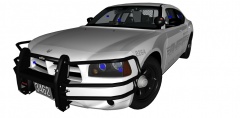 wow amazing, is it public???
 -
 will it be public?
 -
8
-
hey dude I didn't find any pictures of the car and I don't live in america so I can't use my fantasy so sorry :( but I can make the skin :D hey dude I didn't found a mcdonanld van but I found a burger shot van is that ok too?
-
np :D
-
k
-
some more pictures http://gyazo.com/0ed31a41a8cdec39688615793d0ea38a http://gyazo.com/c0b0cb487dae8a2308164a42c77c2f6d
-
-
haha yea it will take sometime but I have nothing else to do so yea I will try to complete them all :D
-
private or do I upload it on lcpdfr?
-
http://gyazo.com/758ae10aaf4f7aaa736249e9aff2110d here's a picture of the finished model :D
-
np :D do u want something else on the car like a laptop or something?
-
false got ninjad damn the person below me hates dis game
-
false no ideas :D
-
true and now I really ran out of ideas
-
true the person below me is ineseri
-
true the person below me has no signature on lcpdfr.com


