Skip to content
View in the app

A better way to browse. Learn more.

LCPDFR.com

A full-screen app on your home screen with push notifications, badges and more.

To install this app on iOS and iPadOS
  1. Tap the Share icon in Safari
  2. Scroll the menu and tap Add to Home Screen.
  3. Tap Add in the top-right corner.
To install this app on Android
  1. Tap the 3-dot menu (⋮) in the top-right corner of the browser.
  2. Tap Add to Home screen or Install app.
  3. Confirm by tapping Install.
Due to overzealous filtering on Microsoft’s side, some emails to Outlook and Hotmail addresses may not be delivered. If you’re affected, please use a different email address or try again later.

dezka

Members
  • Joined

  • Last visited

Everything posted by dezka

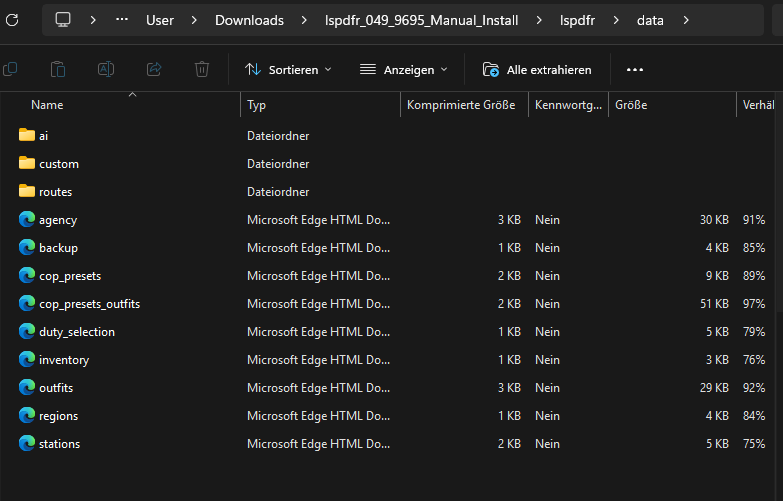
  1. I do not use the automatic one , see screen below thats a manual install zip folder, only what i did installed like using the LSPDFR Configuration exe, what i did see the xml been downloading with micorosoft edge download like on the foto, thats the same in the GTA folder with the edge, how can i download it again but as right file xml or change ther types or this have to look like it?
  2. how can i fix it orginal downlaoded zip shows the same
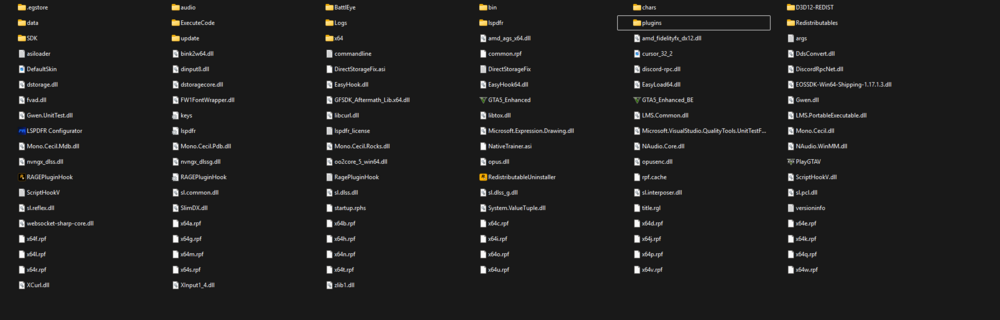
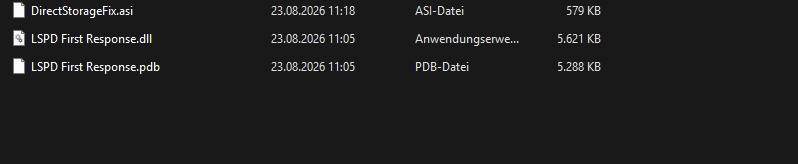
  3. Hey, I instlled brand new the GTA also LSPDFR with DirectStorage and Scripthook for work. If i starting rageplugin as administrator they normaly working without plugins, but i cant user the F4 console of ragehook. If I also start up the game with loadup only the LSPDFR plugin they showing black loading screen goes infinity. I do not have any mod forlder in my GTA folder. RagePluginHook.log thats how the folder looks
Account

Navigation

Search

Search

Configure browser push notifications

Chrome (Android)
  1. Tap the lock icon next to the address bar.
  2. Tap Permissions → Notifications.
  3. Adjust your preference.
Chrome (Desktop)
  1. Click the padlock icon in the address bar.
  2. Select Site settings.
  3. Find Notifications and adjust your preference.