Skip to content
View in the app

A better way to browse. Learn more.

LCPDFR.com

A full-screen app on your home screen with push notifications, badges and more.

To install this app on iOS and iPadOS
  1. Tap the Share icon in Safari
  2. Scroll the menu and tap Add to Home Screen.
  3. Tap Add in the top-right corner.
To install this app on Android
  1. Tap the 3-dot menu (⋮) in the top-right corner of the browser.
  2. Tap Add to Home screen or Install app.
  3. Confirm by tapping Install.
Due to overzealous filtering on Microsoft’s side, some emails to Outlook and Hotmail addresses may not be delivered. If you’re affected, please use a different email address or try again later.

MuricanBadass1

Members
  • Joined

  • Last visited

Everything posted by MuricanBadass1

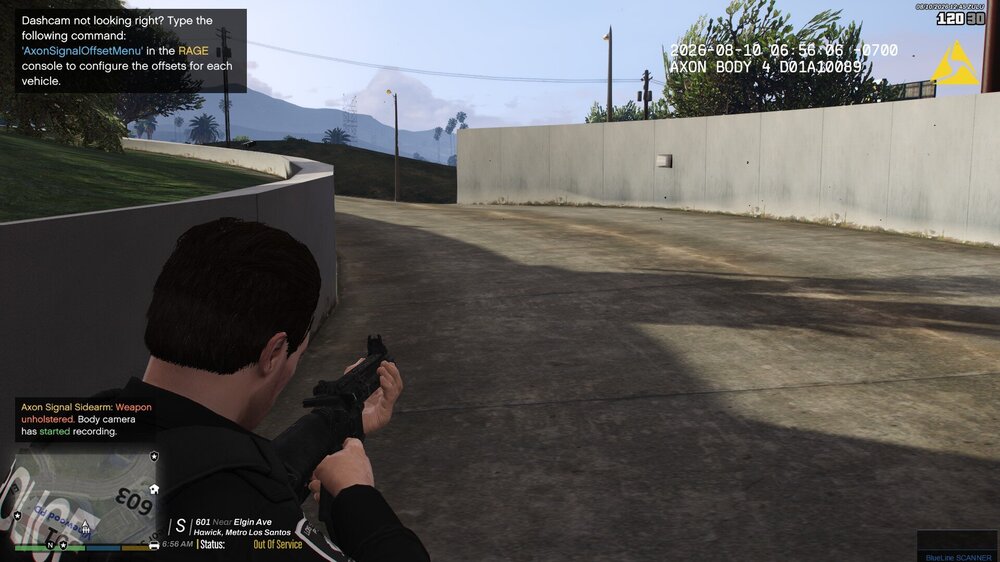
  1. Hello, so I have installed the Generic M4 mod and whenever I pull the rifle from my trunk it is missing all its components like the scope and is just an eyesore to look at. I have tried adjusting the weapons limit adjuster, tried manually adding the attachments through simple trainer, and tried editing the stop the ped ini but have had no luck in fixing this issue. Any help would be greatly appreciated. Photo included. I should also mention that I have had the components working on a previous install of the game, however, I had to reinstall after I installed a graphics mod which broke my game.
Account

Navigation

Search

Search

Configure browser push notifications

Chrome (Android)
  1. Tap the lock icon next to the address bar.
  2. Tap Permissions → Notifications.
  3. Adjust your preference.
Chrome (Desktop)
  1. Click the padlock icon in the address bar.
  2. Select Site settings.
  3. Find Notifications and adjust your preference.