

London443
Members
-
Joined
-
Last visited
Everything posted by London443
-
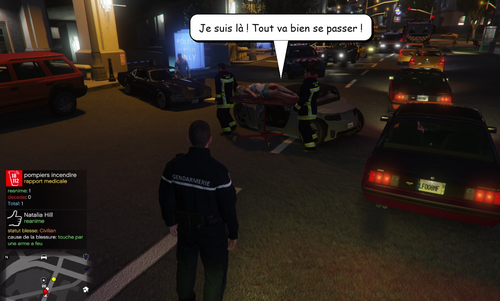 Description : This mod replaces the following LSFD (rescue) character voices with fully French voice lines : - S_M_M_PARAMEDIC_01_BLACK_MINI_01 (paramedic - voice 1) - S_M_M_PARAMEDIC_01_LATINO_MINI_01 (paramedic - voice 2) - S_M_M_PARAMEDIC_01_WHITE_MINI_01 (paramedic - voice 3) - S_M_Y_FIREMAN_01_LATINO_FULL_01 (firefighter - voice 1) - S_M_Y_FIREMAN_01_LATINO_FULL_02 (firefighter - voice 2) - S_M_Y_FIREMAN_01_WHITE_FULL_01 (firefighter - voice 3) - S_M_Y_FIREMAN_01_WHITE_FULL_02 (firefighter - voice 4) All voices were created by myself using ElevenLabs (AI voice generation). These voice models do not exist. This is a full dub made from scratch, line by line to match the context of each dialogue line (emergency responses, treating the injured, reactions to danger, etc.) In total 522 lines were translated and dubbed in French across the 7 voices : - 68 for PARAMEDIC_BLACK_MINI_01 - 67 for PARAMEDIC_LATINO_MINI_01 - 69 for PARAMEDIC_WHITE_MINI_01 - 82 for FIREMAN_LATINO_FULL_01 - 73 for FIREMAN_LATINO_FULL_02 - 78 for FIREMAN_WHITE_FULL_01 - 85 for FIREMAN_WHITE_FULL_02 This is not the full set of lines these characters can say in the game, but a selection covering the most common situations (emergency response, treating wounded, fear/shock reactions, dialogue with the player, etc.) Archive contents / folder structure : IMPORT_FR_PARAMEDIC_BLACK.zip ├─ s_m_m_paramedic_01_black_mini_01.awc.xml (XML description file, │ used to rebuild the │ AWC via OpenIV) └─ s_m_m_paramedic_01_black_mini_01\ └─ ... (68 .wav files, one per dialogue line) IMPORT_FR_PARAMEDIC_LATINO.zip / IMPORT_FR_PARAMEDIC_WHITE.zip └─ same structure as above (67 and 69 .wav files) IMPORT_FR_FIREMAN_LATINO01.zip / _LATINO02.zip / _WHITE01.zip / _WHITE02.zip ├─ s_m_y_fireman_01_<variant>.awc.xml (XML description file) └─ s_m_y_fireman_01_<variant>\ └─ ... (73 to 85 .wav files depending on the variant, one per line) File type explanation : .wav : raw audio file, one French line per file. .awc.xml : description file used by OpenIV to rebuild an .awc file from the .wav files provided in the same folder. Installation (via OpenIV) : 1. Back up the original files before making any changes : - S_MINI_SER.rpf for the 3 PARAMEDIC files - S_FULL_SER.rpf for the 4 FIREMAN files 2. Open GTA V then enable Edit mode in OpenIV. 3. Navigate to mods > x64 > audio > sfx > S_MINI_SER.rpf (for paramedics) or S_FULL_SER.rpf (for firefighters). 4. Use the provided .awc.xml file for each character (together with its matching .wav folder next to it) to rebuild the .awc via OpenIV, then import the result. 5. Repeat for all 7 characters. 6. Confirm the replacement, close OpenIV and launch the game. Do not import the .wav files one by one manually : use the .awc.xml file and its matching .wav folder for each character instead. Uninstallation : - Restore the S_MINI_SER.rpf and S_FULL_SER.rpf backups made before installation (see step 1 above) using OpenIV. Compatibility : - Tested with LSPDFR on GTA V. - Requires OpenIV for installation. Notes : - This mod only modifies the seven voices listed above, the other in-game voices remain unchanged. - For each voice, only part of the possible lines was translated (see numbers above) ; lines not covered remain in their original language (English). - No guarantee is given regarding compatibility with other audio mods. License / reuse : - This mod is provided free of charge for personal use. - Reposting this mod (in full or in part) on another site requires my permission.
 -
-
-
 Pasted content