Skip to content
View in the app

A better way to browse. Learn more.

LCPDFR.com

A full-screen app on your home screen with push notifications, badges and more.

To install this app on iOS and iPadOS
  1. Tap the Share icon in Safari
  2. Scroll the menu and tap Add to Home Screen.
  3. Tap Add in the top-right corner.
To install this app on Android
  1. Tap the 3-dot menu (⋮) in the top-right corner of the browser.
  2. Tap Add to Home screen or Install app.
  3. Confirm by tapping Install.
Due to overzealous filtering on Microsoft’s side, some emails to Outlook and Hotmail addresses may not be delivered. If you’re affected, please use a different email address or try again later.

AlexTheGuy771

Members
  • Joined

  • Last visited

Everything posted by AlexTheGuy771

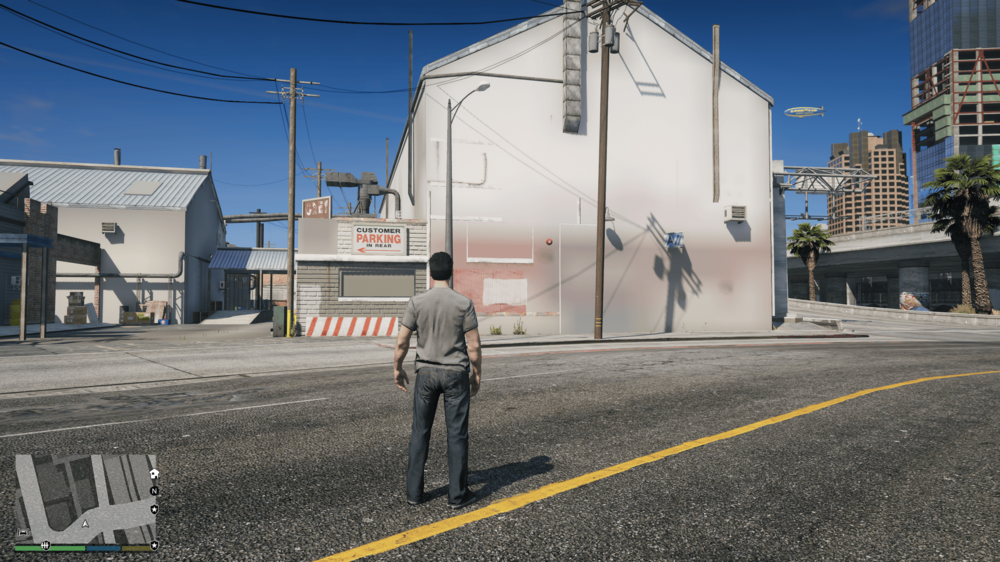
  1. Hello Guys, so I have a wierd graphical Glitch where always when I load lspdfr the textures on certain buildings become blurry. I have NVE and I suspect this could be casuing the problem but I also downloaded the lspdfr compatibillity patch for it along with the GTAV Ressource Adjuster, but nothing seems to work. Any Hardware problems would be really unlikely since I have a high - end pc. If someone has any ideas on how to fix it I would be really gratefull if they could share the solution with me :) Thanks a lot in advance.
Account

Navigation

Search

Search

Configure browser push notifications

Chrome (Android)
  1. Tap the lock icon next to the address bar.
  2. Tap Permissions → Notifications.
  3. Adjust your preference.
Chrome (Desktop)
  1. Click the padlock icon in the address bar.
  2. Select Site settings.
  3. Find Notifications and adjust your preference.