
Hexus
Members
-
Joined
-
Last visited
Everything posted by Hexus
-
 Thank you for taking the time to share your feedback. I would like to clarify the comments regarding artificial intelligence. This plugin was not entirely created using artificial intelligence. It was used as a development aid specifically to help identify and troubleshoot the raising and lowering functionality of the tow truck bed. The concept, implementation, testing, adjustments, and continued development of the plugin involved hands on work. I am also fully aware that the plugin may not be perfect at launch. Software development involves testing, finding issues, fixing them, and improving the project over time. Releasing something that has room for improvement does not mean there was no effort put into creating it. As for the thumbnail and description, I appreciate the criticism and will take it into consideration for future releases. Presentation is something that can always be improved, just like the plugin itself. I have a great deal of respect for the developers who have spent years creating content for the LSPDFR community. My goal is not to replace their work or claim that my projects are better. I enjoy developing, learning new things, and contributing my own projects to the community. That being said, nobody is required to download or use my plugin. If you do not like what I have created or believe the functionality could be done better, you are completely welcome to create your own version and make it exactly how you believe it should work. There is room in this community for both experienced developers and people who are still learning. Constructive criticism, bug reports, and suggestions are always welcome because they help me improve my work. Simply discouraging someone from developing because their project is not perfect on its first release does not help improve the project or the community. I will continue working on my projects, learning from feedback, fixing issues, and improving each release. Thank you to everyone who has downloaded, tested, reported issues, or provided constructive feedback.
 -
-
🚨 TOW TRUCK PLUS – FLATBED BRIDGE ERROR FIX 🚨 If you are getting the FlatbedBridge error while using Tow Truck Plus, please follow these steps: Go to your GTA V Main Directory. Find the two .txt files related to FlatbedBridge. Delete both .txt files. Restart GTA V and try Tow Truck Plus again. ⚠️ DO NOT delete the FlatbedBridge .dll file. Only delete the two .txt files. If you're still having problems or have any questions, please join the Hexus Development Discord and open a support ticket. https://discord.gg/RE72Bgy9gD 🔧 Thanks for using Tow Truck Plus!
-
-
🚨 TOW TRUCK PLUS 🚨Realistic Automated Towing for LSPDFRTow Truck Plus is an LSPDFR plugin designed to make towing vehicles feel much more realistic and immersive. Instead of a vehicle simply disappearing after requesting a tow, Tow Truck Plus sends an actual tow truck to the scene and performs a complete towing sequence. The tow truck responds to your location, positions itself near the vehicle, and the tow operator handles the rest of the process before leaving the scene with the vehicle. ⚠️⚠️ IMPORTANT — REQUIRED TOW TRUCK DOWNLOAD ⚠️⚠️🛑 YOU MUST DOWNLOAD THE TOW TRUCK BELOW BEFORE INSTALLING TOW TRUCK PLUS!Tow Truck Plus requires ScorpionFam's F550 Rollback tow truck. The plugin is designed to work with this tow truck, so Tow Truck Plus will NOT work correctly without it installed. REQUIRED TOW TRUCK:https://www.lcpdfr.com/downloads/gta5mods/vehiclemodels/50437-non-elselsaddonfivem-ready-f550-rollback/ ⭐ FULL TOW TRUCK CREDIT: ScorpionFamI did NOT create the tow truck model. Full credit for the F550 Rollback tow truck goes to ScorpionFam. Please support the original creator by downloading the truck from their official LSPDFR release linked above. 🚨 IMPORTANT ELS INFORMATIONAfter downloading and installing ScorpionFam's tow truck, USE THE ELS FILE PROVIDED IN MY TOW TRUCK PLUS DOWNLOAD. The ELS configuration included with Tow Truck Plus is set up for use with the plugin. Do not skip this step. 🚛 FEATURESTow Truck Plus includes a complete automated towing sequence designed to make roadside towing more immersive. ✔️ Smart Tow Response A tow unit responds to the vehicle instead of instantly removing it. ✔️ Tow Truck Positioning The tow truck approaches and positions itself for the towing process. ✔️ Tow Operator AI The driver exits the tow truck and performs the towing sequence. ✔️ Automatic Flatbed Operation The rollback bed operates as part of the towing process. ✔️ Vehicle Hookup Sequence The operator approaches the vehicle and performs the hookup process. ✔️ Automatic Vehicle Loading The selected vehicle is loaded onto the rollback. ✔️ Driver Returns to the Truck After loading is complete, the operator returns to the cab. ✔️ Automatic Departure The tow truck leaves the scene with the vehicle once the towing process is finished. ✔️ Immersive LSPDFR Integration Designed to make requesting a tow during patrol feel like an actual roadside service instead of simply deleting the vehicle. 📥 INSTALLATIONSTEP 1 — DOWNLOAD THE REQUIRED TOW TRUCK FIRSTBefore installing Tow Truck Plus, download: ScorpionFam's F550 Rollback https://www.lcpdfr.com/downloads/gta5mods/vehiclemodels/50437-non-elselsaddonfivem-ready-f550-rollback/ Follow the installation instructions included with the tow truck and make sure the vehicle is installed correctly. STEP 2 — INSTALL THE TOW TRUCKInstall the F550 Rollback into GTA V using the instructions provided by ScorpionFam. Make sure the truck works in-game before continuing. STEP 3 — INSTALL MY ELS FILEAfter the tow truck is installed, locate the ELS file included with the Tow Truck Plus download. Use my included ELS configuration for the tow truck. This is important for the truck to appear and function as intended with Tow Truck Plus. STEP 4 — INSTALL TOW TRUCK PLUSOpen the Tow Truck Plus download. Copy the included files/folders into your main: Grand Theft Auto V directory. Allow Windows to merge folders if prompted. Your Tow Truck Plus plugin files should end up inside the appropriate Plugins folder included in the download. STEP 5 — START GTA VLaunch GTA V using RAGEPluginHook. Load into LSPDFR and go on duty. Tow Truck Plus should then be ready to use. ⚠️ REQUIREMENTSYou will need: • Grand Theft Auto V • LSPDFR • RAGEPluginHook • Tow Truck Plus • ScorpionFam's F550 Rollback Tow Truck • The ELS configuration included with Tow Truck Plus 🛑 TROUBLESHOOTINGTow truck doesn't spawn?First make sure you installed the required ScorpionFam F550 Rollback. Tow Truck Plus depends on the required tow truck being installed correctly. Tow truck lights aren't working correctly?Make sure you're using the ELS file included with the Tow Truck Plus download. Plugin doesn't load?Make sure Tow Truck Plus was installed into the correct GTA V/LSPDFR folders and that you're launching the game through RAGEPluginHook. ❤️ CREDITSTow Truck PlusPlugin / Scripting: Hexus Development F550 Rollback Tow TruckVehicle Creator: ScorpionFam FULL CREDIT FOR THE TOW TRUCK GOES TO SCORPIONFAM. The tow truck model is not my creation. Tow Truck Plus is designed to work alongside ScorpionFam's F550 Rollback. Please download and support the original vehicle release. 🚔 TOW TRUCK PLUSA more immersive way to clear vehicles from your LSPDFR scenes. No more instantly deleting vehicles. Call the tow truck, let the operator handle the vehicle, and continue your patrol. ⚠️ REMEMBER:DOWNLOAD SCORPIONFAM'S F550 ROLLBACK BEFORE USING TOW TRUCK PLUS!
-
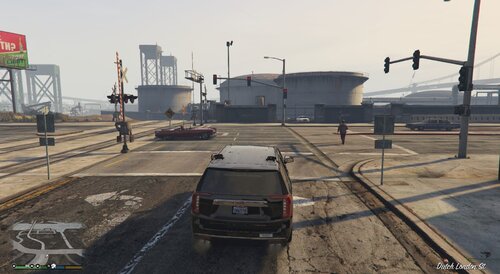 🚦 Emergency Light PriorityEmergency Light Priority brings realistic traffic signal preemption to LSPDFR. When responding Code 3 with your emergency lights and siren activated, the plugin automatically detects upcoming intersections and changes the traffic signal in your direction to green. Cross traffic slows and stops, allowing you to proceed through the intersection more safely and realistically. Once your vehicle has cleared the intersection, traffic lights return to their normal operation. This plugin is lightweight, easy to install, and includes a fully configurable .ini file so you can customize how the system behaves. SUPPORT ME IN MY DISCORD https://discord.gg/rkUQ7GAbR6 Features🚦 Automatic traffic signal priority 🚓 Activates only while responding Code 3 🚗 Cross traffic slows and stops 🔄 Traffic lights automatically restore after you pass ⚙️ Fully configurable through an .ini file ⚡ Lightweight and optimized for performance InstallationInstallationDownload and extract the plugin files. Copy the plugin files into your Grand Theft Auto V Plugins folder. Launch the game using RagePluginHook. Respond Code 3 with your emergency lights and siren activated to use the plu Grand Theft Auto V\Plugins Copy EmergencyLightPriority.ini to: plugins folderGrand Theft Auto V\PluginsLaunch GTA V using RagePluginHook. RequirementsGrand Theft Auto V RagePluginHook LSPDFR ConfigurationThe included EmergencyLightPriority.ini allows you to customize: Detection distance Traffic light search distance Cross traffic search radius Vehicle stopping distance No code changes are required. Version 1.0Initial public release. Automatic traffic light priority Cross traffic management Configurable settings Code 3 activation Automatic signal restoration Known IssuesThis is the initial release. If you encounter any bugs or have suggestions for future updates, please leave a comment on the download page.
 -
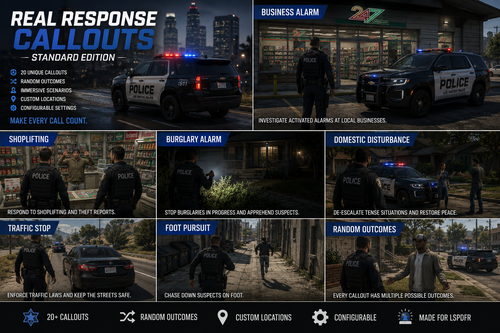 Real Response Callouts adds 20 custom police callouts to LSPDFR, featuring randomized outcomes, staged interactions, configurable settings, and custom business locations. Included callouts include: • Welfare Check • Assault • ATV Complaint • Burglary Alarm • Business Alarm • Disabled Vehicle • Domestic Disturbance • DUI Investigation • Hit and Run • Illegal Dumping • Illegal Hunting • Lost Child • Missing Person • Noise Complaint • Reckless Driver • Shoplifting • Suspicious Vehicle • Traffic Collision • Vehicle Fire • Wrong Way Driver FEATURES • 20 custom callouts • Multiple possible outcomes • Staged conversations and investigations • Suspect surrender, refusal, hostility, and fleeing outcomes • XML-based business locations • Configurable callout settings • City, county, and highway incidents • Automatic entity and blip cleanup INSTALLATION 1. Download and extract the ZIP file. 2. Open the included plugins folder. 3. Drag the plugins folder into your main Grand Theft Auto V directory. 4. Allow Windows to merge the folders. 5. Launch GTA V through RAGEPluginHook.exe. 6. Go on duty with LSPDFR. The files should be installed here: Grand Theft Auto V\plugins\LSPDFR\RealResponseCallouts.dll Grand Theft Auto V\plugins\LSPDFR\RealResponseCallouts.ini Grand Theft Auto V\plugins\LSPDFR\Data\BusinessLocations.xml CONTROLS Y - Interact during callouts END - Complete a resolved callout REQUIREMENTS • Grand Theft Auto V • RAGE Plugin Hook • LSPDFR • .NET Framework 4.8 When reporting a problem, please include your RagePluginHook.log file and the name of the callout where the problem occurred. More callouts, locations, outcomes, and investigation features are planned for future updates.