Skip to content
View in the app

A better way to browse. Learn more.

LCPDFR.com

A full-screen app on your home screen with push notifications, badges and more.

To install this app on iOS and iPadOS
  1. Tap the Share icon in Safari
  2. Scroll the menu and tap Add to Home Screen.
  3. Tap Add in the top-right corner.
To install this app on Android
  1. Tap the 3-dot menu (⋮) in the top-right corner of the browser.
  2. Tap Add to Home screen or Install app.
  3. Confirm by tapping Install.
Due to overzealous filtering on Microsoft’s side, some emails to Outlook and Hotmail addresses may not be delivered. If you’re affected, please use a different email address or try again later.

ToxxicCherry

Members
  • Joined

  • Last visited

Everything posted by ToxxicCherry

  1. Yes removing dls allowed it to work. I actually figured it out this morning thank you for the help.
  2. I'm fairly sure I had re-copy and pasted the one in the els download files multiple times unless that one that comes with els is outdated it should be the correct version. I couldn't find a download for just advanced hook v on the internet.
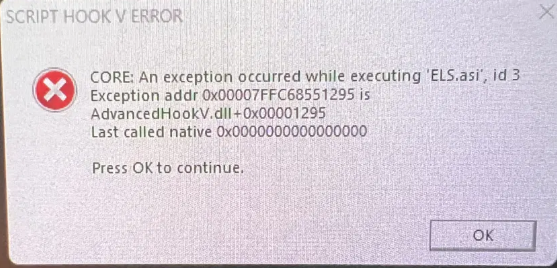
  3. I have installed many mods onto my gta and was just about finish before getting this bug I can not fix. The game starts and I enter story mode but after the rage plugins loaded screen goes away a black screen pops up before you enter where I get a error code and then the game crashes I am not sure what is causing the issue. I attached the screenshot, and logs. AdvancedHookV.log RagePluginHook.log ScriptHookV.log ELS.log
Account

Navigation

Search

Search

Configure browser push notifications

Chrome (Android)
  1. Tap the lock icon next to the address bar.
  2. Tap Permissions → Notifications.
  3. Adjust your preference.
Chrome (Desktop)
  1. Click the padlock icon in the address bar.
  2. Select Site settings.
  3. Find Notifications and adjust your preference.