NFZ Development
Members
-
Joined
-
Last visited
Everything posted by NFZ Development
-
-
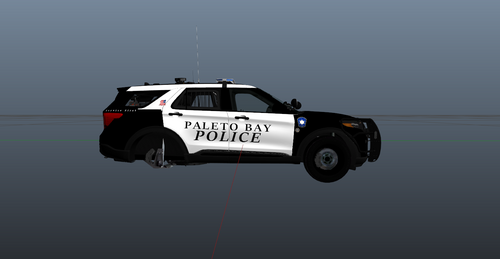 well I do not post on here ever. because I normally only make 1 of 1 Customs for my Client base. so here is a first Release and a Hello LSPDFR from the NFZ Development Group. To place a comission feel free to join our Discord https://discord.gg/fEtkj3hEqW Feel Free to Replace the Badge with your Badge of Choice for Paleto Bay or reach out and we will give you the original. Livery was tested on Ripples Legacy 2020 Fpiu and it fits up pretty well. Imma keep it simple guys, I know my work, its a plain jane car, lets not resell it to make money off my work, if you wanna use it that's fine, give credit where credit is do. its 2026 yall. im trying to make life easier for everyone. enjoy the livery, Join the Discord, and who knows maybe get a custom car Commissioned.