


GAMER4LIFE554
Members
-
Joined
-
Last visited
Everything posted by GAMER4LIFE554
-
-
-
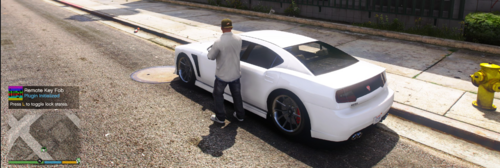 Remote Key Fob Remote Key Fob is a utility plugin that adds a realistic remote locking system for vehicles. Features Lock and unlock your last driven vehicle remotely Configurable activation key Configurable interaction distance Vehicle light flash feedback Lock/unlock notifications Prevents NPCs from entering locked vehicles Clean and lightweight background system INI configuration support Controls Default: L = Lock / Unlock vehicle Installation 2. Place RemoteKeyFob.dll into: Grand Theft Auto V/plugins/ 3. Start GTA V with RagePluginHook. 4. Load the plugin through the RagePluginHook console. Configuration After first launch, the plugin creates: Plugins/RemoteKeyFob.ini You can customize: Keybind Distance Cooldown settings Requirements Grand Theft Auto V RagePluginHook ScriptHookVDotNet3 Known Issues This is the first release. Some vehicles may not support all GTA V light/sound features. Additional features will be added in future updates.
