Truthless
Members
-
Joined
-
Last visited
Everything posted by Truthless
-
-
 I will look at it when I’m home again🙏 I will look at it when I’m home again🙏 I am not sure, sorry!
- 20 comments
- 2 reviews
-
-
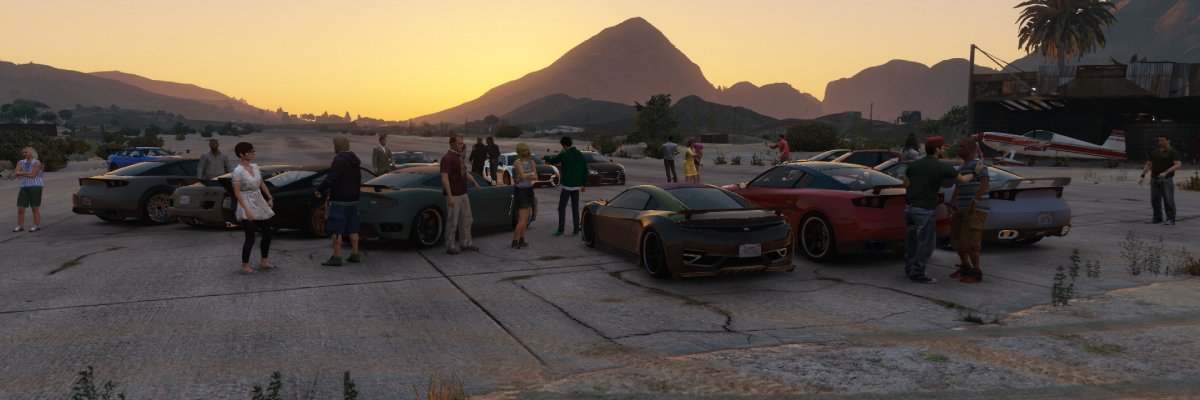
Living Los SantosLiving Los Santos makes Los Santos feel more alive by dynamically adjusting traffic, pedestrians, parked vehicles, and ambient world activity throughout the day. It also introduces Dynamic Car Meets, bringing themed gatherings of customized vehicles and spectators to locations across Los Santos and Blaine County. Instead of having the same density everywhere at all times, Living Los Santos creates realistic changes based on in-game time, weather, and location, while Car Meets add unique nighttime events that make the world feel active and lived in. You can customize the settings to however you'd like. Features:Dynamic Car MeetsRandom themed car meets at night Sports Car Meets Muscle Car Meets Luxury Car Meets JDM Nights Supercar Meets Classic Car Meets Multiple Car Meet LocationsLS Customs Maze Bank Arena Sandy Shores Airfield. Car Meet ActivitiesCar owners gather around their vehicles Small groups of NPCs interact with each other Spectators attend meets Randomized vehicle tuning and modifications Randomized vehicle colors and styling Meets naturally end around 3 AM as attendees leave Dynamic World DensityMorning rush hour traffic Evening rush hour traffic Quiet late-night streets Dynamic pedestrian density Dynamic parked vehicle density Weather-Based Density ChangesRain and thunderstorms reduce pedestrian activity Vehicle traffic adjusts dynamically during bad weather Nightlife ZonesPopular nightlife areas remain active after dark Downtown Vinewood receives increased activity during the evening CustomizationFully customizable .ini file Adjustable density multipliers Adjustable car meet settings Adjustable spawn chances and limits PerformanceLightweight Performance-friendly Designed to run seamlessly alongside other plugins Examples:LS Customs parking lot filled with Supercars and spectators, ending around 3 AM. Roads becomes busier during rush hour. Streets become noticeably quieter late at night. Bad weather such as rain and thunder reduces pedestrian density and slightly increases vehicle traffic. Nightlife zones like Downtown Vinewood remain active while the rest of the city quiets down. Requirements:RagePluginHook Installation:Place Living Los Santos.dll into your GTA V\Plugins folder. Place Living Los Santos.ini into your GTA V\Plugins folder. Launch GTA V through RagePluginHook. Open the RagePluginHook console (F4 by default). Type: "LoadPlugin Living Los Santos.dll" Configuration:All settings can be customized through Living Los Santos.ini Default Debug Key: F10 The weather multiplier works like this: Weather multipliers are applied on top of the current density values. Example: PedMultiplier=1.25 RainPedMultiplier=0.50 Result: 1.25 × 0.50 = 0.625 The final pedestrian density during rain would then be 0.625x. This applies to all other density values too. Made by Truthless Feedback, suggestions and balancing recommendations are always welcome. If you like what I do and would like to support me and my work, you can support me here: https://buymeacoffee.com/truthlessmods https://ko-fi.com/truthlessmods
- 20 comments
- 2 reviews
-
-

- 3
-
-
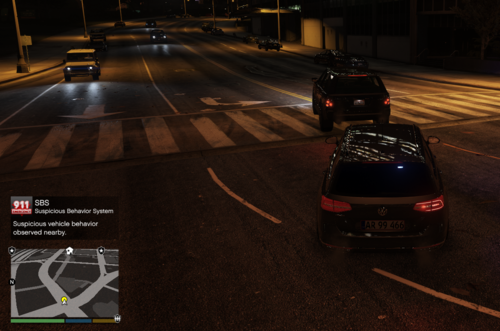 SBS - Suspicious Behavior System SBS (Suspicious Behavior System) enhances routine patrol gameplay by introducing subtle suspicious behaviors among nearby pedestrians and vehicles. Unlike traditional callout plugins, SBS does not spawn crimes, shootouts, or scripted events. Instead, it creates organic moments that encourage investigation and officer discretion during normal patrols. A nervous driver suddenly accelerates. A vehicle appears to avoid police presence. A pedestrian changes direction when spotting an officer. These behaviors may indicate criminal activity or they may be completely innocent. The choice to investigate is yours. FeaturesSuspicious Vehicle Behavior Optional suspicious pedestrian behavior Area-based suspicion multipliers Dynamic map blips for suspicious entities Customizable settings through SBS.ini Configurable keybinds Lightweight and performance-friendly Designed for routine patrol gameplay Compatible with LSPDFR and RagePluginHook Examples of Suspicious BehaviorDrivers speeding up unexpectedly Vehicles attempting to avoid police presence Pedestrians acting nervously or fleeing Increased suspicious activity in high-crime areas ConfigurationSBS includes a customizable configuration file allowing you to adjust: Debug keybind Vehicle and pedestrian behavior Scan intervals Notification cooldowns Blip durations Area suspicion multipliers Maximum suspicious entities per scan RequirementsRagePluginHook LSPDFR (recommended) InstallationPlace SBS.dll into your GTA V\Plugins folder Place SBS.ini into your GTA V\Plugins folder Known Limitations: SBS creates suspicious behavior, not crimes. Some flagged vehicles or pedestrians may be completely innocent. Intended to encourage investigation rather than guarantee criminal activity. Made by Truthless.