


Na8o
Members
-
Joined
-
Last visited
Everything posted by Na8o
-
well I wanna try to fix my game again but now i have this issue lol do you know how to fix this?
.png.e34294f0dc2225e69fa8e02875a83dbd.png)
-
well still haven't tried it i just got back from a jelly roll and post malone concert
-
alrighty ill try that when i hop on my girls pc tomorrow. my pc is down due to remodeling my house
-
ok the only thing i can think with the player to just delete my players and reinstall lspdfr again. What is the System.OutOfmemoryexception though? It was running perfectly fine so I didnt think the memory of the cpu or gpu was being taken up if thats what its meaning
-
RagePluginHook.log
-
lspdfr.dll still crashing even with it like that it crashes still and loading lspdfr plugin alone it still crashes so, its not the mods, plugins and i dont think it had anything to do with my lspdfr folder. I genuinely don't know wtf happened to my game, but it is pissing me off lol
-
gonna try that now
-
even with just eup and lspdfr plugin being in the plugins folder it does the same thing with freezing at the telemtry services line
-
game keeps freezing when loading up lspdfr by itself by using loadplugin lspdfr and its freezing at telemtry(or telemetry) services or something along those lines RagePluginHook.log
-
trying that now sir ok so I did that and the problem still occurs, I also got a error message for trainerv asi crashing but the game stayed open and i tried to screenshot the error and it wouldn't take the SC asiloader.log the trainer v asi crashed after lspdfr.dll did
-
alright Im home can someone help me? lol Imma jump in the shower and respond if someone can help. I had installed a dlc car pack and i just removed it thinking it was the problem and its not.
-
I load all of them and it crashes and it crashes when loading it by its self. I have heaplimit adjuster and all of that stuff installed, I have a ragenativeui that was updated 6/13 and my game was working perfectly two days ago. I went to start it yesterday and my gta exe was missing so I had to reinstall those and then now lspdfr.dll is crashing againRagePluginHook.logScriptHookV.logHeapAdjuster.log asiloader.log i have work so i may not be able to respond anytime soon. I get off at 10 est and get home and out of the shower around 11:30 est
-
-
I have them installed sorry forgot to update yall, I restarted the game after the crash and it works perfectly now that I have the car dlc out lol
-
RagePluginHook.log ok I got in game spawned the cars i replaced and worked perfectly until i did ReloadAllPlugins lol and it crashed hard and instantly
-
thank you my bad lol ill do that right now, the only thing I can think is i installed a new car pack as replace and dlc to add tot that reply I have gameconfig i cant remember if i have the rest lol ok i removed the car packs dlc and it works now lol so what should i do to be able to use the car pack because i installed it the way it said lol
-
just in advance it's doing it when just loading the game and not rageph
-
-
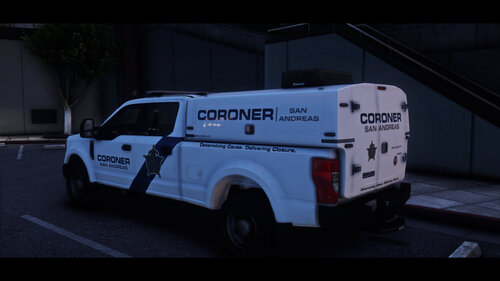 need a replace option for this truck that would be nice to have in lspdfr when I call them in
 -
Got ya well thank you yall
-
ok that worked which lowkey sucks because I really wanted that plugin lol Thank you though. Do you know any solution to it?
-
ok im sorry i know this is probably annoying by now but lspdfr dll didnt crash this time after i put the vanilla vehicles meta in it did make my cars roll though which was funny lol but when i went on duty it started to load then i seen i was on duty because the on-duty menu showed up but it crashed and told me to restart or verify game files or reinstall lol RagePluginHook.log theres the log. Again I am sorry man I wish i knew how to resolve this myself
-
alrighty thank you, i wonder why his vehicles meta is doing this
-
RagePluginHook.log crash report after removing PR
-
Ok follow up to that before I left the house I had removed policing redefined and it still crashed lspdfr.dll while going on duty. Also I can’t force duty because for some reason it’s saying it’s a invalid command but it shows in the rage menu thing
.png.e34294f0dc2225e69fa8e02875a83dbd.png)


