Skip to content
View in the app

A better way to browse. Learn more.

LCPDFR.com

A full-screen app on your home screen with push notifications, badges and more.

To install this app on iOS and iPadOS
  1. Tap the Share icon in Safari
  2. Scroll the menu and tap Add to Home Screen.
  3. Tap Add in the top-right corner.
To install this app on Android
  1. Tap the 3-dot menu (⋮) in the top-right corner of the browser.
  2. Tap Add to Home screen or Install app.
  3. Confirm by tapping Install.

T0AASTED

Members
  • Joined

  • Last visited

Everything posted by T0AASTED

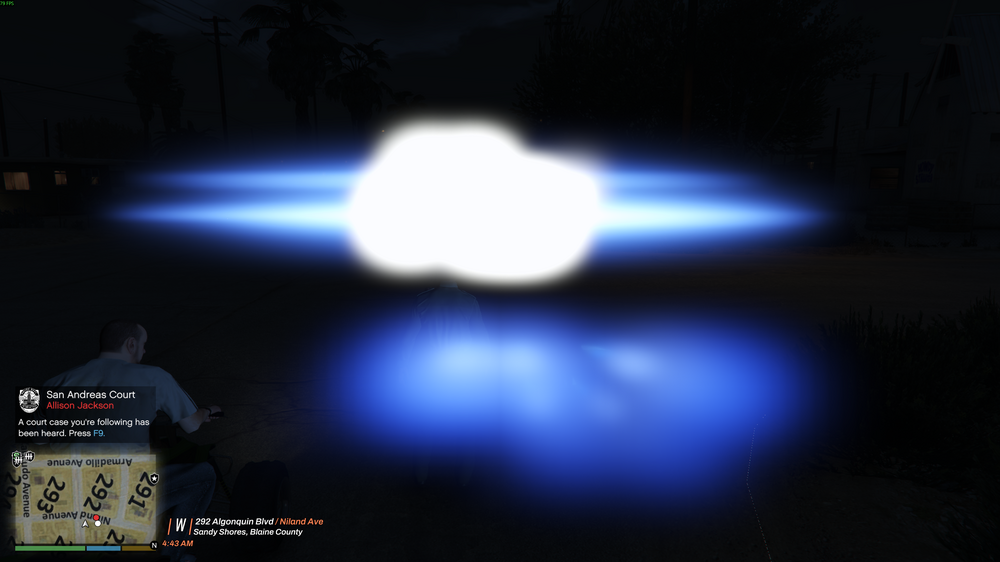
  1. I called for a tow and it had overwhelmingly bright ELS that covered my entire screen, as well as this I noticed that the vehicle model was glitched, this hasn't happened until tonight and I'm not sure why, this may've been caused because of a durango mod that I recently downloaded and maybe it's ELS messed it up but I'm not sure how it would've messed up the model of the tow, I have attached a picture of the issue and a link of the mod incase maybe it has since been deprecated. https://www.lcpdfr.com/downloads/gta5mods/vehiclemodels/48629-els-sahp-criminal-interdiction-dodge-durango/

Account

Navigation

Search

Search

Configure browser push notifications

Chrome (Android)
  1. Tap the lock icon next to the address bar.
  2. Tap Permissions → Notifications.
  3. Adjust your preference.
Chrome (Desktop)
  1. Click the padlock icon in the address bar.
  2. Select Site settings.
  3. Find Notifications and adjust your preference.