szranczulaa
Members
-
Joined
-
Last visited
Everything posted by szranczulaa
-
 Nowa aktualizacja już przechodzi weryfikacje! w changelogu będzie wszystko opisane co zmieniłem chyba że o czymś zapomniałem np zapomniałem dodać w changelogu że dodałem kibiolke: -została dodana kibolka oraz zwykli kibice (mały dodatek)tak ona wygląda : 15% gangsterów to kibole kibicują najczęściej legi Warszawie , 10 % całej populacji to kibice i kibole : 3% z tego to kibole a 7% to zwykli kibice co chodzą raz na 6 miesięcy na jakiś mecz próbowałem dodać że głównie kibicują legi i mniejszościowo jakiemuś WKS lub innemu klubowi lecz spotykałem na małych testach tych co kibicują tylko legi. Nowa wersja będzie dodana jak mi administracja potwierdzi
 -
-
Virustotal:https://www.virustotal.com/gui/file/7c32df6d2b10d8c9d8d927189dc2571e46adbc2853fb453f014564cb0ff9e5aa?nocache=1 Polski :(AUTOR NIE PONOSI ODPOWIEDZIALNOŚCI ZA TWOJE PLIKI!!!) To jest spolszczenie moda NPCAI, wersja 3.1 (nietestowana w innych wersjach moda). Spolszczenie jest obecnie w fazie BETA, więc nie jest w pełni rozwinięta. Postacie niezależne mogą mówić z dziwnymi akcentami lub niewyraźnie. W przypadku wystąpienia jakichkolwiek błędów prosimy o zgłoszenie ich w poście o spolszczeniu na stronie: https://www.lcpdfr.com lub na Discordzie: szranczulaa. Oryginalne pliki moda NPCAI są płatne i można je znaleźć na stronie: https://www.patreon.com/Doublehook/posts/npcai-3-1-is-162348700 Patreon twórcy moda: https://www.patreon.com/cw/Doublehook Npc myślą że są w Warszawie, im NPC jest "wyżej Postawiony" tym bardziej się odnosi z kulturą lecz np. bezdomni bardzo często używają przekleństw lub wyrażeń typu "Czarnu##" itd. Na wsiach npc mają inny akcent tak samo jak np. gang latynoski "vagos". Gangi się nie patyczkują i nie gadają z bytnio z policją zwyzywają cię od pał a jak przesadzisz to może dojść do rękoczynu lub strzelaniny. MOD NIE JEST DO KOŃCA STESTOWANY PRZEZE MNIE JEŻELI POJAWIĄ SIĘ BŁĘDY PROSZE O ZGŁOSZENIE TEGO!!! Posiadam zezwolenie od twórcy NPCAI na spolszczenie jego moda za co ogromnie dziękuje English: THE AUTHOR IS NOT RESPONSIBLE FOR YOUR FILES!!! This is a Polish version of the NPCAI mod, version 3.1 (not tested in other versions). The Polish version is currently in BETA, so it's not fully developed. NPCs may have strange accents or sometimes speak unclearly. If you encounter any errors, please report them under the Polish version post at: https://www.lcpdfr.com or on Discord: szranczulaa. The original NPCAI mod files are paid and can be found at: https://www.patreon.com/Doublehook/posts/npcai-3-1-is-162348700 Mod creator's Patreon: https://www.patreon.com/cw/Doublehook For now, I only anticipate that the bugs will be fixed within a month ( 06.072026), but I make no promises. NPCs think they're in Warsaw. The higher the NPC's rank, the more civilized they are. However, homeless people, for example, often use profanity or expressions like "Czarnu##," etc. In the countryside, NPCs have a different accent, just like the Latino gang "vagos." Gangs don't mess around and don't talk to the police. They call you names, and if you overdo it, it can lead to a fistfight or shooting. THIS MOD HAS NOT BEEN COMPLETELY TESTED BY ME. IF ANY ERRORS APPEAR, PLEASE REPORT THEM!!! Instalacja PL: Aby zainstalować spolszczenie Potrzebujesz: -pliki oryginalnego moda NPCAI(znajdziesz je tutaj:https://www.patreon.com/Doublehook/posts/npcai-3-1-is-162348700) -oraz pliki spolszczenia 1. jeżeli masz wersje 3.1 Moda po prostu przeciągnij folder Plugins do głównego folderu gry. 2.Jeśli masz jaką kolwiek inną wersje moda niż 3.0 musisz polegać na sobie po prostu znajdź te pliki jak te które są załączone w spolszczeniu, W wersji 3.0 moda na pewno te pliki są w: Plugins>Lspdfr>NPCXML i tam gdy się nie uruchomi gry z modem chociaż raz nie występuje Plik "NPCI_EmergencyPrompt" więc musisz gre uruchomić chociaż raz na czysto bez spolszczenia. Wersja 3.0 nie działała MI,lecz może tobie zadziała Bo ja tylko wszedłem do gry chciałem coś gadać ale npc nie reagowały więc nie wiem o co chodzi. Instalation EN: To install the Polish version, you need: - the original NPCAI mod files (you can find them there: https://www.patreon.com/Doublehook/posts/npcai-3-1-is-162348700) - and the Polish version files
-
I tried to change server from Europe To New York and It worked! but Europe servers doesnt
-
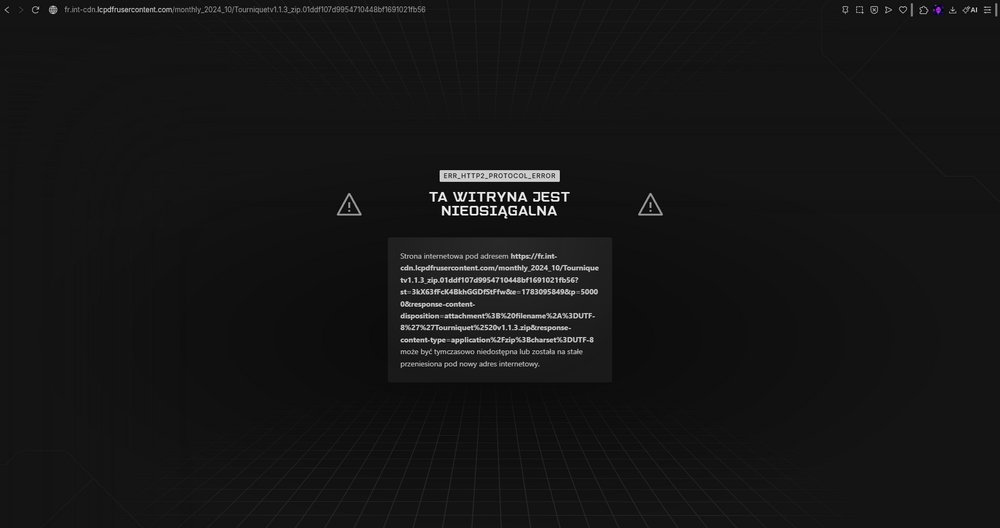
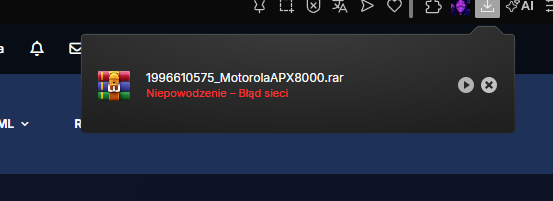
Yesterday and today, I wanted to download some mods for GTA V, but some of the mods I wanted wouldn't download at all. It looked like this: I normally click "Download" on the mod's website, select the version, and there's a download countdown. When the countdown finished, nothing downloaded, even after waiting a few minutes, so I clicked the "If your download doesn't start, click here" option. I clicked it once, and nothing happened. The second time, it took me to a page that's either deleted or doesn't exist. I had trouble with a few mods, but I need to download a few because I really want them. They're called: -"Tourniquet" -"Police Tape" -"ExternalPoliceComputer" -"Mexikan ultimate pack" -"Lidar Gun" -"Polskie Tablice Rejestracyjne" I was having same problem with other mods but i didnt needed them so i was just ignoring them but this mods i really want in my game.s If anyone knows how to fix this or if it's a website error and will be fixed, please write below the post. ps. I still have a problem with the mod "Motorola APX 8000 Radio for LSPDFR", when I download it like any other mod, the file appears normally, but the browser shows me an internet connection error, even though I have internet access and other mods (that work) download normally. *Sorry that the screenshots is in polish* When i try another web browser same thing I tried to change server from Europe To New York and It worked! but Europe servers doesnt
-
hey bro thank you for comment i didnt found out why it was crashing but i reinstalled lspdfr and it worked for me
-
Hi guys, my Lspdfr crashes again when im going on duty. i just uninstalled some addon packs that i installed before cousee of an low fps and it started crasing. Here is the Ragepluginhook.log: RagePluginHook.logAny ideas why?
-
Yea guys thank you for your comments, yesterday i found out that EasyLodoutChanger was crashing my game but i forgot to type it in comments any other mods like Lspdfr enhanced works fine for me
-
Hey bro thank you for your response but after uninstalling XScanner,PolicingRedefined,Compulite and Ultimate Backup it still crashes but beeps stopped. There is another ragepluginhook.log. RagePluginHook.log
-
Hi, I have a problem with SimpleHUD. The menu opens on both V and F10. I want it only on F10, but I can't find where to disable the V key. I checked the .ini file but there is nothing about opening with "V". Is this a bug or a conflict with another plugin? Thanks!
-
My Lspdfr crashes when I try to go on duty. I downloaded and installed the latest RagenativeUI but still nothing. Does anyone know how to fix this?I am posting the RagePluginnhook logs below.And when im going on duty i hear the LSPDFR crash sound and 4 or 5 fast beeps. RagePluginHook.log