




Venol221
Members
-
Joined
-
Last visited
Everything posted by Venol221
-
I know I just posted the message above, but I found a solution. Open the folder: Documents / Rockstar Games / GTA V / Profiles / (your profile number) and delete the last saves. They should look like: SGTA5...., look after the latest modification date. When you go back in, just press "Skip all" if Steam (I don't know if it is the same with Rockstar) asks you if they should use your deleted save. Then just try launching RagePluginHook and see if it works. Remember, never save the game when you are on duty! I hope this post was clear enough to follow.
-
I wish I wouldn't have send the message yesterday... For some reason it won't work and I have the same problem as last time. I was so happy that I could finally play lspdfe and now? I have the same problem... One question: Yesterday, when I left I made a save, could that be the reason why it doesn't work anymore?
-
It works! (for now at least, i hope it stays that way) Thank you guys so much for your support. should i already install mods or is that to risky?
-
Hey, im sorry that i didnt post here for a long time because i got realy frustrated. I contacted Rockstar Games Support but they couldnt help me (i think beacuase i was chatting with a robot)... Now i bought it over Steam and i hope it will work there. You guys are amazing thanks for all your tips so far!
-
Yes it's still not loading, I think I might send an E-Mail to Rockstar Support. (after I try deleting the folder) Is it enough if I just move the folder out of Documents or do I need to delete it?
-
Update: I did everything you told me to do (besides maybe deleting Rockstar Games from Documents, because i dont really know if that works and wont crash my game) and it still doesnt work. If you can confirm me that it wont break my Game if i try deleting the Rockstar Games from Documents i will also try that.
-
I will try that, thank you.
-
So i reinstalled GTA V Lagacy now, and it looks like I am already stuck in the loadingscreen when i start the base game... I seriously dont know what the issue is and how i can fix it. I think the problem is not caused by lspdfr since i havent installed it yet.
-
Alright Thank you
-
Allright and congratulations on your 1.000th Chat message! So im reinstalling the game now, i really hope that will work.
-
i can try reinstalling the base game to start fresh and no i dont have any mods for the base game
-
I still dont have any mods As i said i just installed it and dont have any mods yet
-
Yes, I just downloaded lspdfr without any mods, ped skins and audio changes. It's the base Game and the normal version of lspdfr.
-
No it also doesnt work, im also stuck in the infinit Loadingscreen.
-
You mean loading in without using RPH?
-
Sure RagePluginHook.log
-
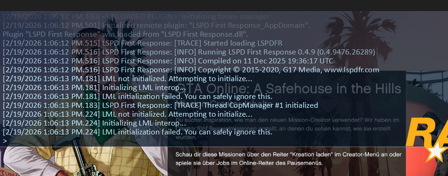
So I reinstalld GTA V Lagacy, reinstalled lspdfr two times, i installed script Hook V and im Back stuck in the infinit loadingscreen... I opened the console tried the Command ReloadAllPlugis. I saw that my Game could not initialize LML. What can i do?
-
So for some reason it deistalled GTA Lagacy (Rochstar Launcher working again), GTA V Enhanced (i play online on Enhanced) still works, im now reinstalling GTA Lagacy (might also be the reason why RPH couldnt launch the game) i will be back when it installed GTA lagacy again. Propably Tomorrow Have a Good Night!
-
Rockstar Games Launcher wont open What of the Script Hook v WinRar Pack should i install? Should i restart my PC?
-
Still not launching Should i change something in the Code of lspdfr? Saw it in a Vid Should i install Script Hook V now or should i have already done this?
-
Its launching the ame for like 2-3 Minutes is that normal?
-
I installed it succesfuly, what now? Should i just try starting it again? (all datas foldrs and that kind of stuff is installed)
-
So reinstall lspdfr?
-
Now RPH despawned and GTA Lagacy is back without all the lspdfr stuff
-
I can confirm that i installed the latest verion of lspdfr beacause i just downloaded it today. I allready made an exeption for GTA and RPH. I will download Script Hook V. I have RagePluginHook.log below. RagePluginHook.log


