


RealSeal
Members
-
Joined
-
Last visited
Everything posted by RealSeal
-
Everyone's pissed because the update nerfed other heists and I am pissed because I can't play LSPDFR the way I like it... Thank you for helping me though! I really appreciate it!
-
You were right, i moved out the EUP folder from plugins folder and the game launched
-
I do have EUP installed, yes. Law & Order, Serve & Rescue and EUP Menu. As for other mods, I do remember I have RDE installed, including E&E. As for quantity, I don't remember exactly, but I think it's not much. Other things I've installed are mostly plugins such as callouts, QoL, etc...
-
No idea how this was supposed to help me... But it did help! But my mods are all gone, for some reason. And also loading RPH after the game itself also solves the issue. Though I can't boot in if i rename the mods folder back from _mods. The error still pops out in this case.
-
Alrighty! Let me try...
-
Thanks so much! I'll install this and see how it works Soo i tried this gameconfig but it didn't work at all😓 In fact, nothing even changed and i still get the same error
-
I’m not sure… I thought it’d update automatically with the game How do I update it then?
-
I just downloaded the updated LSPDFR alongside ScriptHook V, SHVDN Nightly and RageNativeUI. And i got THIS once I tried to start the game. What is this? Upd: I also looked through the gameconfig.xml file via OpenIV and I couldn't find the pool the message talks about, neither by name nor size. PoolManager_Crash.log RagePluginHook.log
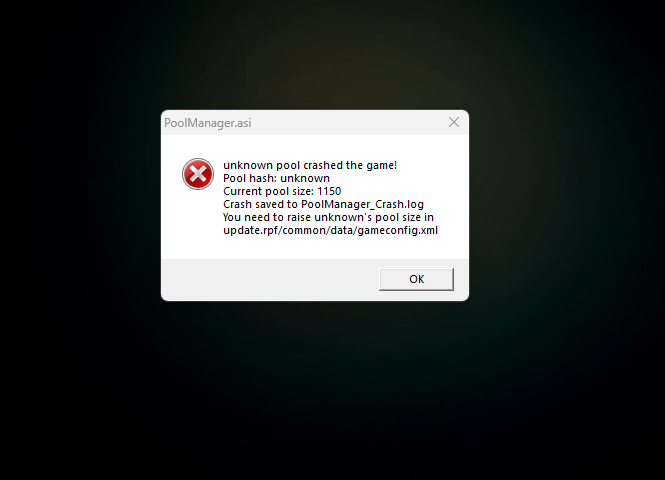
-
you mean this one on the screenshot? i've deleted all the files related to the plugins from here
.thumb.png.04ea81839fd3a1a9843fdb1226c07d2c.png)
-
hmmm thats strange... .ini and .dll are deleted, i just checked and i clearly remember that i've deleted them firsthand
.thumb.png.3e60ff4ca52b042a9d34d5094010bae2.png)
-
hey there again! I have tried multiple times to reinstall both mods, but nothing helped. in the end, i deleted both of them but the emergency lights still don't work! :(( here's the .log file RagePluginHook.log
-
Thanks. I'll try and tell you how it goes
-
Today emergency lights on every vehicle stopped working for some reason... Sounds are present, red and blue lights are don't. I have a Better Siren Control plugin installed, if anything. The game itself works normally. What could be the reason? RagePluginHook.log
-
Hi everyone, my past experience with Windows on Steam Deck wasn’t really good as I expected and I decided to reinstall SteamOS. The thing is I installed Windows only to play LSPDFR in the first place. So now I’m wondering is there a way to install and make LSPDFR work on Steam Deck? Thank you!
-
Ok then I’ll try and see how it goes
-
Hi there again. I've installed everything you said but it didn't helped AT ALL. The game still crashes :(
-
A what? Sorry, I don’t even know such words… I don’t think I ever installed them
-
I’m back. Renaming the folder did nothing to help with the issue, but it also disabled EUP and Simple HUD mods I’ve installed.
-
Of course, here you go RagePluginHook.log
-
Hey guys, few days ago I installed LSPDFR and I had a problem recently: while teleporting to my character’s apartment or riding too fast on the cars my game freezes and then crashes. Did anyone else experience this issue? How do I fix this?

.png.ff1e4964612245616a48e5d069f03809.png)
.png.77ad3875c873819b46c69ee39bc4da39.png)