


JRicci
Members
-
Joined
-
Last visited
Everything posted by JRicci
-
I adore you. I'll name my first child after you. Thanks!
-
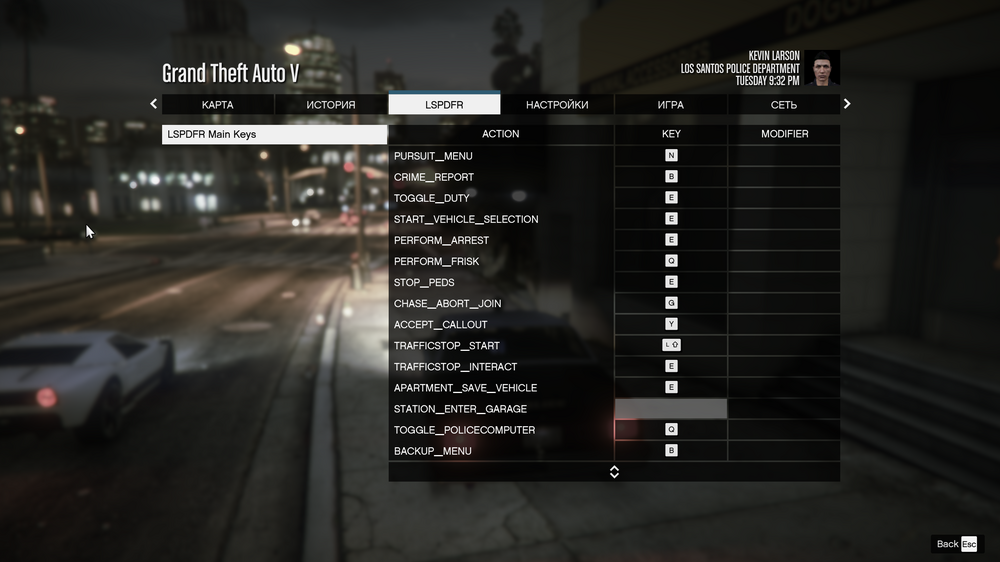
RagePluginHook.log I used to have problems opening RPH, I fixed them thanks to you. Perhaps the old recordings are irrelevant before solving the old problem, it is worth looking only at the new ones. I also can't change the keys in this menu.
-
I also can't interact with the police computer by pressing Q in the car. In general, the buttons just don't work for some reason. RagePluginHookLauncher.log
-
I can't go on duty. I was able to launch LSPDFR myself, I have a menu when you press N or M (I don't remember, but it works). There is an LSPDFR tab when I press esc. There I can change my character, teleport to the nearest police station, etc. But at the same time, the console does not work for me (I tried to change and attach to another button, it also does not work.). I also can't enter the garage by pressing E, and I can't enter the police station menu by pressing E. That is, I can't get on duty and open the console in any way. Help The game doesn't crash, I can walk, do anything. That is, the buttons I wrote about just don't work.
-
I gave the public access to the folder and it helped. Thanks!
-
There is my log file RagePluginHookLauncher.log
-
Gta 5 legacy. The licensed version of Rockstar Game launcher. Windows 11. Antivirus is completely disabled, the folder is added to the antivirus exclusion. I'm running RAGEPluginHook as an admin. The log can't even be created because the game process can't be captured. Battle Eye is disabled. All overlays are disabled, including disabling the DirectX overlay. Restarting the computer did not help. Is there something to turn on or off in the config? Help, I haven't been able to deal with the problem for a day. Error: Could not hook game process. Insufficient permissions or bad anti-virus. Please try again. If the problem persists, please restart your computer.


