Skip to content
View in the app

A better way to browse. Learn more.

LCPDFR.com

A full-screen app on your home screen with push notifications, badges and more.

To install this app on iOS and iPadOS
  1. Tap the Share icon in Safari
  2. Scroll the menu and tap Add to Home Screen.
  3. Tap Add in the top-right corner.
To install this app on Android
  1. Tap the 3-dot menu (⋮) in the top-right corner of the browser.
  2. Tap Add to Home screen or Install app.
  3. Confirm by tapping Install.

FrostFlash

Members
  • Joined

  • Last visited

Everything posted by FrostFlash

  1. using the new version of lspdfr and the problem successful solved.
  2. thats not working. and it's already set to false by default
  3. and also cant walk into the locker room. the door cant open and get 3 star wanted level .already using a clean install RagePluginHook.log
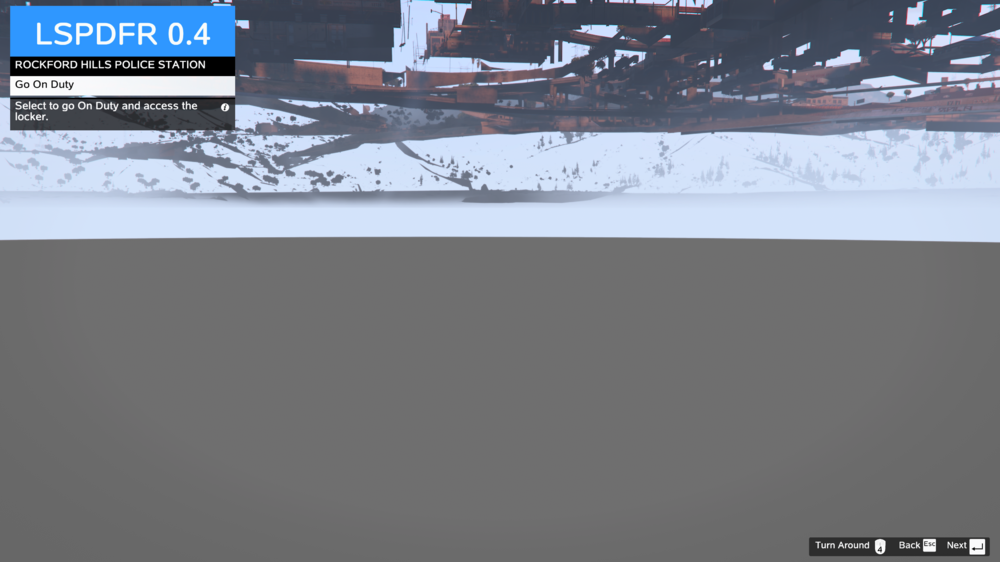
  4. For enhanced version of LSPDFR. the key icon show up in notice cannot display properly. is this a known bug?

Account

Navigation

Search

Search

Configure browser push notifications

Chrome (Android)
  1. Tap the lock icon next to the address bar.
  2. Tap Permissions → Notifications.
  3. Adjust your preference.
Chrome (Desktop)
  1. Click the padlock icon in the address bar.
  2. Select Site settings.
  3. Find Notifications and adjust your preference.