
cyan.devx
Members
-
Joined
-
Last visited
Everything posted by cyan.devx
-
Yes, I understand. GTA isn't closing; it's LSPDFR that's freezing. Even so, it usually happens because of a conflicting plugin. When you arrest someone, one of them malfunctions and causes LSPDFR to crash even though the game is still running. That's why I suggested trying it without DLS, Better Hit Reactions, or SimpleEmotes to see if that fixes the problem.
-
That's not a bug. In the LSPDFR character creator, hair depends on the ped model you're using. If it's a ped that doesn't support hair variations (or a non-MP ped), the game won't let you change it, and the character will remain bald. Try using an MP ped (mp_m_freemode_01 / mp_f_freemode_01) or an EUP-compatible model. With other standard peds, hair is locked and cannot be changed.
-
That's not a mistake. EUP Backup Config and Policing Redefined don't replace the uniforms on their own; they only use what's specified in the LSPDFR XML files. Even if you install RCMP or Vancouver, if the XML files still point to vanilla, the game will always load vanilla. To actually use EUP, you have to edit the LSPDFR outfits.xml files and put the EUP outfits there. If you don't touch those files, they'll never be used. So, you have it installed correctly, but you still need to tell the game which outfits to use.
-
Hi, I just checked your RagePluginHook.log It's not an LSPDFR issue. That usually happens because of a conflicting mod, especially DLS, Better Hit Reactions, or SimpleEmotes. When you arrest someone, one of those mods crashes and the game closes. Try removing them and testing. If you want to use DLS, it's best to do a clean reinstall because those errors aren't normal. Once you've uninstalled them, try reinstalling them with the latest versions.
-
Ah, okay, great, it's a pleasure to help you.
-
The log shows errors initializing LML (Lenny's Mod Loader). Even if you load without mods, if LML is installed, RPH detects it. Try removing dinput8.dll and the lml folder.
-
If you can, please send me your ragepluginhook.log file, which would look like this.<font dir="auto" style="vertical-align: inherit;"><font dir="auto" style="vertical-align: inherit;">Registro del complemento RagePluginHook</font></font> That would help us find out a little more.
-
Hello, this is a message. If F4 isn't working, you could check the RagePluginHook .ini file or directly within the program to see if everything is up to date. If not, you could check the RagePluginHook gear icon when it starts up. I've included a tutorial below, If it doesn't work for you, let me know.
-
Hi, good afternoon. Yes, the screen was freezing. I'll give you a solution: when you open the game, quickly go to the settings, click the gear icon next to RagePluginHook, and there's a section that says "Plugin Timeout threshold." Try setting it to 20000, 30000, or 40000 until it works; you can only go up to 60000. This will allow all the mods to load correctly for a little longer. If it's your first time configuring it, it's recommended to start with 20000 and keep going until it works. If it's not working, try disabling your antivirus, as that could be flagging it as a false positive, which could be causing the most common error.
-
Did you open LSPDFR in administrator mode?
-
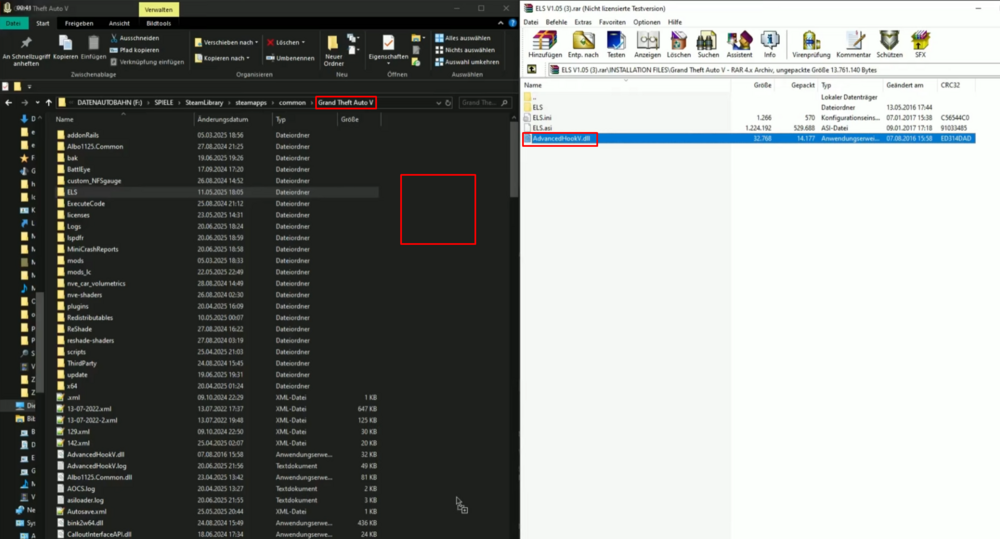
Hi, I found a YouTube video for you. This is the solution. Install ELS 1.05 and place AdvanceHookV in that file. Since it's been updated and is the one that currently works, download the latest version from the official website (in this case, ELS 1.05). Place AdvanceHookV in that file and put it in the folder where you have GTA5 installed with LSPDFR. Cheers! AdvancedHookV makes it clearer: drag it to the desktop where you have lspdfr installed, move it, replace it, and you're done.
-
Hi, there's no estimated time for when it will be released; you'll have to be patient. That message means they're updating it. When it's updated, a download button will appear in the same file that's displaying the error. It was a pleasure trying to help you.
-
This has affected me too, mostly back when I wasn't a professional. I was constantly searching for alternatives. Until I found the solution, and I'm going to share it here so you can fix the problem. It's very simple: what was causing the issue with LSPDFR was the antivirus protection, regardless of the antivirus software. You might be wondering, "Why does this happen?" Well, the comment itself tells you that when you install LSPDFR, it flags it as a false positive, which is why the screen would freeze and the game would crash. To play it, disable your antivirus, and it will no longer flag it as a false positive. If you liked this, let me know, and also if it helped you. See you soon!
-
Buenas, ¿Le sigue ocurriendo ese error? Hello, are you still experiencing that error?