
LN3d3v
Members
-
Joined
-
Last visited
Files posted by LN3d3v
-
EasyOptimizer-V is a free, open-source texture management tool for GTA V modders.
Edit YTD files without extracting, find and migrate duplicates, resize textures, generate
mipmaps, and more all in a single fast native Windows application.
NEW VERSIONS AS 1.2.2 WILL ONLY BE POSTED ON GITHUB SO ITS EASY FOR ME DUE TO THE MOD BEING POSTED ON MULTIPLE SITES
GitHub / Source Code
Features
• Load YTD, WTD, YDR, YFT, YDD and RPF files directly no extraction required
• Open RPF archives (AES, NG-encrypted and FiveM/OpenIV CFXP format) and browse their contents
• Smart Optimize batch resize textures with configurable max resolution, format and mipmap count
• Fast Recompress one-click re-encode with automatic format downgrade (e.g. BC3 → BC1 when
no real alpha channel is present), reducing file size without quality loss
• Duplicate Detection find duplicate textures across all loaded files by name, data hash or both
• Migrate Duplicates preview consolidated YTDs before applying; choose per-file whether to keep
originals; commit only when satisfied
• Per-texture editing via right-click: resize, convert format, export as DDS, or revert to the
original on-disk state (Unload)
• CPU encoding via bc7enc_rdo with ISPC acceleration (BC1–BC7)
• GPU encoding via NVIDIA Texture Tools 3.2.5 (BC1/BC3/BC7 over CUDA) optional, falls back
to CPU automatically
• Grid size toggle: Small / Medium / Native card view
• Sort archives by name, type, size, texture count or modified state
• 15 UI languages: English, Portuguese, Spanish, Russian, Turkish, Mandarin Chinese, Hindi,
Japanese, Arabic, Bengali, French, German, Indonesian, Korean, Italian
• Versioned project cache a snapshot is saved automatically before any Save All operation
Known Issues
• GTA V Enhanced (Gen9) YTD files use a different resource layout and are not yet fully supported;
they will be rejected with a descriptive log message
• YDR/YFT/YDD model files without an embedded texture dictionary (e.g. LOD/SLOD meshes) are
listed as "unavailable" in RPF scans this is expected behaviour, not a crash
• The NVTT GPU encoder supports only BC1 and BC3 at multiples-of-4 dimensions; all other
formats and odd sizes fall back to the CPU encoder automatically
Installation
1. Download and extract the archive to any folder.
2. Run EasyOptimizer-V.exe no installation or registry changes required.
3. (Optional) For GPU encoding: place nvtt30205.dll and vcomp140.dll
(from NVIDIA Texture Tools 3.2.5+) in the same folder as the executable.
4. (Optional) For reading NG-encrypted vanilla GTA V RPF files: place ng.dat and
lut.dat (key tables extracted from the GTA V executable) next to the executable.
Without these files only AES-encrypted and plain-TOC RPFs (FiveM/OpenIV mods) are supported.
No ScriptHookV, ASI Loader or game modification required this is a standalone desktop tool.
Basic Usage
• Drag and drop YTD/WTD/RPF files onto the window, or use Add File / Add Folder
• Right-click a texture card for per-texture options
• Right-click an archive header to Unload it from the workspace
• Click Detect Duplicates, review the PREVIEW consolidated YTDs, then click
Migrate Dups to apply
• Click Save All to persist changes; a versioned backup is always created first
Dependencies
No runtime dependencies are required for core functionality.
Optional GPU encoding requires:
• NVIDIA Texture Tools 3.2.5+ (free, from NVIDIA) -
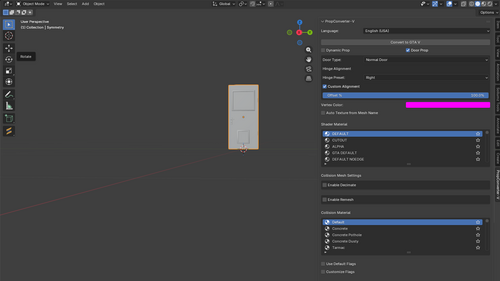
PropConverter-V
Add-on for automatic conversion of props to GTA V with integrated Vertex Color Master tools.
Github repositorie
GitHub
GitHub - LN-Development/PropConverter-V: Addon for automa...
Addon for automated prop conversion in GTA V that rely's on Sollumz extension - LN-Development/PropConverter-V
1.0.0 SHOWCASE (OUTDATED)
https://www.youtube.com/watch?v=E8R2V-n_yQ0
HOW TO USE
Import a Mesh, select it, change the vertex color, select collision and shader materials then click to convert, after it remember to set the textures on the drawable model.
All the names will be as the original mesh.
YTYP, YDR and YTD.
You need to create a YTD with the same name as in the others.
Dependencies
https://github.com/Sollumz/Sollumz Sollumz 2.8.0
Installation
1. Do not extract the .zip file after download.
2. Open Blender.
3. Go to Edit > Preferences > Add-ons > Install from Disk.
4. Locate the add-on directory and select the .zip file.
5. Install and restart Blender.
CHANGELOG
2.0.0
- Auto ambient Occlusion
- You can now create dynamic props
- You can now create any door type
- Added Model Information tab for dev purposes, the data is print at the system console
- Minor changes
1.2.2
- Fixed some bugs that broke the tool
- Code refactor
1.2.1
Fixed a bug that broke the tool
1.2.0
Collision Flag Selection before conversion
Collision Flag Default preset
Added a integrity improves on loggin
Multi languange support (EN, BR and SPA)
Credits
https://github.com/Sollumz/Sollumz" Sollumz
https://github.com/dexyfex/CodeWalker CodeWalker
License
Copyright (C) 2026 LN
This program is free software: you can redistribute it and/or modify it under the terms of the GNU General Public License as published by the Free Software Foundation, either version 3 of - Big objects auto divider and converter with non embedd collision
Auto Ambient Occlusion be useful, but WITHOUT ANY WARRANTY. Without even the implied warranty of MERCHANTABILITY or FITNESS FOR A PARTICULAR PURPOSE. See the LICENSE GNU General Public License for more details.
You should have received a copy of the GNU General Public License along with this program. If not, see https://www.gnu.org/licenses/">https://www.gnu.org/licenses/ -
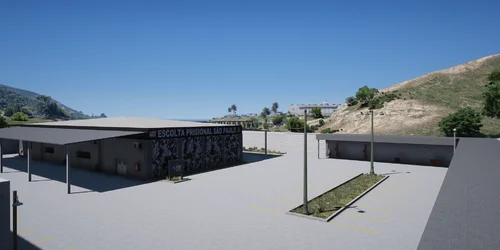
Mapa que simula o container usado pelas unidades de Polícia Pacificadora no Rio de Janeiro.
My Nexus profile:
https://next.nexusmods.com/profile/LN3D3V
Discord: lndev
- 32 Downloads
Updated -
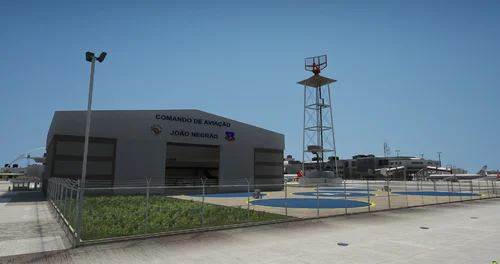
Mapa SAP Santa - LN3D3V
My Nexus profile:
https://next.nexusmods.com/profile/LN3D3V
- 36 Downloads
Updated -
MAPA CavPM LN3D3V
My Nexus profile:
https://next.nexusmods.com/profile/LN3D3V
Discord: lndev
- 89 Downloads
Updated -
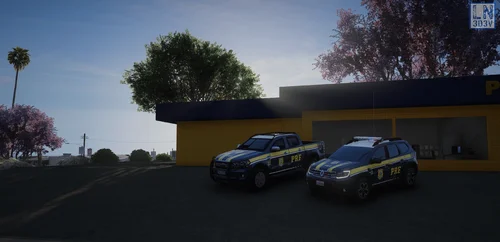
Mapa localizado em uma das rodovias do mapa
Advanced Highway Police base from Brazil
Base da Policia Rodoviaria Federal - Brasil
Features
- MLO
- 4 Layers Textures
- Height, Diffuse, Normal and Specular Map
Installation instructions
Drag and drop on your fivem maps directory
Copiar e colocar na pasta de mapas do seu server de Fivem
My Nexus profile:
https://next.nexusmods.com/profile/LN3D3V
Discord: lndev
- 162 Downloads
Updated -
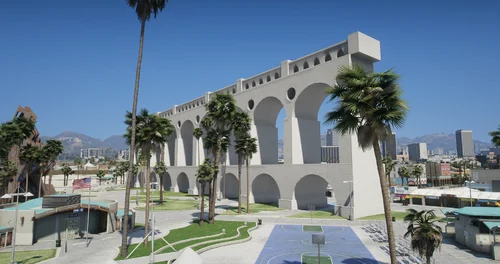
Mapa que simula monumento encontrado no Rio De Janeiro
My Nexus profile:
https://next.nexusmods.com/profile/LN3D3V
Discord: lndev
- 15 Downloads
Updated