Skip to content
View in the app

A better way to browse. Learn more.

LCPDFR.com

A full-screen app on your home screen with push notifications, badges and more.

To install this app on iOS and iPadOS
  1. Tap the Share icon in Safari
  2. Scroll the menu and tap Add to Home Screen.
  3. Tap Add in the top-right corner.
To install this app on Android
  1. Tap the 3-dot menu (⋮) in the top-right corner of the browser.
  2. Tap Add to Home screen or Install app.
  3. Confirm by tapping Install.

seba1334tt

Members
  • Joined

  • Last visited

Everything posted by seba1334tt

  1. It works, but no mods from the previous folder are loaded I have much mods in this folder. I tried to check which one wasn't working, but it seems like every single one of them is. It used to be fine.
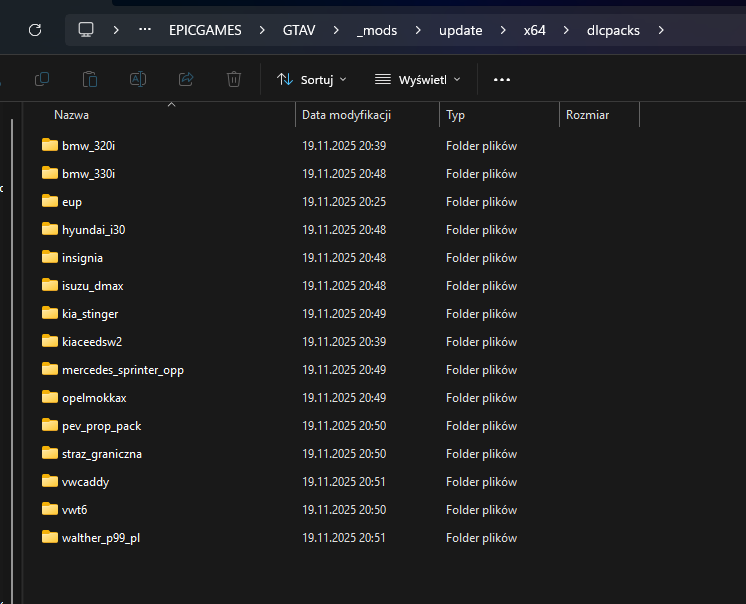
  2. Exception code: 0xc0000005 EXCEPTION_ACCESS_VIOLATION I download a few mods and this happened. RagePluginHook_19112025_200530.log RAGE Plugin Hook v1.122.1379.17094.txt
Account

Navigation

Search

Search

Configure browser push notifications

Chrome (Android)
  1. Tap the lock icon next to the address bar.
  2. Tap Permissions → Notifications.
  3. Adjust your preference.
Chrome (Desktop)
  1. Click the padlock icon in the address bar.
  2. Select Site settings.
  3. Find Notifications and adjust your preference.