
Skip to content
View in the app

A better way to browse. Learn more.

LCPDFR.com

A full-screen app on your home screen with push notifications, badges and more.

To install this app on iOS and iPadOS
  1. Tap the Share icon in Safari
  2. Scroll the menu and tap Add to Home Screen.
  3. Tap Add in the top-right corner.
To install this app on Android
  1. Tap the 3-dot menu (⋮) in the top-right corner of the browser.
  2. Tap Add to Home screen or Install app.
  3. Confirm by tapping Install.

emk

Members
  • Joined

  • Last visited

Everything posted by emk

  1. @Camb Thank you for your suggestion! I've made a Youtube Video showcasing what we have so far!
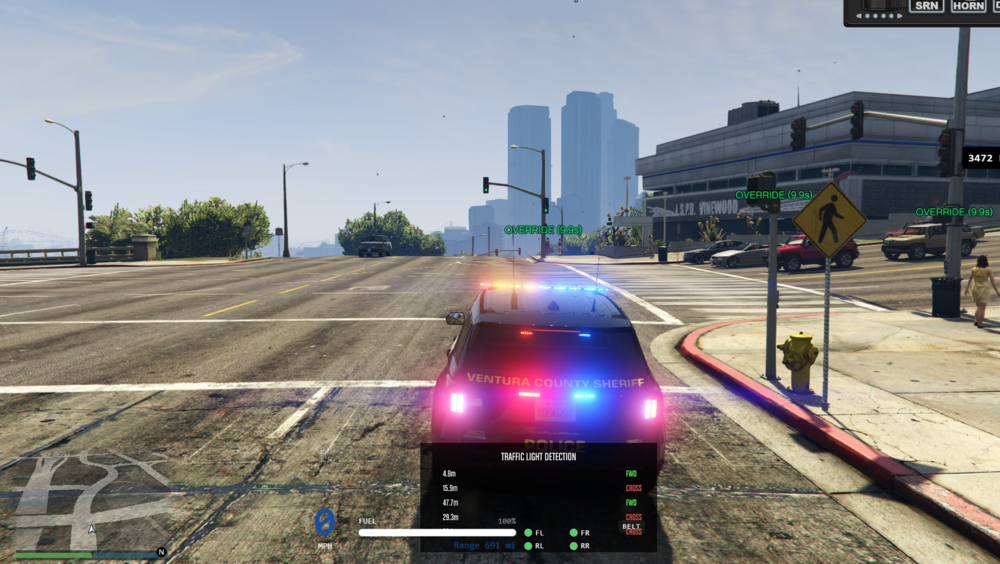
  2. I'm making my own Fivem Ready Opticom system but I was wondering if I should make it paid for or free? It has a debug UI, Console debug, Full settings to control how it works, full config settings to control it even further as well, It uses / commands so that way it keeps it easy and simple! I've also made my own MDT that has REAL NPC data you can run plates use dispatch and so on I mean I'm thinking of just making my own version of FivePD as that's what I was inspired by but I'm also wondering it its a good idea to do or just again make it free and post it on here

Account

Navigation

Search

Search

Configure browser push notifications

Chrome (Android)
  1. Tap the lock icon next to the address bar.
  2. Tap Permissions → Notifications.
  3. Adjust your preference.
Chrome (Desktop)
  1. Click the padlock icon in the address bar.
  2. Select Site settings.
  3. Find Notifications and adjust your preference.