
Jack Dav
Members
-
Joined
-
Last visited
Everything posted by Jack Dav
-
Sorry for the late reply. Would this be in the MiniCrashReports?
-
Doesnt let me. plus isnt that for game crashes?
-
If you mean make the crashes happen then yeah i can do that. where would i get the logs? Edit: Nvm i got it I believe this is the log. RagePluginHook_01102025_170415.log
-
*sigh* No this hasnt worked either. and its kind of annoying, this has been happening over the past week now. earlier this year i had no problems. And to say again...all the game plugs i have is EUP L.O, EUP Menu and LSPDFR. no other plugins. If you mind sharing the ways you use custom uniforms that would be great
-
So... ill try to explain it as best as i can. When i open the plugin, almost instantly at the bottom left it says something along the lines of "EUP.DLL has crashed. Like the image shown, but EUP. ill get an actual picture of it now though.

-
Okay i have done this, nothing has changed.
-
-
If your not sure on how to fix it, thats okay.
-
-
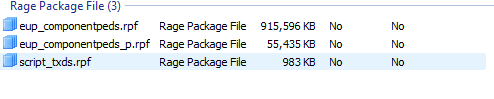
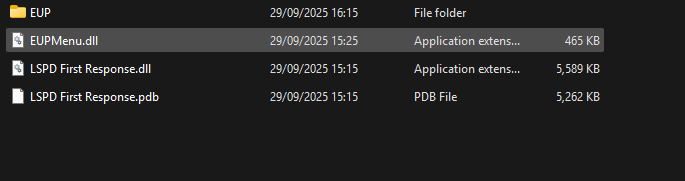
Ive gone into OpenIV, inside is dlcpacks > eup > dlc.rpf > Content.xml, setup2.xml, x64. inside x64 is the shown image second image is my plugins folder sorry for late reply
-
No, it just crashes as the plugin its self, so the RPH message shows up saying it crashed, not the whole game
-
My EUP crashes every time i press F11 [open button]. I only have LSPDFR, EUP Menu and EUP L&O. Keep in mind its only crashing the solo plugin. Ive uninstalled and reinstalled gta so many times and there is no fix. every thing is up to date, i have the latest Native UI [1.9.3]. RagePluginHook_29092025_150444.log