Skip to content
View in the app

A better way to browse. Learn more.

LCPDFR.com

A full-screen app on your home screen with push notifications, badges and more.

To install this app on iOS and iPadOS
  1. Tap the Share icon in Safari
  2. Scroll the menu and tap Add to Home Screen.
  3. Tap Add in the top-right corner.
To install this app on Android
  1. Tap the 3-dot menu (⋮) in the top-right corner of the browser.
  2. Tap Add to Home screen or Install app.
  3. Confirm by tapping Install.

Big Money Fabs

Members
  • Joined

  • Last visited

Everything posted by Big Money Fabs

  1. To not get flagged and taken down by the real brand
    • 902 downloads
    • Version 1.0.0
    Pfister 911 GT3 RS Non ELS Discord: https://discord.gg/NDyGwv5Ffm Features: Custom Engine Audio Custom Handling Breakable Windows Changelogs: 1.0: Initial Release Known Bugs: Dials Not Working Spawn name: slgt3leo Notes:
    • 1,542 downloads
    • Version 1.0.0
    2024 Albany Cavalcade Detective Discord: https://discord.gg/9hNrWv3z Features: LODs Working Dirtmap Full Around LEO Lights Glass Lighting/Realistic Lighting Changelogs: 1.0: Initial Release Known Bugs: Dials Not Working Spawn name: slcavleo Notes:
    • 425 downloads
    • Version 1.0.0
    Ocolot R88 Non ELS Discord: https://discord.gg/9hNrWv3z Features: Working Dirtmap Working Dials Changelogs: 1.0: Initial Release Known Bugs: Non At This Time Spawn name: slf1pd2 Notes:
    • 855 downloads
    • Version 1.0.0
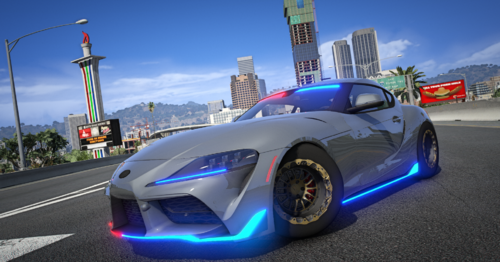
    2020 Toyota Supra Non ELS Discord: https://discord.gg/9hNrWv3z Features: Working Dirtmap Extra Features: Single Turbo Engine Setup Custom Parachute Custom Drag Rims and Radials Changelogs: 1.0: Initial Release Known Bugs: NO Working Dials Shitty Normals On Trunk Spawn name: slmk5leo Notes:

Account

Navigation

Search

Search

Configure browser push notifications

Chrome (Android)
  1. Tap the lock icon next to the address bar.
  2. Tap Permissions → Notifications.
  3. Adjust your preference.
Chrome (Desktop)
  1. Click the padlock icon in the address bar.
  2. Select Site settings.
  3. Find Notifications and adjust your preference.