
LouieDevs
Members
-
Joined
-
Last visited
Everything posted by LouieDevs
-
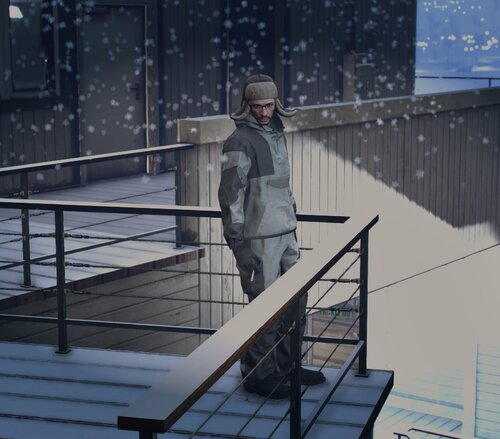 This mod adds a classic russian hat to the game. The Ushanka features high-quality textures, creating a nice. Features High-quality Detailed materials and surface effects Adapted for GTA V MP Male compatible Install MP Male: mods\x64v.rpf\models\cdimages\streamedpeds_mp.rpf\mp_m_freemode_01 Ripped Escape from Tarkov Converted by LouieDevs / Louies Development Follow the development of my mods, check out WIP previews, screenshots, and upcoming releases.
-
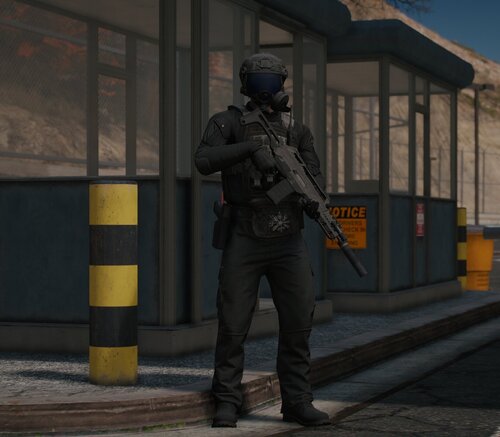 This mod adds the MSA Millenium Gas Mask to the game. The MSA Millenium Gas Mask features high-quality textures. Features High-quality Detailed materials and surface effects Adapted for GTA V MP Male compatible Comes with 1 Texture Install MP Male: mods\x64v.rpf\models\cdimages\streamedpeds_mp.rpf\mp_m_freemode_01 Ripped Escape from Tarkov Converted by LouieDevs / Louies Development Follow the development of my mods, check out WIP previews, screenshots, and upcoming releases.
-
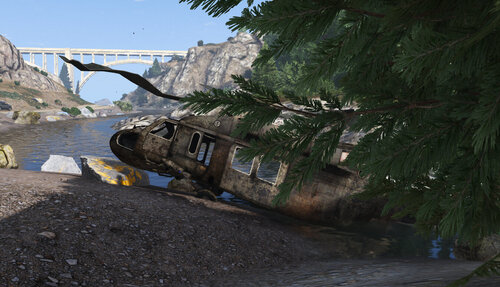 Description: Adds a simple crashed blackhawk in the mountains of San Andreas ----------------------------------------- 1.0 - inital release 1.1 - Fixed Glow on Prop ----------------------------------------- ----------------------------------------- Credits: "Louies Development" (Me) for the Crashed Blackhawk Prop! ----------------------------------------- Features: Crashed Blackhawk Optimized ----------------------------------------- Installation FIVEM: A - Open the file with 7zip, Winrar, or any other program that allows you to unzip these types of files B - Unzip the file into your MAP FOLDER and start on your server.cfg Installation Single Player: A - Open OpenIV and enable Edit Mode B - Navigate to the path mods\update\x64\dlcpacks C - Drag the map DLC folder into the dlcpacks folder then copy the name of this DLC folder D - Return to the update folder and double click to open update.rpf E - Open common\data find dlclist.xml right click it and select Edit F - Scroll to the bottom of the file copy the last line of code press Enter and paste it on a new line G - Replace the DLC name in the new line with the name of your map DLC folder H - Save the file Installation is complete launch the game to use the mod
-
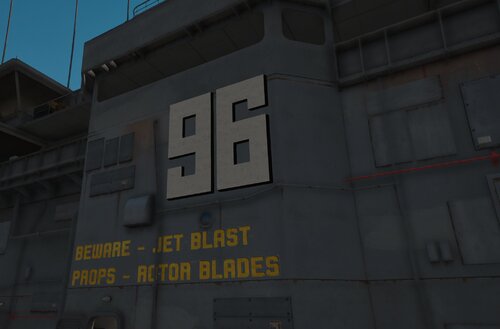 Description: Adds a Fleet to the base game aircraft carrier ----------------------------------------- Credits: "SW Developmet" for the Class Destroyer prop! "Louies Development" (Me) for the USS Oliver prop! ----------------------------------------- --Changelog-- 1.0 - Release 1.0.1 - Fixed SP ----------------------------------------- Features: 1 Aircraft Carrier 2 Destoryers 2 Guided missile frigates ----------------------------------------- Installation FIVEM: A - Open the file with 7zip, Winrar, or any other program that allows you to unzip these types of files B - Unzip the file into your MAP FOLDER and start on your server.cfg Installation Single Player A - Open OpenIV and enable Edit Mode B - Navigate to the path mods\update\x64\dlcpacks C - Drag the map DLC folder into the dlcpacks folder then copy the name of this DLC folder D - Return to the update folder and double click to open update.rpf E - Open common\data find dlclist.xml right click it and select Edit F - Scroll to the bottom of the file copy the last line of code press Enter and paste it on a new line G - Replace the DLC name in the new line with the name of your map DLC folder H - Save the file Installation is complete launch the game to use the mod
-
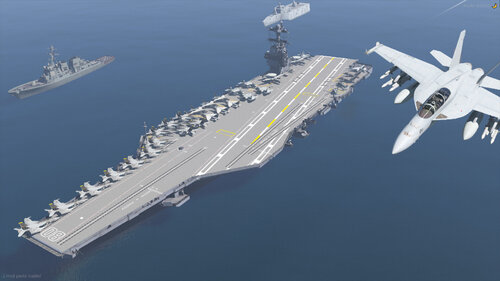 Description: Adds a American Fleet off the coast of the Power Station ----------------------------------------- Credits: "SW Developmet" for the ICS, Submarine ,and Class Destroyer prop! "Louies Development" (Me) for the Aircraft Carrier Prop! "Haskins" for the main deck texture and photos in update 1.3 ----------------------------------------- --Changelog-- 1.1 - Fixed Glow at night 1.2 - Removed the fences alongside the perimeter of the deck 1.3 - Better main deck texture thanks to Haskins ----------------------------------------- Features: 1 Aircraft Carrier 2 Destoryers 1 ICS 1 Submarine ----------------------------------------- Installation FIVEM: A - Open the file with 7zip, Winrar, or any other program that allows you to unzip these types of files B - Unzip the file into your MAP FOLDER and start on your server.cfg Installation Single Player A - Open OpenIV and enable Edit Mode B - Navigate to the path mods\update\x64\dlcpacks C - Drag the map DLC folder into the dlcpacks folder then copy the name of this DLC folder D - Return to the update folder and double click to open update.rpf E - Open common\data find dlclist.xml right click it and select Edit F - Scroll to the bottom of the file copy the last line of code press Enter and paste it on a new line G - Replace the DLC name in the new line with the name of your map DLC folder H - Save the file Installation is complete launch the game to use the mod