Skip to content
View in the app

A better way to browse. Learn more.

LCPDFR.com

A full-screen app on your home screen with push notifications, badges and more.

To install this app on iOS and iPadOS
  1. Tap the Share icon in Safari
  2. Scroll the menu and tap Add to Home Screen.
  3. Tap Add in the top-right corner.
To install this app on Android
  1. Tap the 3-dot menu (⋮) in the top-right corner of the browser.
  2. Tap Add to Home screen or Install app.
  3. Confirm by tapping Install.

CoinStar

Members
  • Joined

  • Last visited

Everything posted by CoinStar

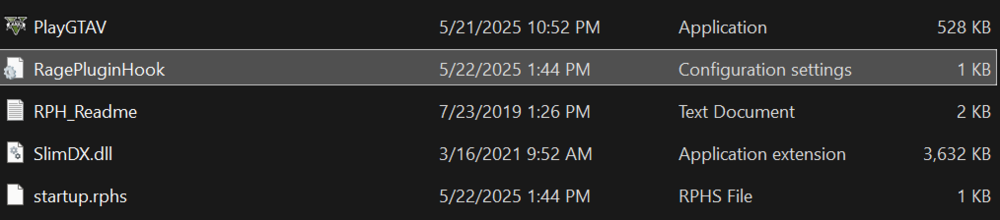
  1. I had downloaded the files and had set up LSPDFR as per the tutorial, had gotten a RPH files, but not the startup file. I do not know what I am doing as this is my first time setting up any type of mod for GTA5. I had just installed GTA5 yesterday and I am generally new to owning a PC, so any support would be greatly appreciated. Edit: The Ragepluginhook.exe file is not in my folder
  2. I am just insanely excited to actually set up a modded GTA file as I am no longer locked to a gaming console. I just need to know if it is suggested to play past the prologue or to whatever mission before I try to install this mod or any mod in general.
Account

Navigation

Search

Search

Configure browser push notifications

Chrome (Android)
  1. Tap the lock icon next to the address bar.
  2. Tap Permissions → Notifications.
  3. Adjust your preference.
Chrome (Desktop)
  1. Click the padlock icon in the address bar.
  2. Select Site settings.
  3. Find Notifications and adjust your preference.