Skip to content
View in the app

A better way to browse. Learn more.

LCPDFR.com

A full-screen app on your home screen with push notifications, badges and more.

To install this app on iOS and iPadOS
  1. Tap the Share icon in Safari
  2. Scroll the menu and tap Add to Home Screen.
  3. Tap Add in the top-right corner.
To install this app on Android
  1. Tap the 3-dot menu (⋮) in the top-right corner of the browser.
  2. Tap Add to Home screen or Install app.
  3. Confirm by tapping Install.

somethingLErelated

Members
  • Joined

  • Last visited

Everything posted by somethingLErelated

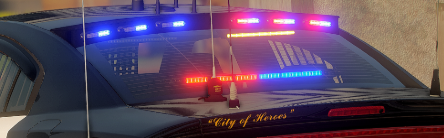
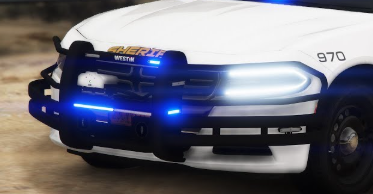
  1. After looking at many packs, I still haven't found quite "the one". Now there must be a developer that is just as crazy as me and made at least some cars that are fully decked out with lights and equipment. I'm looking for a pack that has the external window lights (example attached), full siderunners, roof full of antennas and ALPRs, a full wraparound pushbar, and generally a boatload of lights. Maybe someone uses them or has an idea where to get them. Previous cars or packs just have felt.. incomplete. Thanks!
Account

Navigation

Search

Search

Configure browser push notifications

Chrome (Android)
  1. Tap the lock icon next to the address bar.
  2. Tap Permissions → Notifications.
  3. Adjust your preference.
Chrome (Desktop)
  1. Click the padlock icon in the address bar.
  2. Select Site settings.
  3. Find Notifications and adjust your preference.